
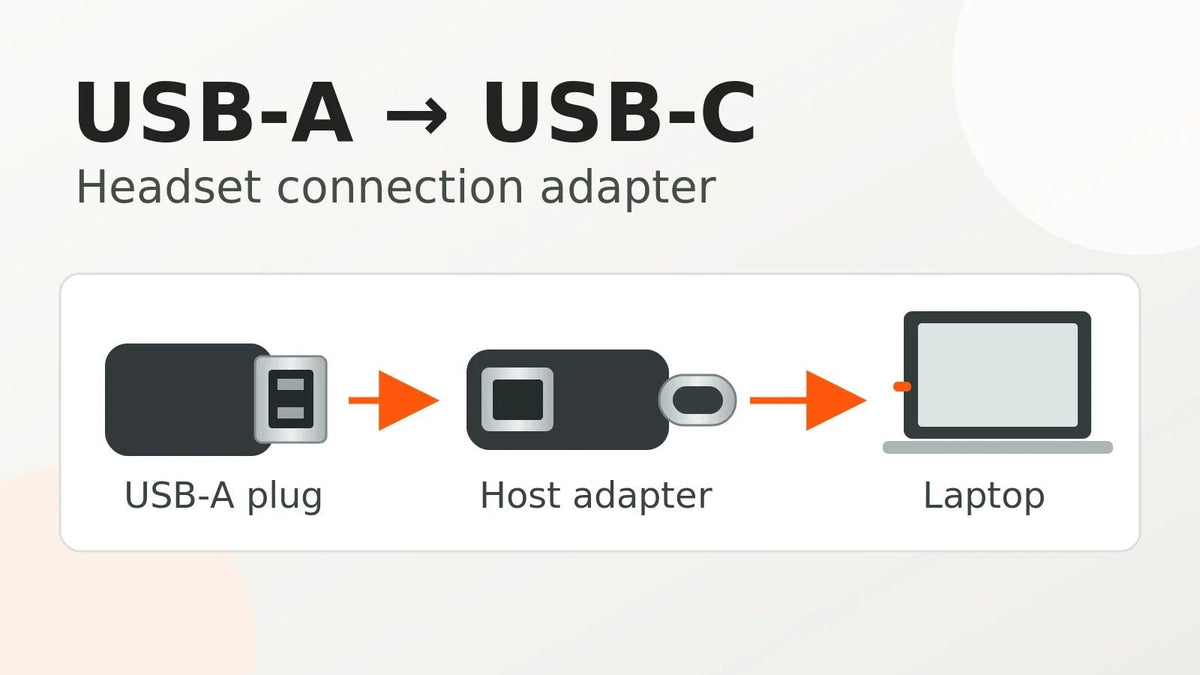
Headphones with a USB adapter can use three different connections: a USB audio converter for 3.5 mm headphones, a USB-A/USB-C connector adapter for a wired USB headset, or a wireless USB receiver. Match the adapter to the headphones and source device before buying. A USB-A headset on a USB-C laptop needs a data-capable USB-C host adapter and compatible USB audio support. A passive USB-to-3.5 mm plug cannot turn digital USB headphones into analog headphones. For wireless models, see the PC Bluetooth and USB-receiver guide.
Check the complete connection. Identify the source device, headphone plug, and microphone requirements. If buying headphones with an included USB adapter, check the exact model’s package contents and supported devices. Confirm whether the included piece carries wired USB data, converts analog audio, or provides the wireless link; the word “adapter” alone does not tell you.
| Need | Typical adapter | Main check |
|---|---|---|
| 3.5 mm headphones on USB-C phone | USB-C to 3.5 mm audio adapter | Digital audio/DAC support and mic path |
| 3.5 mm headset on PC USB-A | USB-A sound adapter with combo or separate jacks | TRRS support or mic/headphone split |
| USB headset on USB-C laptop | USB-C host adapter/hub | USB audio class support and power |
| Two-plug PC headset on combo jack | TRS mic + headphone to TRRS combiner | CTIA wiring and correct direction |
Direction Matters
To connect USB-A headphones to a USB-C laptop, look for a USB-C male to USB-A female adapter that supports USB data, not charging alone. The laptop must act as a USB host and recognize the headset as an audio device. Windows includes drivers for compatible USB Audio Class devices, as described in Microsoft's USB device class documentation; this does not guarantee support for every headset feature. Connect the headset, then select it in the computer's sound settings if audio stays on the built-in speakers.
Can you connect USB headphones to a 3.5 mm jack? Not with an ordinary passive adapter. USB headsets require digital communication and power from a USB host, while a 3.5 mm headphone jack provides analog audio. A USB sound adapter with a 3.5 mm socket normally works in the opposite direction, allowing an analog headset to connect to a USB computer.
Phones, tablets, consoles and desk phones may have USB ports without supporting your particular USB headset or its microphone. Check the exact device and headset before ordering. Wantek's headset adapter listing includes a USB-to-Type-C variant, but the variant label alone does not establish connector orientation or compatibility with every device.

Microphone Support Is Separate
Some inexpensive dongles provide headphone output only. If you use a headset with a boom microphone, confirm that the adapter exposes microphone input and that its 3.5 mm jack supports the correct TRRS wiring. For 3.5 mm headset wiring, the TRS vs. TRRS connector guide explains why a physically compatible jack can still lose the microphone path.
With a digital USB headset connected through a USB-C host adapter, microphone access depends on the host and headset software support. Choose the headset as the input device in both system sound settings and your calling app; working playback alone does not prove the microphone or inline controls will work.
USB-C Can Need Active Conversion
Many USB-C phones and tablets output digital audio. In that case, a USB-C to 3.5 mm adapter needs compatible digital-to-analog conversion. Android's USB-C audio adapter specification requires digital-to-analog conversion for compliant adapters. Do not assume a passive wiring adapter will work on every USB-C device.
PC Sound Adapters Can Solve Broken Jacks
A compatible USB audio adapter can bypass a damaged or noisy motherboard audio jack. On Windows or macOS, select it as the playback device and, if it supports microphone input, as the recording device in both the operating system and your call or recording app.
Avoid Double-Adapter Chains
Every additional adapter creates another compatibility point. When possible, use one direct adapter from the source device to the headset rather than chaining USB, 3.5 mm and splitter adapters. For a new setup, connect directly to the computer first, select the USB audio device for playback, and test a short microphone recording if you need calls. Check mute and volume controls separately before adding a hub or dock.
Frequently Asked Questions
Can a USB adapter add a headphone jack to a laptop?
Yes, if it is a USB audio adapter supported by the laptop operating system.
Will a USB-C to 3.5 mm adapter support my headset mic?
Only if the adapter supports microphone input and the headset wiring is compatible.
Can I plug a USB-A headset into a USB-C port?
Yes, with a USB-C male to USB-A female adapter that carries data, if the computer supports the headset as a USB audio device. Confirm microphone and call-control support separately.
Can I use USB headphones with a 3.5 mm headphone jack?
Not through a passive cable. A digital USB headset needs a compatible USB host; a standard 3.5 mm headphone jack carries analog audio. An ordinary USB sound dongle is designed for analog headphones going into a USB device, not the reverse.
Why does audio work but my mic does not?
The adapter may be output-only, the TRRS wiring may not match, or the wrong recording device may be selected. Confirm microphone-input support, then choose the USB device in both system sound settings and your calling app.
Prefer a wired headset for computer calls? Compare Wantek USB headsets and check the connector options for your device.

