Welcome to Wantek online store!

Announcement: Free shipping in USA, UK, FR, DE, IT, ES

Noise Canceling Bluetooth Headphones with Microphone

Wireless Headsets with Mic & Bluetooth Headphones

(9 products)

Compare Wantek wireless headsets for office calls, remote work and mobile conversations. The range includes WK881BT single-ear and WK882BT dual-ear work headsets, 186BTC multipoint calling, and other Bluetooth audio options.

View as

Wireless Headset Guide

Choose by Use Case

For work calls, begin with the device carrying the call and the microphone you need. Compare wearing style and controls next. Listening, swimming, and gaming have different noise-control and connection requirements.

Wantek wireless headset comparison by use case
Use case Model to compare Verified highlights
Dual-ear work calls WK882BT Dual-ear design, boom microphone, Bluetooth 5.2, passive noise cancellation, one-key mute, and up to 45 hours of listed battery life.
Single-ear work calls WK881BT Single-ear design, boom microphone, Bluetooth 5.2, passive noise cancellation, one-key mute, and up to 45 hours of listed battery life.
Multi-device work 186BTC Multipoint-oriented Bluetooth headset with a boom microphone and passive noise cancellation; check device switching for your setup.
Work and study 162BTC Over-ear design, adjustable microphone, and 50 mm drivers for meetings, classes, and everyday audio.
ANC listening T3 Over-ear ANC, transparency mode, inline microphone, Bluetooth 5.3, and up to 60 hours of listed battery life.
Open-ear everyday use OBT030 Clip-on open-ear design, built-in microphone, Bluetooth 5.4, up to 8 hours per charge, and up to 50 hours total with the case.
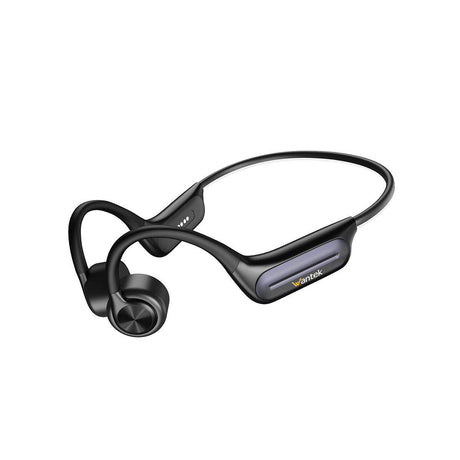
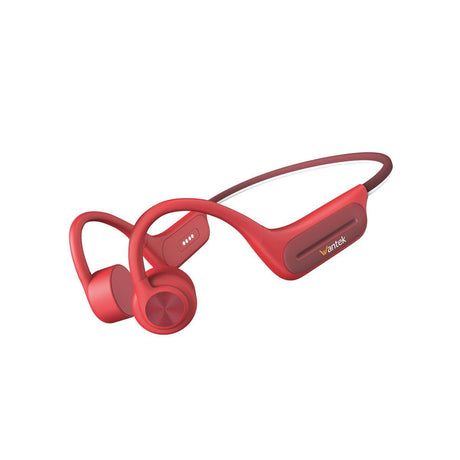
Swimming BC3 Pro Bone-conduction design, IP68, 32GB onboard MP3 storage for underwater playback, Bluetooth 5.3 for use out of water, and up to 6 hours of listed battery life.
Gaming T2L Bluetooth gaming headset with a flip-to-mute boom microphone, 40 mm drivers, and up to 20 hours of listed battery life; verify the console audio and chat path.
Buying Framework

How to Choose a Wireless Headset

Match the headset to the device carrying your audio before comparing extra features. A Bluetooth phone, a computer softphone, and a physical desk phone can require different connections. Check that your device supports both headset audio and microphone input, not merely Bluetooth pairing.

For frequent work calls, a movable boom microphone and an accessible mute control are useful starting points. Choose WK881BT when you want one ear uncovered or WK882BT when you prefer two covered ears. The right fit depends on your working environment, not just the number of earcups.

If you move between a laptop and phone, compare the multipoint-oriented 186BTC, but confirm its call-switching behavior on your devices. Multipoint does not automatically mean two audio streams play at once. For music and travel, the T3 addresses sound reaching your ears with ANC, rather than promising stronger microphone noise rejection.

Professional wearing a Wantek dual-ear wireless headset during a video call
Wearing style

Single-Ear or Dual-Ear for Work Calls?

WK881BT keeps one ear uncovered so you can hear coworkers or your surroundings. WK882BT covers both ears if you prefer a more enclosed listening experience. Both list Bluetooth 5.2, a boom microphone, one-key mute, and up to 45 hours of battery life; neither is listed as an active-noise-cancelling model.

Multi-device work

Need to Work Across Multiple Bluetooth Devices?

Wantek markets the 186BTC for Bluetooth multipoint work, with a movable boom microphone and passive noise cancellation. Before ordering, check how calls switch between your phone and computer and whether your calling app can use the headset microphone. Multipoint is not the same as mixing two calls.

Before Ordering

Four Checks That Prevent a Wrong Match

A listed feature is useful only when it works with your devices, software, and routine. Check these details on the exact product and bundle.

  1. Connection: Identify whether calls happen on a phone, Bluetooth-enabled computer, computer softphone, or desk phone. Check for any required receiver, base, or adapter.
  2. Microphone and controls: Confirm that your device and calling app recognize the headset as both input and output. Mic mute, call buttons, and platform-specific controls can behave differently.
  3. Battery and bundle: Compare your talk-time needs with the manufacturer's up to rating. Charging docks, receivers, and other accessories may differ by selected variant.
  4. Fit and environment: Choose single-ear, dual-ear, ANC, or open-ear based on awareness, outside noise, comfort, and whether speech or listening is your main task.
Noise Control

ANC and Call-Focused Noise Control Are Different

ANC changes the noise you hear; microphone noise reduction changes what other people hear. Those are separate buying decisions.

T3 lists active noise cancellation and transparency mode for listening, alongside an inline microphone. WK881BT and WK882BT list passive noise cancellation (PNC) and movable boom microphones instead.

Passive isolation comes from the physical fit of the earcups. A boom can position the microphone closer to your mouth, but that alone does not establish the quality of electronic microphone noise suppression. See the guide to ANC, passive isolation, and microphone noise reduction if background sound is your deciding factor.

Focused listening T3 ANC

Active noise cancellation, transparency mode and inline microphone.

Work calls WK881BT / WK882BT

Boom microphones with passive noise cancellation and dedicated work-headset form factors.

Desk Phone Buyers

Check Desk Phone Compatibility Before Ordering

A Bluetooth headset is not automatically compatible with a physical desk phone. First identify whether the call runs on the phone itself or a computer softphone. Wantek's compatibility tool begins with your exact phone model and required connection; a matching port or wireless label alone is not enough.

  • Confirm the exact phone brand and model.
  • Check the available headset connection.
  • Confirm any base station or adapter requirements.
  • Confirm where the call and microphone audio are handled.
Beyond Work Calls

Other Wireless Headphone Options

Not every wireless headphone here is intended for all-day office calls. Open-ear designs leave the ear canal uncovered; swimming requires onboard playback; gaming requires a verified console audio connection.
Wantek OBT030 black open-ear clip-on earbuds
Wantek BC3 Pro bone conduction headphones in black and red
Open-ear

OBT030

OBT030 rests outside the ear canal and uses Bluetooth 5.4 with a built-in microphone for casual calls. Wantek lists up to 8 hours per earbud charge and up to 50 hours in total with the case. It does not seal out surrounding sound.

View OBT030
Swimming

BC3 Pro

BC3 Pro combines an IP68-rated bone-conduction design with 32GB of onboard MP3 storage and up to 6 hours of listed battery life. Transfer music before swimming and play it in MP3 mode: Bluetooth signals do not provide a reliable underwater audio connection.
View BC3 Pro
Gaming

T2L

T2L is a Bluetooth gaming headset with a flip-to-mute boom microphone, 40 mm drivers, and up to 20 hours of listed battery life. Its product page names PC, Xbox, and PS5, but that does not confirm direct Bluetooth pairing or voice chat on each console. Before ordering, review PS5 Bluetooth audio connection options and verify the specific T2L connection path with Wantek.

View T2L
Questions & Answers

Wireless Headset FAQs

Which Wantek wireless headsets are designed for work calls?

WK882BT, WK881BT, 186BTC, and 162BTC are the main work-oriented choices here. Compare the calling device, ear coverage, boom microphone, and supported audio connection before selecting a model.

What is the difference between WK882BT and WK881BT?

WK882BT is dual-ear while WK881BT is single-ear. Both list Bluetooth 5.2, boom microphones, passive noise cancellation, one-key mute and up to 45 hours of battery life.

Which Wantek wireless headset supports a multi-device workflow?

Wantek positions 186BTC as a Bluetooth multipoint work headset with a boom microphone. Confirm phone-to-computer call switching and microphone support on your devices; multipoint does not guarantee mixed audio.

Which wireless model has active noise cancellation?

The T3 is the ANC over-ear model in this collection. It also lists transparency mode and an inline microphone.

Which headset keeps one ear uncovered?

WK881BT uses a single-ear design, making it the work-call model to compare when you want the other ear open.

Will a Bluetooth headset work with my desk phone?

Bluetooth support alone does not confirm desk-phone compatibility. Check the exact phone model, supported connection and any required base or adapter before ordering.

Which model uses an open-ear design?

OBT030 uses a clip-on open-ear design with a built-in microphone and Bluetooth 5.4.

Which model is designed for swimming?

BC3 Pro is the swimming-oriented model, with IP68 protection and 32GB of onboard MP3 storage. Use downloaded music in MP3 mode underwater; Bluetooth streaming is not reliable in water.

Does the OBT030 provide 50 hours from one charge?

No. Wantek lists up to 8 hours for the earbuds themselves and up to 50 hours total when the charging case is included. Actual runtime varies with use.

Can T2L pair directly with a PS5 or Xbox over Bluetooth?

Do not assume so. Standard Bluetooth audio pairing is not supported natively on PS5, and Xbox wireless audio uses different connection methods. Confirm the exact T2L console connection and chat requirements before purchasing.

Compare Before You Choose

Not sure whether wireless is the right connection for your setup? Use the related guides to compare office-headset features, wired and wireless workflows, and desk-phone compatibility before deciding.

Compare /3

Loading...