
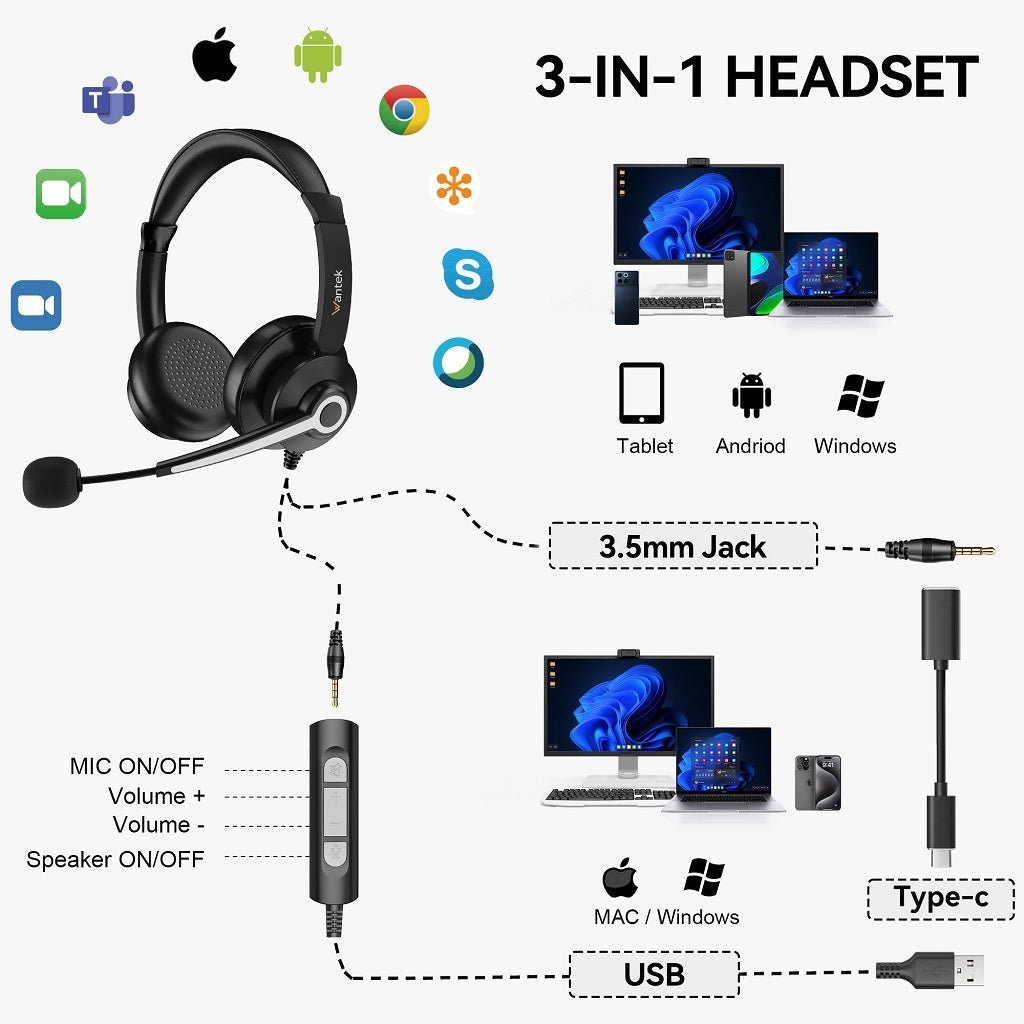
A phone does not need a built-in 3.5 mm jack to use wired headphones. Start by checking the phone's physical port, then choose either a direct 3.5 mm connection, a USB-C audio device, or a USB-C-to-3.5 mm adapter that supports the kind of audio and microphone path you need.
Quick answer: some current phones still include a 3.5 mm jack, while many mainstream models use USB-C instead. If your phone has no headphone jack, do not assume every USB-C dongle will work. Confirm digital-audio support, adapter conversion, and microphone compatibility before buying.

Do Phones Still Have Headphone Jacks in 2026?
Yes, but the 3.5 mm jack is no longer universal. Current examples that still list a native 3.5 mm audio jack include the Sony Xperia 1 VII, Sony Xperia 10 VII, and ASUS ROG Phone 9. Their manufacturers explicitly list the analog jack in current specifications.
| Phone or path | Wired connection | What to verify |
|---|---|---|
| Sony Xperia 1 VII / 10 VII | Native 3.5 mm audio jack | Whether your headset plug and microphone wiring match the phone's supported headset connection. |
| ASUS ROG Phone 9 | Native 3.5 mm headphone jack | Whether you need playback only or a headset microphone and inline controls. |
| USB-C iPhone | USB-C audio or USB-C-to-3.5 mm adapter | Use an adapter or headset that supports the required USB-C audio path. |
| Google Pixel without 3.5 mm jack | USB-C digital audio or compatible adapter | The accessory must support USB-C digital audio; a passive analog USB-C adapter is not enough. |
For current manufacturer details, see Sony's Xperia 1 VII specifications and Xperia 10 VII specifications, plus ASUS's ROG Phone 9 specifications.
If Your Phone Has No 3.5 mm Jack, Use the USB-C Path Deliberately
USB-C is only the connector shape. The audio behavior still depends on the phone and accessory. Google's Pixel wired-audio guidance says USB-C accessories, including adapters, must work with digital audio. That means a simple passive analog USB-C adapter can fail on devices that expect digital audio conversion.
Apple sells a USB-C to 3.5 mm Headphone Jack Adapter for connecting standard 3.5 mm audio plugs to compatible USB-C devices. The same principle applies when comparing third-party adapters: verify the actual audio conversion and microphone support instead of buying by connector shape alone.
Key distinction: a USB-C plug does not prove that an adapter contains a DAC or that it supports a headset microphone. Check the phone, adapter, and headset as one complete signal path.
Choose the Right USB-C to 3.5 mm Adapter
Use the headset you already own as the starting point. A basic pair of stereo headphones and a headset with a microphone can require different support from the adapter.
- For listening only: confirm that the adapter converts the phone's USB-C digital audio to the analog output your headphones need.
- For calls: confirm that the adapter also supports microphone input from the 3.5 mm headset.
- For inline buttons: do not assume every volume, play/pause, or call-control function will work across every phone and adapter.
- For charging while listening: use a purpose-built charging-and-audio adapter only when the phone and accessory documentation support that configuration.
TRS vs. TRRS Matters for Phone Headsets
A 3.5 mm plug can fit physically and still fail to provide the microphone function you expect. Standard stereo headphones commonly use a three-contact TRS plug, while consumer headsets commonly use a four-contact TRRS plug so one connector can carry left audio, right audio, microphone, and ground.
If you need both playback and a boom or inline microphone, the TRS vs. TRRS connector guide explains the contact layouts, CTIA/OMTP differences, and why physical fit alone does not prove compatibility.
Does Wired Audio Automatically Sound Better Than Bluetooth?
No. Connection type alone does not rank sound quality. Wired audio avoids Bluetooth transmission, but the final result still depends on the headphones, phone or adapter electronics, source material, output level, and listening environment. A USB-C DAC can also move the conversion stage into the adapter or headset rather than using a phone's analog output.
The useful buying question is therefore not “wired or wireless always sounds better?” but “does this connection path work reliably with my phone and headset, and does the actual hardware meet my listening or call needs?”
How to Troubleshoot a Wired Headset on a Phone
Identify the phone port
Check whether the phone has a native 3.5 mm jack or requires USB-C audio.
Check the headset plug
Determine whether you are using ordinary stereo headphones or a headset that also needs microphone support.
Verify the adapter path
For USB-C phones, confirm that the adapter supports digital audio conversion and any microphone function you need.
Test playback and microphone separately
A connection can pass headphone audio while the microphone still fails. Test both functions before assuming the adapter is fully compatible.
Frequently Asked Questions
Which current phones still have a 3.5 mm headphone jack?
Current examples include Sony Xperia 1 VII, Xperia 10 VII, and ASUS ROG Phone 9. Availability varies by region, so confirm the exact regional model before buying.
Can I use old 3.5 mm headphones with a USB-C phone?
Usually, if the phone and adapter support the required USB-C audio path. For phones that output digital audio over USB-C, use an adapter with the needed digital-to-analog conversion.
Why do my headphones work but the microphone does not?
The adapter may support playback but not mic input, or the headset plug and destination may use incompatible contact wiring. Check adapter microphone support and the headset's TRRS arrangement.
Do I need a DAC in a USB-C to 3.5 mm adapter?
You need active conversion when the phone provides digital USB-C audio but your headphones require analog 3.5 mm output. The phone manufacturer's audio-accessory requirements should be the deciding reference.
Does a 3.5 mm jack guarantee headset microphone support?
No. A jack can be headphone-only or a headset combo connection. Confirm the device specification and whether it supports the plug and microphone wiring used by your headset.
Need a 3.5 mm Headset for Calls?
Compare current Wantek 3.5 mm headsets by wearing style, microphone design, controls, and connection requirements.

