
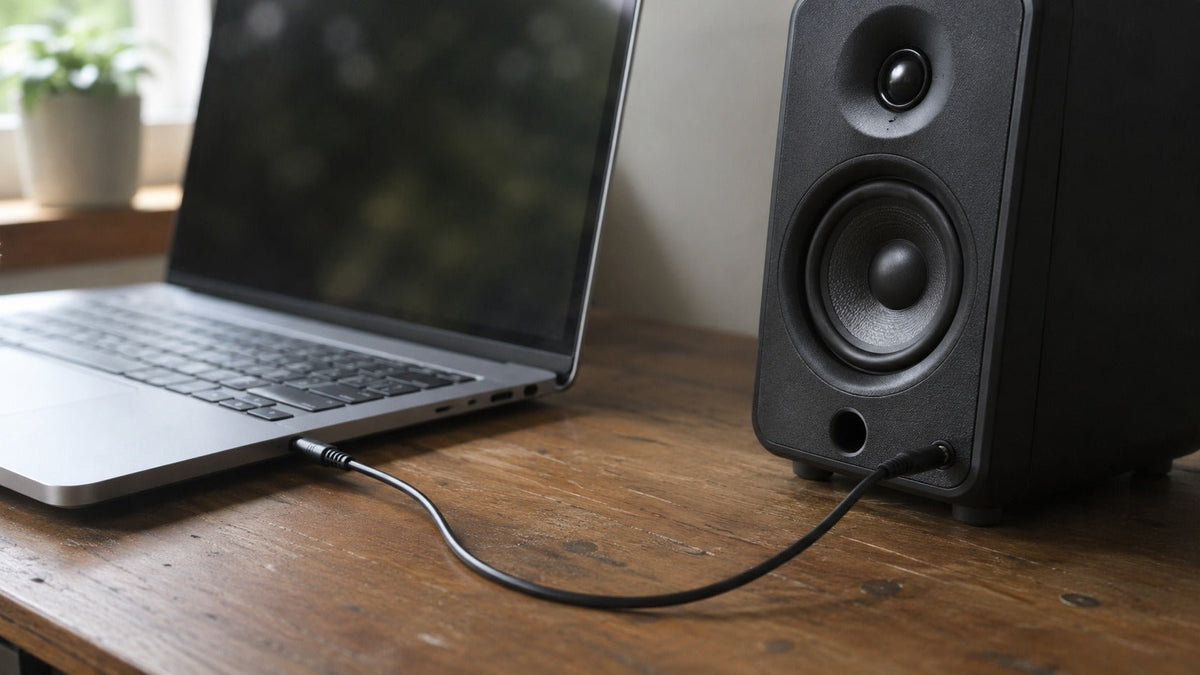
A 3.5 mm audio cable—often called an aux cable, auxiliary cable, or headphone cable—is an analog interconnect used to carry audio between compatible devices. A typical stereo male-to-male cable uses a three-conductor TRS (Tip-Ring-Sleeve) plug for left audio, right audio, and a common return. Headsets that combine stereo audio with a microphone commonly use four-conductor TRRS plugs, where pinout compatibility becomes especially important.
For most buyers, the practical decisions are straightforward: choose the correct connector and pinout, use only as much cable length as you need, look for durable strain relief and suitable shielding, and confirm that the device actually supports the required audio and microphone functions. Expensive conductor materials or elaborate marketing claims matter far less than correct electrical and mechanical design.
If you want a separate connector-focused comparison, Wantek's 3.5 mm audio cable guide covers male-to-male and extension configurations in more detail.
Why the 3.5mm Audio Cable Still Matters in a Wireless World
Bluetooth has become the default connection for many phones, headphones, speakers, and cars, while USB-C increasingly handles digital audio on newer devices. Even so, the 3.5mm connection remains useful because it is simple, widely understood, and does not require wireless pairing or a battery in the cable itself.
A wired analog connection also avoids the radio transmission, codec processing, and buffering associated with Bluetooth audio. That does not mean every wired system has literally zero latency: the source device may still perform digital-to-analog conversion, DSP, software buffering, or other processing. The advantage is that the cable itself does not add a wireless transmission stage.
The 3.5mm interface remains common across laptops, desktop computers, game controllers, portable audio equipment, powered speakers, some vehicles, audio interfaces, cameras, and legacy Hi-Fi equipment. Its continued usefulness is therefore less about being universally compatible and more about providing a direct analog connection when both devices expose compatible ports.
The key word is compatible. Two sockets can both measure 3.5mm yet support different combinations of stereo output, microphone input, headset controls, or line-level signals. Matching the connector diameter is only the first step.

The Anatomy of the 3.5mm Jack: TS, TRS, TRRS, and Related Connectors
The "3.5mm" designation describes the approximate diameter of the plug. The number and arrangement of conductive sections determine what signals the connector can carry.
TS (Tip-Sleeve) – Mono Signal
A TS plug has two conductive sections:
- Tip: Signal
- Sleeve: Common return or ground
This arrangement carries a single unbalanced signal. TS wiring is common on larger instrument connectors, while 3.5mm TS plugs appear in some microphones, trigger cables, specialist equipment, and older consumer devices.
A 3.5mm TS plug should not automatically be treated as interchangeable with a stereo TRS or headset TRRS connection merely because it fits physically.
TRS (Tip-Ring-Sleeve) – Stereo Audio
The familiar stereo aux connection generally uses a three-conductor TRS plug:
- Tip: Left channel
- Ring: Right channel
- Sleeve: Common return
A standard 3.5mm aux cable typically uses TRS male connectors at both ends when connecting a stereo source to an analog stereo input.
Common examples include:
- Laptop headphone output to powered speakers
- Portable player to a receiver's analog input
- Phone or tablet with a headphone jack to a car AUX input
- Computer audio output to a desktop speaker system
TRS describes the physical connector structure, however, not the signal topology in every possible application. Professional equipment can also use TRS connectors for mono balanced signals, so a TRS plug is not inherently synonymous with stereo or unbalanced audio.
TRRS (Tip-Ring-Ring-Sleeve) – Stereo Audio + Microphone
A TRRS plug adds a fourth conductive section. It is widely used for headsets that combine stereo headphones and a microphone through one connector.
The important complication is pinout.
For Android-compatible four-conductor headsets, the Android 3.5 mm headset specification specifies the CTIA LRGM arrangement and also documents the alternative OMTP LRMG arrangement where applicable.
In practical terms, CTIA normally places:
- Tip: Left audio
- Ring 1: Right audio
- Ring 2: Ground
- Sleeve: Microphone
OMTP reverses the microphone and ground positions.
This is why a headset may physically fit a device but still produce microphone problems or incorrect audio behavior. Modern consumer devices commonly use CTIA-style headset wiring, but you should verify the device when dealing with older hardware or specialized equipment.
4.4mm Pentaconn – A Different Connector
Pentaconn should not be described as a 3.5mm TRRRS standard.
The Pentaconn balanced headphone connector is a 4.4mm, five-pole connector associated with JEITA RC-8141C. It is used on certain headphone amplifiers, digital audio players, DACs, and higher-end audio equipment designed for balanced headphone connections.
It is physically and electrically distinct from conventional 3.5mm TRS and TRRS connectors. A normal 3.5mm plug will not substitute for a 4.4mm Pentaconn connection.
Types of 3.5mm Cables: Beyond the Standard Aux
Searching for a 3.5mm cable reveals several configurations that look similar but solve different problems. Start with the ports on both devices and the signal you need to carry.
1. Standard Stereo Male-to-Male Cable
This is the familiar 3.5mm male to male audio cable: a male TRS plug at each end.
Its job is to connect an analog stereo output to a compatible analog stereo input.
Typical uses:
- Laptop to powered speakers
- Portable audio player to an amplifier
- Phone with a headphone jack to a car AUX input
- Computer to a stereo receiver
- Audio device to a portable speaker with AUX input
Most versions contain insulated copper conductors inside a flexible jacket, often with foil, braid, or a combination of shielding around the signal conductors.
For ordinary short consumer connections, correct wiring, good connector contact, sensible cable length, and mechanical durability matter more than exotic conductor claims.
2. 3.5mm Male-to-Female Extension Cable
An extension cable has a male plug on one end and a female 3.5mm socket on the other.
It is useful when:
- A headphone cable does not reach the listening position
- A device's audio jack is difficult to access
- You want to route an existing cable through a desk or entertainment system
- You need a replaceable extension rather than repeatedly stressing the device's built-in port
Extensions add another connector interface, so use only the length you need and avoid stacking multiple adapters unnecessarily.
3. 3.5mm to RCA Cable
A 3.5mm-to-RCA cable normally has a stereo TRS plug on one end and two RCA plugs on the other:
- Red: Right channel
- White or black: Left channel
This configuration is useful for connecting a laptop, portable player, phone with analog output, or other compatible source to an amplifier, powered speaker system, or receiver with line-level RCA inputs.
The key requirement is signal-level compatibility. A headphone or line output can often feed a suitable line input, but a speaker-level amplifier output should not be connected directly to a line-level 3.5mm or RCA input without the appropriate level-conversion hardware.
4. 3.5mm to 6.35mm (1/4-Inch)
The larger 6.35mm connector is common on:
- Headphone amplifiers
- Audio interfaces
- Mixers
- Musical instruments
- Professional headphones
- Studio equipment
A 3.5mm-to-6.35mm cable or adapter can bridge compatible analog connections, but connector size alone does not establish electrical compatibility. A 6.35mm TRS connector might carry stereo headphone audio or a balanced mono signal depending on the equipment.
Verify the input or output function before connecting devices.
5. Coiled 3.5mm Cable
Coiled cables trade compactness for variable reach.
They are useful where the user moves relative to the equipment, including:
- DJ setups
- Broadcast desks
- Some headphones
- Gaming stations
- Stage or monitoring environments
Their primary advantage is mechanical: unused cable retracts rather than lying across the floor or desk.
There is no useful universal rule that a coiled cable automatically rolls off frequencies above a particular threshold. Any electrical effect depends on the cable's actual resistance, capacitance, inductance, length, source impedance, and load.
6. Right-Angle 3.5mm Cable
A right-angle connector turns the cable approximately 90 degrees at the plug.
This can be useful when:
- A phone sits in a pocket
- A game controller's jack faces the player
- A laptop is used against a wall
- A device is mounted inside a car
- A straight plug would protrude into a high-traffic area
A right-angle plug can reduce leverage and awkward bending in some installations. In other layouts, a straight connector provides easier access. Choose based on the physical arrangement rather than assuming one is universally more durable.

Key Technical Concepts, Materials, and Brand Considerations
Cable marketing often emphasizes metallurgy, plating, shielding, and conductor specifications. Some of these factors are electrically meaningful, but their practical importance depends on the system.
Brand Is Secondary to the Exact Cable
Brands including Belkin, Monoprice, Anker, UGREEN, AudioQuest, and others sell analog audio cables or related accessories, but construction varies by product line and can change over time.
Do not assume that every cable from a known brand has:
- The same conductor material
- The same shielding
- The same connector plating
- The same strain relief
- The same warranty
- The same electrical specifications
Compare the exact cable rather than buying solely by logo or price.
Resistance
Every conductor has resistance.
Higher series resistance can reduce signal level or alter the interaction between the source and load, particularly in demanding low-impedance headphone applications. For ordinary short line-level interconnects, however, a correctly designed cable should contribute very little resistance relative to the connected equipment.
There is no universal requirement that every 3.5mm cable must measure below an arbitrary resistance such as 0.1 ohm to be considered good.
Capacitance
A cable has capacitance between its conductors.
Together with source impedance, cable capacitance can form a low-pass network. The effect becomes more relevant as source impedance, cable capacitance, or cable length increases.
For normal short consumer interconnects driven by appropriately designed outputs, cable capacitance is usually not a reason to buy an expensive boutique product. It becomes more important in unusual high-impedance systems and very long cable runs.
Balanced vs. Unbalanced
Typical stereo 3.5mm aux connections use left audio, right audio, and a shared return, which makes them unbalanced stereo connections.
But the TRS connector itself is not inherently unbalanced. A TRS connector can also carry a balanced mono signal in professional audio.
For a detailed explanation of why balanced connections can improve noise rejection in suitable equipment, see Rane's balanced and unbalanced audio interconnection guidance.
A simple 3.5mm-to-XLR cable does not magically convert an unbalanced source into a true balanced source. Proper balancing requires the appropriate output/input circuitry, transformer, DI box, or interface.
AWG and Conductor Size
American Wire Gauge describes conductor diameter: lower AWG numbers indicate thicker conductors.
Thicker conductors generally have lower resistance over the same distance and material, but AWG alone does not determine cable quality. For short 3.5mm interconnects, flexibility, connector construction, shielding, and overall resistance can be more useful purchasing criteria than chasing the thickest possible conductor.
OFC, CCA, and Silver-Plated Conductors
OFC (oxygen-free copper) is a high-purity copper category frequently used in audio cables. It is a legitimate conductor material, but the label does not by itself demonstrate lower audible distortion or superior sound compared with every other properly specified copper conductor.
CCA (copper-clad aluminum) uses an aluminum core with a copper outer layer. Because aluminum has greater electrical resistivity than copper, equivalent conductor dimensions can produce different resistance characteristics. Whether that difference matters depends on gauge, length, source, load, and application.
Silver-plated copper is also used in some premium cables. Silver is an excellent electrical conductor, but silver plating does not automatically create audible improvements in an ordinary short 3.5mm interconnect.
For most buyers, conductor labels should therefore be treated as one specification—not as a substitute for documented electrical performance and solid construction.
Comprehensive Uses: Where the 3.5mm Cable Excels
1. Automotive Audio
Vehicles with an AUX input can accept analog audio from a compatible source through a 3.5mm connection.
Unlike Bluetooth, the cable itself does not require pairing or wireless encoding. However, the final sound still depends on the source's DAC and analog output, the cable, the vehicle's input stage, amplification, speakers, and the quality of the original audio.
Newer phones that lack a headphone jack require a compatible adapter or another connection method.
For a car installation, prioritize:
- Enough length to reach without tension
- A plug shape that does not obstruct nearby controls
- Good strain relief
- A cable that does not create excessive slack around the console
2. Gaming and Latency-Sensitive Audio
Gaming makes wired audio attractive because audio timing can affect the relationship between on-screen events and what the player hears.
A conventional analog cable avoids Bluetooth's radio transmission, codec, and wireless buffering stages. Overall system latency can still come from the console, computer, game engine, USB or controller electronics, DAC, DSP, and display synchronization, so calling every wired setup "zero latency" is too absolute.
Wired headsets also remove headset battery charging and wireless pairing from the signal path.
Compatibility still matters. A controller with a 3.5mm socket may require a TRRS headset connection for microphone support, while a desktop PC may use separate headphone and microphone jacks.
3. Hi-Fi and Headphone Systems
3.5mm connections are common between portable DACs, headphone amplifiers, music players, active speakers, and other compact audio equipment.
Cable electrical properties are measurable, but their audible significance depends on the circuit.
For a short, properly designed line-level interconnect:
- Keep resistance reasonably low
- Avoid unnecessary length
- Use adequate shielding where interference is present
- Choose connectors that fit securely
- Prioritize mechanical durability
A cable cannot recover information lost elsewhere in the audio chain. Source quality, DAC performance, amplification, transducer design, headphone impedance, speaker placement, and acoustic conditions usually have far larger effects than changing between two electrically competent short interconnects.
4. Broadcast, Podcasting, Cameras, and Content Creation
3.5mm analog connections remain common on cameras, wireless microphone receivers, portable recorders, monitoring equipment, and compact production systems.
The important distinction is signal and pinout:
- Camera microphone inputs may expect a specific TRS arrangement
- Smartphones and some laptops may use TRRS headset wiring
- Wireless microphone receivers may require manufacturer-specific TRS or TRRS cables
- A headphone output and a microphone input perform different electrical jobs even if both use 3.5mm connectors
Do not choose the cable solely by plug diameter. Match the source output, receiving input, and wiring specified by the equipment manufacturers.
5. Home Audio and Desktop Systems
A 3.5mm connection is useful for feeding analog audio from a laptop, desktop computer, portable player, television headphone output, or other compatible source into powered speakers or an amplifier.
A 3.5mm-to-RCA cable is often appropriate when the source uses a 3.5mm stereo output and the destination provides RCA line inputs.
Do not connect speaker terminals directly to a normal 3.5mm line input. Speaker-level outputs operate at substantially different voltage and power levels and require appropriate conversion when interfacing with line-level equipment.
Wantek 3.5mm Headsets
Need a 3.5mm Headset for Work Calls?
Compare Wantek wired 3.5mm headsets by single-ear or dual-ear design, then verify the connection on the product page before choosing.
The Buying Guide: What to Look For
1. Start With Connector and Pinout Compatibility
Before comparing materials, identify both devices.
Ask:
- What connector does the source use?
- Is it an output or input?
- Is it stereo, mono, or headset audio?
- Does microphone support matter?
- Does the device use TRS, TRRS, RCA, 6.35mm, USB-C, or another connector?
- If TRRS is involved, which pinout is required?
This prevents the most common buying mistake: purchasing a cable that physically fits but does not carry the correct signals.
2. Connector Quality and Plating
Gold plating: Gold is valued primarily for corrosion resistance and stable contact properties. It does not inherently make an analog signal sound better than a clean, properly functioning nickel-plated connector.
Strain relief: Look for a flexible transition where the cable enters the plug. This area experiences repeated bending and is a common mechanical failure point.
Connector dimensions: Large metal housings may look durable but can interfere with recessed ports, phone cases, controllers, or closely spaced jacks.
Fit: A plug should insert securely without requiring excessive force.
3. Shielding
An analog cable can interact with electromagnetic or radio-frequency interference, particularly when the signal is weak, the run is long, or the environment contains electrically noisy equipment.
Shielding may use:
- Foil
- Copper braid
- Spiral shields
- Combined foil-and-braid designs
No single shield structure is automatically best for every application. Coverage, resistance, grounding, flexibility, frequency range, and cable construction all matter.
For ordinary consumer use, choose a competently shielded cable and avoid unnecessary length. If hum remains after swapping the cable, investigate the complete system rather than assuming the cable is the only possible cause.
4. Conductor Material
OFC is a reasonable material choice, but it should not be treated as a mandatory minimum for usable audio.
Instead, prioritize:
- Appropriate conductor resistance
- Correct cable length
- Consistent termination
- Secure soldering or crimping
- Mechanical flexibility
- Reliable connectors
A cable with impressive metallurgy but poor strain relief is still a poor purchase.
5. Jacket Material
Common jackets include:
PVC: Durable and inexpensive, although flexibility varies substantially by formulation.
TPE: Thermoplastic elastomer jackets can provide a soft, flexible feel.
TPU: Thermoplastic polyurethane is a different material category and is commonly selected when abrasion resistance and flexibility are priorities.
Braided fabric or nylon: Can improve abrasion resistance and tactile durability, although some braided cables transmit more mechanical rubbing noise than smooth jackets.
For portable headphones or IEMs, cable microphonics may matter more than it does for a stationary speaker interconnect.
6. Length
Choose the shortest cable that reaches comfortably without putting tension on either connector.
Typical scenarios include:
- 0.5–1 m: Portable or desktop connections
- 1.5–2 m: Desk, speaker, and home listening setups
- 3–5 m: Larger rooms or equipment separated by greater distance
Longer unbalanced runs increase conductor resistance and capacitance and provide a larger physical path through an interference-prone environment. That does not mean a particular length automatically causes audible treble or bass loss.
For unusually long analog runs, reconsider the system architecture. A balanced interface or a different connection method may be more robust than simply buying a more expensive long aux cable.
Common Failures and Troubleshooting
1. Sound Only in One Channel
Possible causes include:
- Broken conductor near the plug
- Damaged connector
- Dirty or contaminated contact
- Worn device jack
- Plug not fully inserted
- Incorrect TRRS/TRS compatibility
First test the cable with another known-good device. Then try a different cable with the original equipment.
If flexing the cable near one connector repeatedly makes the channel appear and disappear, internal conductor damage is likely and replacement is usually the practical solution.
2. Static, Crackling, or Buzzing
Noise does not automatically mean the cable is poorly shielded.
Possible causes include:
- Damaged cable or connector
- Loose jack
- Power-supply noise
- Ground-loop problems
- RF interference
- Poor connector contact
- Fault elsewhere in the source or amplifier
Test systematically:
- Substitute a known-good cable.
- Test another source.
- Disconnect unnecessary powered accessories temporarily.
- Check whether the noise changes when a laptop charger or other power supply is removed.
- Inspect connectors and ports for visible contamination or damage.
If replacing the cable does not change the problem, continue troubleshooting the equipment rather than repeatedly purchasing different cables.
3. Loose or Unstable Connection
A plug that moves excessively or loses contact may indicate:
- A worn plug
- A damaged device jack
- Incorrect connector dimensions
- Debris inside the socket
Try another known-compatible cable first. If several cables behave identically, the device's jack is a more likely cause.
Do not force an oversized, damaged, or poorly fitting plug into the socket.
4. Audio Cuts Out When the Cable Moves
Intermittent audio during movement commonly points to mechanical damage near:
- The plug
- Strain relief
- Inline control
- Cable entry point
The conductor may make electrical contact only at certain angles.
Replacement is generally more reliable than repeatedly bending the cable into a position where it works. For the replacement, look for better strain relief and avoid sharp bends where the cable meets the connector.
FAQ: Common 3.5mm Cable Questions
Is a $5 3.5mm audio cable the same as a $50 cable?
Not necessarily, but price alone does not determine audio quality.
A more expensive cable may offer better strain relief, connectors, shielding, finish, warranty coverage, or mechanical durability. Those differences can be worthwhile.
What it does not mean is that a $50 cable must produce audibly superior sound. If two short cables have sufficiently low resistance, appropriate capacitance, competent shielding, secure connections, and correct wiring, the audible difference may be negligible in a normal consumer system.
Pay for useful construction and specifications, not unsupported claims.
Can I connect a 3.5mm cable to USB-C or Lightning?
Not directly if the device provides only a digital USB-C or Lightning connection.
For Android devices following the platform specification, Google's USB-C-to-analog audio adapter specification describes digital-to-analog adapters that convert USB audio to an analog 3.5mm connection.
A compatible adapter may therefore contain:
- A DAC for headphone output
- An ADC for microphone input
- Headset detection
- Button-control support
Lightning devices without a headphone jack similarly require a compatible Lightning audio adapter.
Always verify the exact phone, tablet, computer, and adapter. A connector's physical shape alone does not guarantee analog-audio support.
Is a coiled 3.5mm audio cable better than a straight one?
Neither design is universally better.
Choose a coiled cable when you want variable reach without excess loose cable. Choose a straight cable when you want predictable routing, lower weight, or a permanent installation.
Claims that coiled cables inherently cause an audible high-frequency cutoff at a particular frequency are too broad. Electrical behavior depends on the complete cable and connected circuit.
Does a 3.5mm TRRS plug work in a TRS port?
Sometimes for audio, but compatibility is not guaranteed.
A TRRS plug contains an additional contact for functions such as microphone input. When inserted into a TRS jack, the contacts may align differently depending on the socket design.
Possible outcomes include:
- Stereo playback works normally
- Microphone does not work
- One channel behaves incorrectly
- Audio becomes intermittent or distorted
If a headset has one TRRS plug but a desktop computer has separate headphone and microphone sockets, use a compatible headset splitter designed for the required pinout.
Why is my 3.5mm cable picking up radio interference or buzzing?
The cable can be part of the problem, but it is not always the only cause.
Poor shielding, damaged shielding, incorrect grounding, high-impedance inputs, long cable runs, connector problems, nearby RF sources, and the input circuitry of the receiving device can all contribute.
Try a shorter, correctly shielded cable and test the system with different equipment. If the interference remains with multiple cables, investigate the source and receiving hardware as well.
Can I use a normal 3.5mm stereo cable for a microphone?
Only if the equipment's wiring and electrical requirements match.
Microphone connections may use TS, TRS, or TRRS wiring, and some microphone inputs provide bias or plug-in power. A normal stereo TRS cable is designed primarily to carry left and right audio plus a common return, which is not automatically the correct microphone wiring.
Check the microphone output and recording-device input specifications before choosing the cable.
Will a gold-plated 3.5mm cable improve sound quality?
Gold plating is primarily a connector-reliability feature, not an audio-enhancement technology.
Gold resists corrosion well, which can help maintain clean electrical contact over time. A properly functioning nickel-plated connector can still transmit the same analog signal without an inherent audible disadvantage.
Choose gold plating when its corrosion resistance or product construction justifies the price, not because the color of the connector guarantees better sound.
Compatibility First
Start With Your Device, Not the Headset
Answer five quick questions about your use case, device, connection, priorities, and wired or wireless preference to narrow the right Wantek starting point.
Start the Headset FinderRelated Connections and Products
Once you understand the 3.5mm interface, several adjacent connection types become easier to evaluate:
- USB-C to 3.5mm adapters: Useful when a phone, tablet, or computer lacks an analog headphone jack. Confirm DAC and microphone support where needed.
- 3.5mm headset splitters: Convert a compatible single TRRS headset connection into separate headphone and microphone plugs for computers that use separate ports.
- 3.5mm extension cables: Add reach without replacing an existing headphone cable.
- 6.35mm adapters and cables: Common when connecting headphones or audio sources to professional and Hi-Fi equipment.
- 3.5mm to RCA cables: Connect compatible stereo analog sources to line-level RCA inputs.
- Bluetooth receivers with analog output: Add wireless reception to equipment that already has a suitable analog input.
For office calls, Wantek's WK882 is an example of a wired stereo headset offering USB-C, USB-A, and 3.5mm connection options. If that type of setup matches your device, compare the connection path before choosing a headset with a 3.5mm stereo audio cable.
The Wired Connection Still Matters
A 3.5mm cable is simple, but buying the right one still requires more than matching two round sockets.
Start with the signal path:
- Identify the source output.
- Identify the destination input.
- Confirm TRS, TRRS, or another required wiring format.
- Choose the shortest practical cable length.
- Look for dependable connectors and strain relief.
- Use suitable shielding for the environment.
- Treat plating and conductor materials as supporting specifications rather than guarantees of better sound.
Avoid blanket rules such as "OFC always sounds better," "gold plating improves fidelity," "wired audio has literally zero latency," or "an expensive cable must outperform a cheaper one." Good engineering is more specific than that.
For a source-to-speaker or source-to-car connection, a competently constructed 3.5mm cable with the correct wiring is usually enough. For headsets, microphones, cameras, and professional audio equipment, pinout and signal compatibility become more important.
If your goal is work calls rather than a standalone interconnect, you can also browse Wantek 3.5mm headsets and verify the exact device connection before selecting a model.
Related 3.5mm Guides
Go Deeper on Audio Connections
Use the next guide that matches what you need to solve: connector wiring, plug size, or choosing between analog and USB-C.
Need a wired headset rather than another cable?
Compare 3.5mm Headsets for Work & Calls
