¡Bienvenido a la tienda online de Wantek!

Anuncio: Envío gratuito en EE. UU., Reino Unido, Francia, Alemania, Italia y España

headset with mic with usb

Auriculares con cancelación de ruido para oficina y llamadas de trabajo

(11 productos)

Elija un auricular de oficina en función del ruido que necesite gestionar, el dispositivo que utilice y su forma de trabajar.

"Cancelación de ruido" no siempre significa cancelación activa de ruido. Las páginas de productos Wantek utilizan diferentes tipos de control de ruido según el modelo. El H882, por ejemplo, describe un micrófono de brazo con reducción de ruido, mientras que el WK882BT está especificado con PNC y utiliza explícitamente cancelación de ruido pasiva en lugar de activa.

Compare las especificaciones de cada producto antes de asumir que un auricular incluye ANC.

Ver como

Office headset guide

Start With the Noise You Need to Control

If the caller needs to hear you more clearly

Prioritize the microphone and its positioning. The Wantek H882 uses a boom microphone and is described as helping reduce background noise around your voice during work calls.

If you want less surrounding sound while listening

Check the exact product specification for passive or active noise cancellation. The WK882BT and 186BTC are currently described with passive noise cancellation rather than ANC.

Wantek WK882BT dual-ear Bluetooth office headset with boom microphone and charging dock
Choose by the type of noise control you need, then confirm the exact model specification.

Keep the terms separate: microphone noise reduction, passive isolation and active noise cancellation are not interchangeable features.

Wearing style

Choose by Wearing Style

Choose Single-Ear When Room Awareness Matters

A single-ear headset leaves one ear open so you can stay aware of coworkers, visitors or activity around the workspace.

Current single-ear options include the wired H600 and H881, plus the Bluetooth WK881BT.

Choose Dual-Ear When Listening Focus Matters More

A dual-ear design places audio in both ears and can be a better starting point when you prefer greater listening focus during calls.

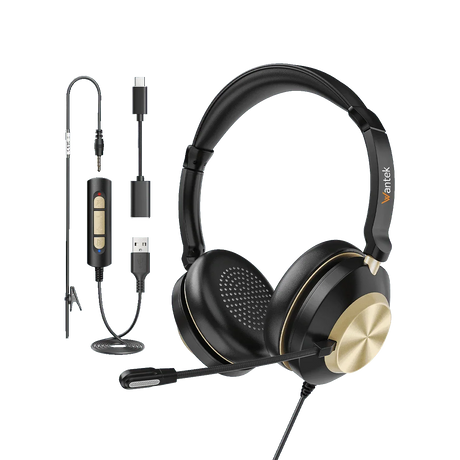
Current dual-ear options include the wired H602 and H882, plus the Bluetooth WK882BT.

Model comparison

Compare Wantek Office Headset Starting Points

Use the verified specifications below as a starting point, then open the individual product page to confirm the current option before ordering.

Model Wearing style Connection Verified noise-control listing Call controls
H600 Single-ear, corded USB-C / USB / 3.5mm PNC Volume + one-key mute
H602 Dual-ear, corded USB-C / USB / 3.5mm PNC Volume + one-key mute
H881 Single-ear, corded USB / 3.5mm PNC Volume + one-key mute
H882 Dual-ear, corded USB / 3.5mm PNC; product copy also describes a noise-reducing boom mic Volume + one-key mute
WK881BT Single-ear Bluetooth Bluetooth 5.2; USB listed in specifications PNC One-key mute
WK882BT Dual-ear Bluetooth Bluetooth 5.2; USB listed in specifications Passive noise cancellation / PNC One-key mute
H600 / H602

Each weighs 3 oz / 85 g and uses Type-C, USB and 3.5mm connections.

H881 / H882

USB and 3.5mm connections, boom microphones, PNC, volume control and one-key mute.

WK881BT / WK882BT

Bluetooth 5.2, boom microphones, one-key mute and up to 45 hours of battery life with approximately two-hour charging.

Connection first

Wired or Wireless?

Choose Wired for a Direct Workstation Connection

The H600 and H602 provide Type-C, USB and 3.5mm connection options. The H881 and H882 provide USB and 3.5mm connections.

Start with the port available on your computer or device, then confirm that the complete audio-and-microphone connection is supported.

Choose Bluetooth When Mobility Matters

The WK881BT and WK882BT are Bluetooth 5.2 work headsets. WK881BT uses a single-ear design, while WK882BT uses a dual-ear design. Both list up to 45 hours of battery life and one-key mute controls.

Bluetooth support alone does not confirm compatibility with a specific office phone. Verify the device and connection before ordering.

Wantek wired office headset with boom microphone beside a laptop and desktop display
Choose the connection around the device you actually use for work calls.
Desk-phone compatibility

Need a Desk-Phone Headset?

Desk-phone and RJ9 compatibility should be checked separately. Wantek maintains a dedicated desk-phone compatibility path and a separate collection for wired RJ9 headsets. RJ wiring can vary between phone models, so do not choose solely from connector appearance.

Check Desk Phone Compatibility
Quick model decisions

Compare the Closest Wantek Alternatives

Choosing Between H600 and H602

  • Choose the H600 when you want a single-ear wired design.
  • Choose the H602 when you prefer dual-ear listening.

Both list 3 oz / 85 g weight, Type-C / USB / 3.5mm connections, boom microphones, PNC, volume control and one-key mute.

Choosing Between WK881BT and WK882BT

  • Choose WK881BT when you want a single-ear Bluetooth work headset that keeps one ear open.
  • Choose WK882BT when you prefer a dual-ear Bluetooth design.

Both use Bluetooth 5.2 and list PNC, boom microphones, one-key mute, up to 45 hours of battery life and approximately two-hour charging.

Frequently asked questions

Office Headset Questions

Is microphone noise cancellation the same as ANC?

No. Microphone noise reduction affects the sound transmitted during a call, while active noise cancellation reduces surrounding sound heard by the wearer. Check the exact model because Wantek products use different types of noise control.

Does every Wantek office headset on this page have ANC?

No. The WK882BT is explicitly described as using passive noise cancellation rather than active noise cancellation. Always check the individual product specification before assuming ANC is included.

Which Wantek wired headsets support USB-C?

The H600 and H602 list Type-C, USB and 3.5mm plug options. Both use boom microphones and provide volume and one-key mute controls.

What is the difference between H600 and H602?

H600 is a single-ear corded headset, while H602 is dual-ear. Both list Type-C / USB / 3.5mm connectivity, PNC, a boom microphone, volume control and one-key mute.

What is the difference between WK881BT and WK882BT?

WK881BT uses a single-ear design, while WK882BT is dual-ear. Both use Bluetooth 5.2 and list PNC, boom microphones, one-key mute and up to 45-hour battery life.

Should I choose a wired or Bluetooth office headset?

Choose according to your connection and workflow. Wired models provide direct USB-C, USB or 3.5mm options depending on model, while Bluetooth models such as WK881BT and WK882BT provide wireless mobility.

Should I choose a single-ear or dual-ear headset?

Choose single-ear when awareness of coworkers or visitors matters. Choose dual-ear when you prefer audio in both ears and greater listening focus during calls.

How do I choose a headset for a desk phone?

Start with the exact phone model and available headset connection. Use Wantek’s desk-phone compatibility information before selecting an RJ9 or other phone-headset configuration.

Next step

Find the Right Headset for Your Work Setup

Compare models by wearing style, connection and verified noise-control specifications before ordering.

Comparar /3

Cargando...