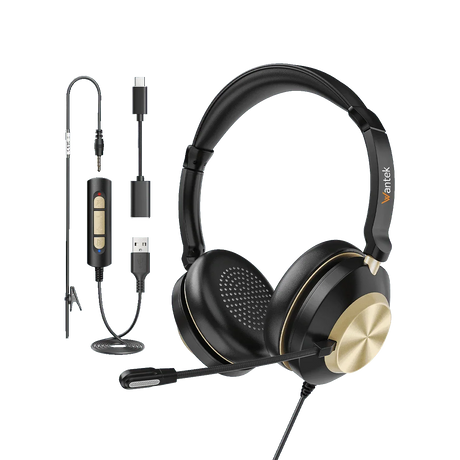
Find Wantek office headsets for computer meetings, customer calls, reception desks and remote work. Compare wired USB and USB-C models, supported 3.5mm options, RJ9 desk-phone headsets and Bluetooth work headsets.
Start with the device that handles your calls. For desk phones, verify the exact model and RJ wiring; for PCs, check ports and supported headset controls. Choose single-ear or dual-ear wear according to the way you work, rather than connector appearance alone.
An office headset should match the device handling your calls, provide a suitable microphone and feel comfortable during your normal workday. Start with the calling device and connection; then compare wearing style, controls and mobility.
Desk phone
Confirm the exact phone and RJ wiring
Start with the complete phone brand and model. Wantek carries RJ9 headset variants using different wiring configurations, including RJ1, RJ2 and RJ4 options.
A modular plug can fit yet use the wrong wiring. Check the exact phone and headset variant before ordering.
For calls on a PC or laptop, a headset with a supported USB-A or USB-C connection is a practical starting point. In your calling app, confirm that the headset can be selected for both speaker and microphone audio.
Some wired Wantek headsets list multiple connection options. Check the actual product variant and port rather than relying on the model-family name alone.
Choose a wireless office headset when you need more freedom to move during calls.
For Bluetooth models, confirm pairing with the device you actually use for calls, plus battery life and charging requirements. A Bluetooth headset does not automatically connect to a desk phone; some phone setups require a compatible base or adapter.
Rule out incompatible connections first. Then judge each remaining option by how you take calls, what callers need to hear, and how long you wear the headset.
01
Identify the Calling Device
Identify where the call audio comes from:
desk phone;
computer or softphone;
a supported mobile device, or a mix of desk-phone and computer calls.
If you use both a desk phone and computer, treat them as two separate connections until a model or adapter is verified for both.
02
Confirm the Connection
Check the headset’s listed connection against the device’s supported audio input. For desk phones, verify the full phone model and RJ wiring. For a 3.5mm computer jack, check that it accepts microphone input; USB ports also need compatible audio and app support.
03
Choose Wearing Style and Workflow
Select mono when you need an ear open, or dual-ear when audio in both ears suits the task. Compare boom-microphone design, mute and volume controls, cushion fit and wearing comfort. Choose wired for a fixed desk or wireless when movement is worth the charging routine.
Connection
Good Starting Point
Check Before Buying
RJ9 / modular wired
Compatible desk phones and office phones
Exact phone model, RJ wiring, headset port and any required accessories
USB / USB-C
PCs, laptops and computer-based calling
Supported USB audio, correct connector, app settings and required button functions
3.5mm
Devices with a compatible headset jack
Headset-mic input, plug format and whether a splitter or adapter is needed
Wireless
Workflows where movement matters
Actual wireless connection, phone/base support, charging and call controls
Check the selected product variant and the calling device—not just the connector shape—before ordering. For team use, test one complete call setup before purchasing at scale.
Current collection starting points
Which Wantek Office Headsets Should You Compare?
Use these groups as starting points rather than assuming every model fits every device.
For Wireless Work Calls
Compare the single-ear WK881BT with the dual-ear WK882BT. Both are listed as Bluetooth work-headset options. Check the selected product page for device support, charging-dock options and the exact included accessories.
For a single-ear wired option, compare H881 or H783. For dual-ear calling, compare H882 or H786. USB versions of the H600 and H602 families are also listed. Verify the connector and microphone controls on the exact product listing.
The H600 is a single-ear starting point and the H602 a dual-ear one; both have separately listed RJ9 variants. Match the exact phone to its required RJ1, RJ2 or RJ4 wiring version before ordering. A USB model from the same family is not a substitute for the RJ9 variant.
An otherwise compatible headset can still be the wrong choice if it blocks sounds you need to hear, feels uncomfortable or puts the wrong controls out of reach.
Single-Ear or Dual-Ear Office Headset?
A single-ear headset keeps one ear open. Consider it for reception, shared desks or roles where coworkers and visitors may need your attention during calls.
A dual-ear headset provides call audio in both ears. It can help you stay focused in a busy room, though actual isolation depends on the earcups and fit.
For either style, check headband adjustment, cushion fit and comfort over the length of your typical shift.
Wired headsets fit a fixed workstation and avoid a headset-battery charging routine. They also keep the user within reach of the cable.
Wireless headsets make sense when you routinely stand or move during calls, provided the device and wireless connection are supported.
Check charging, supported connection method, and whether mute or other physical controls perform the functions needed in your calling app. Do not assume pairing support confirms full call-control support.
A noise-reducing microphone is intended to limit background sound sent to the other person on a call. Passive isolation and active noise cancellation (ANC) instead describe ways of reducing sound heard by the wearer. A product labelled “noise cancelling” does not necessarily provide both. Check its microphone specification and, where possible, try a call in your normal workspace.
Check the Controls in Your Calling App
Confirm that the headset works for both incoming and outgoing audio, then check mute, volume and any answer/end-call buttons you need. Those functions can depend on the headset, connection and app. Listening to audio through a headset alone does not prove that every physical call button will work.
For multiple workstations
Buying for a Call Center or Team?
For multiple workstations, start by documenting the setup before standardizing one headset across the team.
the device or phone model used at each station;
the required connector and any adapter or base;
mono or dual-ear preference and fit requirements;
microphone, mute and calling-app control requirements;
whether agents need wired or wireless operation;
the number of headsets required.
Before a larger rollout, trial the selected model at representative stations. Verify speaker and microphone audio, call controls, comfort and background-noise handling in the actual calling environment; check every desk-phone model separately.
Start with the full phone model and its documented headset port. Wantek offers RJ9 wired variants, but RJ1, RJ2 and RJ4 wiring is not interchangeable; verify the exact supported setup before ordering.
How do I know whether I need RJ9, USB, USB-C or wireless?
Use RJ9 only with a compatible desk-phone setup; USB-A or USB-C for computers that support the selected headset; and wireless when the calling device supports its connection method. Check 3.5mm microphone support separately.
Should I choose a mono or dual-ear office headset?
Mono keeps one ear open for nearby activity. Dual-ear puts call audio in both ears for greater listening focus. Check cushion fit and comfort before deciding, especially for longer shifts.
Are wired office headsets better than wireless?
Wired headsets suit fixed desks and do not need headset charging. Wireless headsets provide mobility but require a compatible connection and a charging routine. Compare your normal movement and controls before choosing.
Can I use one headset with both a desk phone and computer?
Possibly, but only when the selected headset and any required base or adapter support both devices. Check the phone and computer separately, including how you switch calls between them.
Does a noise-cancelling office headset remove background noise from calls?
Not necessarily. Microphone noise reduction concerns sound transmitted to callers; ANC and passive isolation concern what the wearer hears. Check the model’s microphone specification rather than assuming one noise-control label covers both.
Will the headset’s mute and call buttons work in my meeting app?
That depends on the headset, connection method and app. Verify microphone audio first, then test mute, volume and any answer/end controls in the software you actually use.
Find the Right Office Headset
Have your device and connection details ready? Compare the wired USB options or check desk-phone wiring before selecting a model. For wireless needs, use the wireless choices above and verify the specific device pairing path.