Welcome to Wantek online store!

Announcement: Free shipping in USA, UK, FR, DE, IT, ES

usb headsets with microphone​

Single Ear Headsets with Mic for Work Calls

(14 products)

Choose a Wantek single-ear headset when you want to hear call audio on one side while keeping the other ear open to coworkers and your surroundings. Compare mono wired models for computer calls, office phones and customer-service work.

Options include USB, RJ9, 3.5mm and 2.5mm connections, depending on the model. Confirm your device's exact connector and microphone support before comparing fit, boom-mic position and inline controls. Compare dual-ear headsets if you prefer two-ear listening.

View as

Start with the connection

Choose Your Headset by Device First

Start with the device that handles your calls. Confirm its audio connection and microphone support, then compare single-ear fit, controls and work needs. A plug that fits is not proof that the microphone will work.

Calling device Connection to compare What to confirm
Computer or softphone USB-A or supported USB-C audio Confirm the port, headset audio support and calling app
Compatible desk phone RJ9 variant Verify the exact phone model and required wiring
Device with headset jack 3.5mm or 2.5mm Check plug size, microphone contacts and device support

RJ9 requires verification. Do not choose an RJ9 headset from connector shape alone. Desk-phone headset wiring can vary between devices.

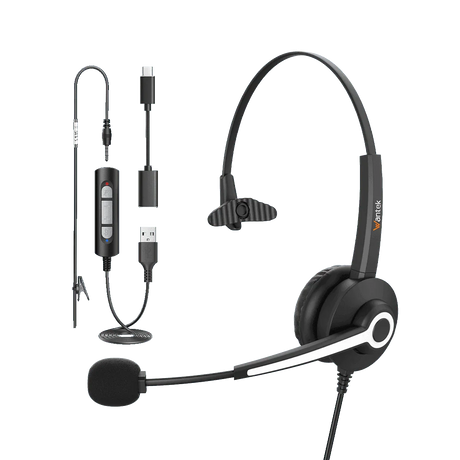
Wantek H783 single ear wired headset with boom microphone and connection adapters
Wantek H783 single-ear wired headset

Mono headset use

Why Choose a Single Ear Headset?

A single-ear headset, also called a mono or monaural headset, puts call audio in one ear and leaves the other ear uncovered.

It suits reception, customer support and desk-phone roles where a person needs to hear coworkers or visitors between calls. The open ear improves access to room sounds, but it does not make every environment equally easy to hear.

Choose Single Ear for Awareness

Choose mono when you need one ear free for short conversations or workplace announcements. Pay attention to which ear you prefer to cover and whether the model allows that fit.

Choose Dual Ear for Focus

Choose dual-ear when nearby conversations are distracting or you want call audio delivered to both ears. Isolation still depends on the particular earcup design.

Compare Dual Ear Headsets →

Compare by connection

Compare Single Ear Headsets by Connection

Computer calls

USB Single Ear Headsets

For laptop and desktop calls, check whether the headset uses USB-A or USB-C, and whether that device and connection support USB audio. After connecting, select the correct speaker and microphone in your calling app.

Several Wantek mono listings have multi-connector variants. Check the exact variant rather than assuming all adapters or plugs shown for one model are included with another. In-line buttons and software call controls may not behave identically across apps.

Browse USB Headsets →
Desk phones

RJ9 Single Ear Headsets

RJ9-style modular plugs are used by some desk-phone headsets, but pin wiring and phone configuration vary. A physical fit is not a compatibility guarantee.

This collection includes RJ1, RJ2 and RJ4-labelled variants. Match the complete desk-phone make and model to the specific headset variant and any required adapter or configuration before ordering.

Browse RJ9 Headsets →
Check Desk Phone Compatibility →
Supported headset jacks

3.5mm and 2.5mm Single Ear Headsets

A 3.5mm headphone-only socket may play audio without accepting a headset microphone. A combined 3.5mm headset jack and separate headphone/mic jacks are different setups; an appropriate splitter may be needed.

Also check the headset plug contacts and wiring standard, especially for a combined 3.5mm audio-and-mic connection. A 2.5mm jack on a phone or accessory is not automatically compatible with every 2.5mm headset.

Wantek H681 single-ear headset shown for customer support and office calls

Comfort and listening

Check Fit and Listening Needs

Check the Fit of a Single-Ear Headset

For longer shifts, compare headband adjustment, ear cushion contact and the pressure on the covered ear. Confirm whether the microphone boom can be positioned comfortably for the side you wear.

A good fit should keep the earpiece steady without relying on excessive clamping force. Comfort is individual, so product weight alone does not settle the choice.

Think About the Room and Call Audio

Single-ear designs keep an ear open but can make callers harder to follow in a loud room. If uninterrupted listening matters more than awareness, compare dual-ear designs and their actual isolation features.

Compare Dual Ear Headsets →

Microphone and controls

Compare the Microphone and Call Controls

For spoken calls, check the microphone and mute controls separately from any claim about noise cancellation.

Microphone noise reduction targets the sound sent to the other person. Passive isolation concerns the earpiece fit; active noise cancellation, when present, changes what the wearer hears. These are separate capabilities, not interchangeable specifications.

Some Wantek mono variants list a boom microphone and in-line volume or mute controls; descriptions may also use “PNC.” Check what that term means on the exact listing. A physical mute switch, a software mute status and call-answer buttons should not be assumed to synchronize across every calling app.

Some RJ9 variants include Quick Disconnect (QD), which can help with repeated departures from a fixed phone station. Confirm the precise QD version and mating cable; QD does not solve desk-phone wiring incompatibility.

  • Microphone noise reduction Reduces some unwanted sound reaching the caller; results depend on the model and conditions.
  • Passive isolation Physical attenuation from the earpiece and fit, not electronic noise cancellation.
  • Active noise cancellation Electronically reduces certain sounds heard by the wearer; do not infer it from “noise-cancelling mic.”

Work scenarios

Choose a Single Ear Headset by Work Scenario

Use case Starting point What matters most
Reception desk Single-ear wired headset Room awareness and exact phone or computer connection
PC meetings USB single-ear headset Computer port and call controls
Office desk phone Compatible RJ9 headset Exact phone model and wiring
Support or dispatch Mono headset with microphone Room awareness, connector and microphone placement
Shared or louder workspace Compare single and dual ear Decide whether awareness or greater isolation is more important

Before you choose

Before You Choose a Model

Use these three checks in order, then confirm the exact model and accessories on its product page.

What device handles the call?

Identify the computer and call application, or the full desk-phone model. For a jack-based device, confirm its microphone input.

Which connection does that device require?

Check the precise plug, wiring or USB audio path. Do not infer compatibility from matching connector shape.

Does a mono headset suit your room?

Decide whether awareness or fewer distractions matters more. Then check wearing comfort, boom placement and usable mute controls.

Once compatibility and the wearing style are settled, compare fit, included accessories, product availability and price. If you are ordering for a team, verify a sample with the actual calling setup first.

Common questions

Frequently Asked Questions

What is a single ear headset?

A single-ear or mono headset uses one earpiece and leaves the other ear uncovered. It is commonly chosen when the user needs to hear both the call and activity around the workstation.

Is a single ear headset good for office calls?

Yes when room awareness is important. Reception, support, office-phone and dispatch roles are common examples, while users who want both ears covered may prefer a dual-ear headset.

Which connection should I choose for a computer?

Start with a headset that matches your computer’s supported audio connection, such as USB-A or USB-C. Also check the microphone input and calling-app settings; matching port shape alone is insufficient.

Will any RJ9 headset work with my desk phone?

No. Similar modular connectors can use different wiring. Confirm the complete phone model and the required Wantek RJ9 variant before ordering.

What is the difference between single-ear and dual-ear headsets?

Single-ear headsets leave one ear open for greater awareness of the room. Dual-ear models cover both ears and are a better starting point when you prefer audio in both ears.

Do Wantek single-ear headsets have mute and volume controls?

Some listed wired mono models include in-line volume and mute controls. Verify the exact variant and how your calling app handles those buttons; hardware and software mute indicators may differ.

What does Quick Disconnect mean?

Quick Disconnect (QD) lets a compatible headset separate from its lower cable without taking off the earpiece. The headset and mating cable must match; QD does not guarantee phone compatibility.

Do wired single-ear headsets need charging?

These corded models do not need Bluetooth battery charging for normal wired use. If your work requires moving away from the desk, compare wireless models and verify their device connection and charging needs.

Why can I hear a call but the headset microphone does not work?

Check whether the device jack supports microphone input, then select the headset as the microphone in your call settings. For a 3.5mm connection, confirm the plug wiring and whether a headset splitter is required.

Continue by headset type

Move to the collection or guide that matches the device, wearing style or team workflow you need.

Compare /3

Loading...