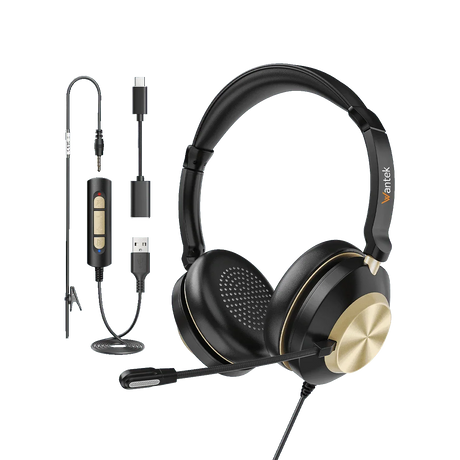
What is a dual-ear headset with a microphone?
A dual-ear (binaural) headset plays call audio through two earpieces and uses a microphone for speaking. The wired Wantek models shown here are intended for compatible office, computer and desk-phone calling setups.
Which dual-ear headset connection works with my computer?
Check the computer’s USB-A or USB-C port, or whether its 3.5mm jack supports both headphones and microphone input. For example, the H602 3-in-1 has USB-A, USB-C via adapter and 3.5mm paths.
Why does my 3.5mm headset play audio but the microphone not work?
The port may support headphones only, while the headset requires a compatible microphone connection. Check whether your device has a combined headset jack or separate mic/audio ports; the latter may need a compatible headset splitter.
Should I choose single-ear or dual-ear for office calls?
Choose dual-ear if you prefer call audio in both ears. Choose single-ear when you need one ear open for coworkers, customers or nearby activity. Headset fit and surrounding noise still affect the experience.
Does dual-ear mean active noise cancellation?
No. Dual-ear describes the two-ear wearing style. A noise-reducing microphone affects audio transmitted to a caller; passive isolation depends on physical fit; ANC is a separate listening-side feature that must be explicitly specified.
Will any Wantek dual-ear RJ9 headset work with my desk phone?
No. RJ1, RJ2 and RJ4 use different wiring paths, even when the modular plugs appear alike. Confirm the complete phone model and the required headset variant with the compatibility information first.
How do I choose between H602, H682, H786 and H882?
Start with the required connector and then compare the specific product’s boom mic, controls, weight and fit. H602/H682 have multiple wired variants; the listed H786/H882 specifications include USB/3.5mm and inline volume/mute.