
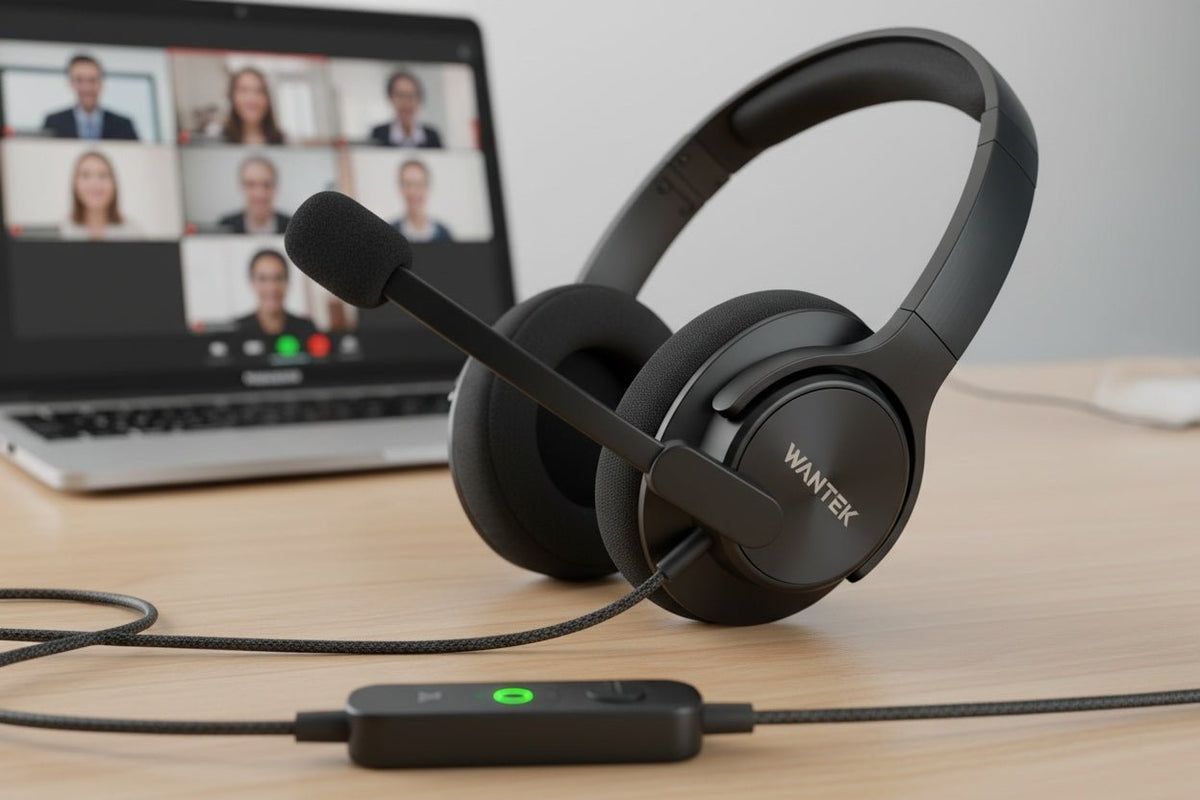
Ein gutes USB-Headset für das Homeoffice sollte zu Ihrem Computer passen, eine konstante Mikrofonleistung bei Anrufen gewährleisten, über die Dauer Ihres durchschnittlichen Meetings komfortabel bleiben und Ihnen die Funktionen bieten, die Sie tatsächlich benötigen. Beginnen Sie mit diesen Anforderungen, bevor Sie Treibergrößen, Frequenzbereiche oder Werbeversprechen vergleichen.
Kurz gefasst: Für einen festen Schreibtisch im Homeoffice ist ein kabelgebundenes USB-Headset oft ein praktischer Ausgangspunkt, da das Aufladen des Headsets und das Bluetooth-Pairing im Arbeitsalltag entfallen. Die bessere Wahl hängt nach wie vor von Ihren verfügbaren Anschlüssen, den Anforderungen an das Mikrofon, der Trageweise, der verwendeten Meeting-Software und davon ab, ob Sie sich während der Gespräche vom Computer entfernen müssen.
Beginnen Sie mit Ihrem Homeoffice-Workflow
Wählen Sie ein Headset nicht danach aus, welches Modell die längste Feature-Liste hat. Fragen Sie sich stattdessen, was im tatsächlichen Arbeitsalltag zum Scheitern eines Headsets führen würde.
| Arbeitssituation | Zuerst prüfen | Warum das wichtig ist |
|---|---|---|
| Fester Schreibtisch, ein Computer | USB-Anschluss, Schwanenhalsmikrofon, Stummschaltung und Lautstärkeregler | Ein kabelgebundenes Setup hält die tägliche Verbindung einfach und vermeidet das Akku-Management des Headsets. |
| Gemeinsam genutzter Raum oder häufige Haushaltsgeräusche | Mikrofonaufnahme sowie Geräuschabschirmung auf der Hörerseite | Was Ihre Kollegen hören und was Sie hören, sind zwei verschiedene Probleme, die getrennt betrachtet werden sollten. |
| Lange Meeting-Blöcke | Passform, Anpressdruck, Wärmeentwicklung und Platzierung der Bedienelemente | Ein Headset, das unbequem wird oder bei dem die Stummschaltung umständlich ist, sorgt für Frust, auch wenn die technischen Daten gut aussehen. |
| Notwendigkeit, Personen in der Nähe zu hören | Einseitiges Design oder geringere Abschirmung | Ein offenes Ohr kann die Aufmerksamkeit für die Umgebung erleichtern, wenn dies Teil der Arbeit ist. |
| Regelmäßiges Entfernen vom Schreibtisch | Ob ein kabelgebundenes USB-Headset noch zum Workflow passt | Wenn Mobilität wichtig ist, kann ein kabelloses Modell trotz des Aufwands für Laden und Verbindung praktischer sein. |
Wenn Sie USB-Headsets für verschiedene Arbeitsumgebungen vergleichen und nicht nur für das Homeoffice, nutzen Sie den umfassenderen Kaufberater für USB-Headsets mit Mikrofon. Diese Seite konzentriert sich auf die wichtigsten Entscheidungen an einem stationären Arbeitsplatz.
1. Prüfen Sie den Anschluss, bevor Sie Audiofunktionen vergleichen
USB-A und USB-C beschreiben die Steckertypen. Sie garantieren jedoch kein bestimmtes Niveau an Klangqualität, Mikrofonqualität, Unterstützung für Anrufsteuerungen oder Softwareintegration. Überprüfen Sie genau, welche Anschlüsse Ihr Computer bietet und welche Verbindung das Headset unterstützt.
Unter Windows stellt Microsoft einen integrierten USB-Audio 2.0-Klassentreiber für kompatible Geräte bereit. Das erklärt, warum viele Standard-USB-Audiogeräte ohne separaten Audiotreiber funktionieren, bedeutet aber nicht, dass jede Headset-Funktion oder jede Hardware-Taste in jeder Anwendung funktioniert.
Ein 3,5-mm-Headset kann ebenfalls eine gute Wahl sein, wenn der Computer einen kompatiblen analogen Anschluss bietet. USB ist nicht automatisch besser, nur weil es digital ist. Wenn Sie zwischen diesen beiden kabelgebundenen Optionen wählen, vergleichen Sie die Anforderungen an Signal und Kompatibilität im Leitfaden für USB- vs. 3,5-mm-Headsets.
Praktischer Check: Überprüfen Sie sowohl die Wiedergabe als auch den Mikrofoneingang über den Anschluss, Adapter oder das Inline-USB-Modul, das Sie verwenden möchten. Ein Stecker, der physisch passt, bedeutet nicht automatisch, dass das Headset vollständig funktionsfähig ist.
2. Betrachten Sie Mikrofonleistung und Geräuschunterdrückung als separate Entscheidungen
Bei Telefonaten kann die Platzierung des Mikrofons genauso wichtig sein wie seine technischen Daten. Ein Schwanenhalsmikrofon bringt die Kapsel näher an den Mund als ein Mikrofon an der Ohrmuschel oder am Kabel, was eine konsistentere Ausrichtung ermöglicht. Die tatsächliche Qualität der Aufnahme hängt dennoch vom Mikrofon-Design, der Signalverarbeitung, dem Raum, der Anwendung und der Positionierung ab.
Verwechseln Sie nicht die drei verschiedenen Formen der Geräuschunterdrückung:
- Mikrofon-Rauschunterdrückung beeinflusst den Klang, der an die anderen Teilnehmer gesendet wird.
- Passive Isolierung entsteht durch den physischen Sitz und das Material um Ihre Ohren.
- Aktive Geräuschunterdrückung (ANC) nutzt Mikrofone und Signalverarbeitung, um Umgebungsgeräusche für den Träger zu reduzieren.
Ein Headset kann über eine Mikrofon-Rauschunterdrückung verfügen, ohne ANC für den Hörer zu besitzen. Es kann auch ANC haben, ohne für professionelle Sprachanrufe optimiert zu sein. Entscheiden Sie für das Homeoffice, welches Problem Sie lösen müssen, bevor Sie für beides bezahlen.

3. Entscheiden Sie sich nach Ihrer Arbeitsweise für ein ein- oder beidseitiges Headset
Ein einseitiges Headset lässt ein Ohr für den Raum frei. Das kann für das Homeoffice geeignet sein, wenn Sie die Türklingel, Familienmitglieder, Kollegen oder andere Signale in der Nähe hören müssen, während Sie in einem Gespräch sind. Ein beidseitiges Headset sendet den Ton an beide Ohren und sorgt für eine stärkere akustische Abschirmung von der Umgebung.
Keine der beiden Varianten garantiert automatisch Komfort. Der Anpressdruck des Bügels, die Form der Polster, Wärmeentwicklung, Verstellbarkeit, das Tragen einer Brille, die Frisur und die individuelle Anatomie beeinflussen das Ergebnis. Die Checkliste von OSHA für Computerarbeitsplätze betont ausdrücklich, dass ein Headset eine bequeme Passform haben sollte, die weder zu fest noch zu locker ist.
Versuchen Sie, die Passform für die Dauer eines normalen Meetings zu bewerten und nicht nur für wenige Minuten. Drehen Sie sich zu einem zweiten Monitor, schauen Sie auf Notizen und prüfen Sie, ob das Mikrofon in Position bleibt. Wenn Sie eine Brille tragen, testen Sie das Headset mit dem Brillengestell, das Sie normalerweise verwenden.
4. Prüfen Sie die Steuerung für Stummschaltung, Lautstärke und Meeting-Apps
Physische Tasten können in einem arbeitsreichen Tag nützlicher sein als eine lange Liste sekundärer Audiospezifikationen. Stellen Sie zumindest sicher, wie Sie das Mikrofon stummschalten und die Lautstärke ändern können, ohne durch Softwaremenüs navigieren zu müssen.
Einfaches USB-Audio und in Apps integrierte Steuerungen sind nicht dasselbe. Microsoft weist darauf hin, dass für Microsoft Teams zertifizierte Peripheriegeräte für Plug-and-Play mit Teams konzipiert sind und Anrufsteuerungen in unterstützten Konfigurationen bieten. Die Zertifizierung sollte für das spezifische Produkt und die Variante geprüft werden und nicht von einem Markennamen abgeleitet werden.
Zoom pflegt eine eigene Liste unterstützter USB-HID-Geräte und dokumentiert Einschränkungen für das Verhalten der Headset-Tasten. Wenn die Synchronisierung der Stummschaltung, Anrufannahme/-beendigung oder andere Hardware-Integrationen für Sie wichtig sind, vergleichen Sie das genaue Headset und die Verbindungsmethode mit der aktuellen Plattformdokumentation.

5. Vergleichen Sie tatsächliche Produktkonfigurationen, keine generischen USB-Versprechen
Sobald Ihre Anforderungen klar sind, vergleichen Sie die konkreten Produktseiten. Das aktuelle USB-Sortiment von Wantek umfasst sowohl einseitige als auch beidseitige kabelgebundene Modelle mit Anschlussoptionen, die je nach Artikelnummer variieren. Die Produktseite des Wantek H681 führt beispielsweise ein einseitiges kabelgebundenes Design, Typ-C/USB/3,5-mm-Anschlussoptionen, ein Schwanenhalsmikrofon sowie eine Inline-Lautstärke- und Stummschaltung auf.
Das macht das H681 zu einem relevanten Beispiel für Nutzer an einem festen Schreibtisch, die Umgebungsgeräusche wahrnehmen möchten und direkte Kabelsteuerungen bevorzugen. Es bedeutet jedoch nicht, dass dieses Modell für jedes Homeoffice die beste Wahl ist, und es beweist kein anwendungsspezifisches Verhalten der Anrufsteuerung, das über das hinausgeht, was in der Produkt- und Plattformdokumentation unterstützt wird.
Wenn Sie ein beliebiges USB-Headset mit Mikrofon vergleichen, nutzen Sie diese Checkliste:
- Anschluss: Überprüfen Sie den genauen USB-A, USB-C, 3,5-mm-Anschluss, Adapter oder den Empfängerpfad.
- Sprechen: Bestätigen Sie die Mikrofonposition und führen Sie einen Testanruf unter Ihren normalen Raumbedingungen durch.
- Hören: Entscheiden Sie, ob passive Isolierung oder ANC für Ihre Umgebung wirklich notwendig ist.
- Steuerung: Testen Sie Stummschaltung und Lautstärke und verifizieren Sie anschließend, ob die von Ihnen benötigten Teams- oder Zoom-Tasten wie gewünscht funktionieren.
- Tragen: Lassen Sie das Headset für die Dauer eines repräsentativen Meetings auf und achten Sie auf Druck, Wärme, Verrutschen oder häufiges Nachjustieren.
Wann ein kabelgebundenes USB-Headset keine gute Wahl für das Homeoffice ist
Kabelgebundenes USB ist ein starker Ausgangspunkt, wenn Sie hauptsächlich an einem Computer arbeiten und das Aufladen oder Koppeln per Bluetooth vermeiden möchten. Es wird weniger attraktiv, wenn Ihr Arbeitstag häufiges Entfernen vom Schreibtisch, regelmäßiges Wechseln zwischen Laptop und Telefon oder ein komplett kabelloses Setup erfordert.
In diesen Fällen sollten Sie kabellose Headsets unter Berücksichtigung derselben Anforderungen vergleichen, anstatt davon auszugehen, dass kabellos automatisch besser ist. Mobilität bringt eigene Fragen zu Akkulaufzeit, Empfänger- oder Bluetooth-Verhalten, Gerätewechsel und Plattform-Steuerungen mit sich.
Wantek USB-Headsets vergleichen
Filtern Sie aktuelle kabelgebundene USB-Optionen nach Anschluss, ein- oder beidseitigem Design, Mikrofontyp und Inline-Steuerung.
Häufig gestellte Fragen
Ist ein USB-Headset für das Homeoffice besser als Bluetooth?
Nicht generell. Kabelgebundenes USB macht das Aufladen und Koppeln an einem festen Arbeitsplatz überflüssig, während Bluetooth nützlicher ist, wenn Mobilität oder ein kabelloser Wechsel zwischen Geräten wichtig ist. Wählen Sie nach Workflow und exakter Kompatibilität.
Klingt USB-C besser als USB-A?
Keine Steckerform garantiert von sich aus einen besseren Klang. Die Leistung von Mikrofon und Lautsprechern hängt vom Headset, der Wandlerelektronik, der Verarbeitung, der Abstimmung, dem Betriebssystem und der Anwendung ab, nicht allein von USB-A oder USB-C.
Brauche ich ANC für Homeoffice-Anrufe?
Nur wenn Lärm auf der Hörerseite ein echtes Problem in Ihrem Raum darstellt. ANC reduziert einige Geräusche für den Träger; es verbessert nicht automatisch die Mikrofonqualität für die Kollegen.
Sollte ich ein einseitiges oder beidseitiges USB-Headset wählen?
Wählen Sie ein einseitiges Headset, wenn die Wahrnehmung der Umgebung wichtig ist. Wählen Sie ein beidseitiges Headset, wenn Sie den Ton lieber auf beiden Ohren hören möchten. Komfort und Isolierung hängen weiterhin von der exakten Passform und dem Design der Polster ab.
Funktioniert jede Taste eines USB-Headsets in Teams oder Zoom?
Nein. Der einfache Ton für Mikrofon und Lautsprecher kann funktionieren, auch wenn die Synchronisierung der Stummschaltung, Tasten für Anrufannahme/-beendigung oder anwendungsspezifische Tasten nicht funktionieren. Prüfen Sie das spezifische Headset, die Verbindungsmethode und die aktuelle Plattformunterstützung.

