






Choose a USB Headset in Four Steps
Start with the device and connection, then compare wearing style, microphone and controls, and the way the headset will be used at work.
Start With the Connection
Check the computer or device you will use for calls before comparing headset features.
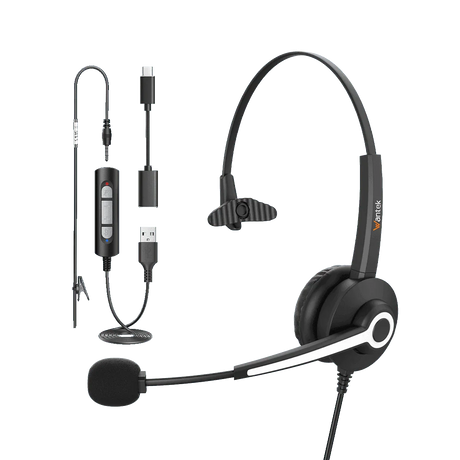
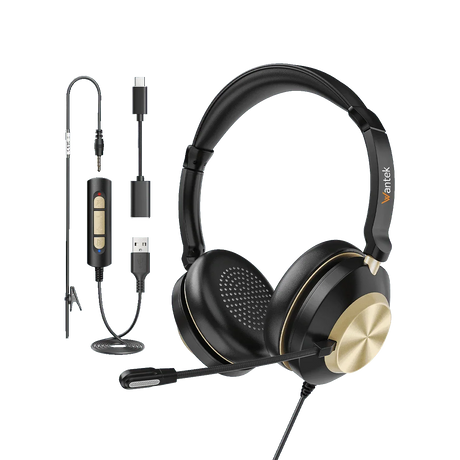
For example, the H600, H602, and H681 list Type-C, USB, and 3.5 mm connections. The H881 and H882 list USB and 3.5 mm connections. Connection options vary, so use the individual product specification as the final reference.
Choose Single-Ear or Dual-Ear
Choose a single-ear headset when you want to keep one ear open to the surrounding workspace. Choose a dual-ear model when you prefer audio in both ears.
The current range includes single-ear models such as H600, H681, and H881, plus dual-ear models such as H602, H682, and H882.
Check the Microphone and Call Controls
A boom microphone and easy access to mute and volume controls can make frequent work calls easier to manage.
The H600, H602, H681, H881, and H882 currently list boom microphones together with volume and mute controls. Verify the exact controls on the product page before choosing a model.
Match the Headset to the Work
For computer meetings and remote work, start with the available port and preferred wearing style.
For customer service or fixed workstations, compare the connector, microphone, mute controls, and single-ear or dual-ear design. Teams ordering multiple units can use Wantek's dedicated bulk USB headset page to compare requirements before ordering.

Compare Wantek USB Headset Options
Use the product attributes below to narrow the range by wearing style, listed connections, microphone, controls, and weight.
| Model | Wearing Style | Listed Connections | Microphone | Listed Controls | Weight |
|---|---|---|---|---|---|
| H600 | Single ear | Type-C / USB / 3.5 mm | Boom mic | Volume + one-key mute | 3 oz |
| H602 | Dual ear | Type-C / USB / 3.5 mm | Boom mic | Volume + one-key mute | 3 oz |
| H681 | Single ear | Type-C / USB / 3.5 mm | Boom mic | Inline volume + mute | 3.7 oz |
| H881 | Single ear | USB / 3.5 mm | Boom mic | Volume + one-key mute | 6.5 oz |
| H882 | Dual ear | USB / 3.5 mm | Boom mic | Volume + one-key mute | 6.7 oz |
These attributes are based on the current Wantek collection and individual product information. Confirm the exact product specification and current availability before ordering.
USB, USB-C, 3.5 mm, or Bluetooth?
Start with the port on the device you actually use, then decide whether a wired or wireless workflow makes more sense.
USB or USB-C
A wired choice for compatible computers and devices. Wired models do not require headset battery charging.
3.5 mm
Useful when the device provides a compatible analog audio connection.
Bluetooth
Useful when wireless movement is more important, but Bluetooth headsets require pairing and battery power.
If you are unsure which connection your device provides, check the device ports first and then compare them with the exact product specification.
USB Headsets for Different Work Setups
The right choice depends on the workstation, how much awareness of the room you want, and how frequently you handle calls.

PC Meetings and Remote Work
Prioritize the connector first, then choose single-ear or dual-ear fit and the controls you use most often.
Customer Service and Call Centers
For frequent workstation calls, compare the microphone, inline mute and volume controls, wearing style, and connection. For larger deployments, use the dedicated bulk USB headset resource.
Shared Offices
Single-ear and dual-ear headsets support different working preferences. Decide whether keeping one ear open to the room or listening through both ears better fits the way you work.
For team purchasing, confirm the workstation connection, single-ear or dual-ear preference, microphone and controls, and required quantity before comparing bulk options.

Frequently Asked Questions
What should I check first when buying a USB headset?
Check your computer or device connection first. Then compare wearing style, microphone design, controls, and the product's listed connection options.
Does Wantek offer USB-C headsets?
Yes. Current models including H600, H602, and H681 list Type-C together with USB and 3.5 mm connections.
Should I choose a single-ear or dual-ear USB headset?
Choose single-ear if keeping one ear open to your surroundings matters. Choose dual-ear if you prefer to hear call audio through both ears.
Do wired USB headsets need charging?
Wired USB headsets receive their connection through the cable and do not require headset battery charging.
Which Wantek USB headsets list mute and volume controls?
Current product information lists volume and mute controls for H600, H602, H681, H881, and H882.
Will every Wantek USB headset work with the same meeting applications?
Do not assume identical software compatibility across every model. For example, the H882 product page explicitly references Teams, Zoom, Skype, and Google Meet; confirm the individual product page for any other model.
What should a team compare before ordering USB headsets?
Confirm the workstation connection, single-ear or dual-ear preference, microphone and controls, and required quantity. Wantek provides a separate bulk USB headset page for team purchasing.
Ready to Narrow Down the Options?
Compare the products by connection, wearing style, controls, and current availability. If you are unsure which design fits your setup, use the headset finder or move directly to team-order planning.
