
Welcome to Wantek online store!

Announcement: Free shipping in USA, UK, FR, DE, IT, ES

is bluetooth headset better than earbuds for making calls

Are Headsets or Earbuds More Professional for Work?

Compare headsets and earbuds for work calls, video interviews, and client meetings. Choose by microphone performance, comfort, controls, and your setup.

Joe Steve |

Both Bluetooth headsets and earbuds can be appropriate for professional calls. For frequent speaking, start by comparing a headset with an adjustable boom microphone; for a compact appearance on camera, earbuds are worth considering. Choose the device that passes an audio check in your actual workspace and fits your employer’s requirements.

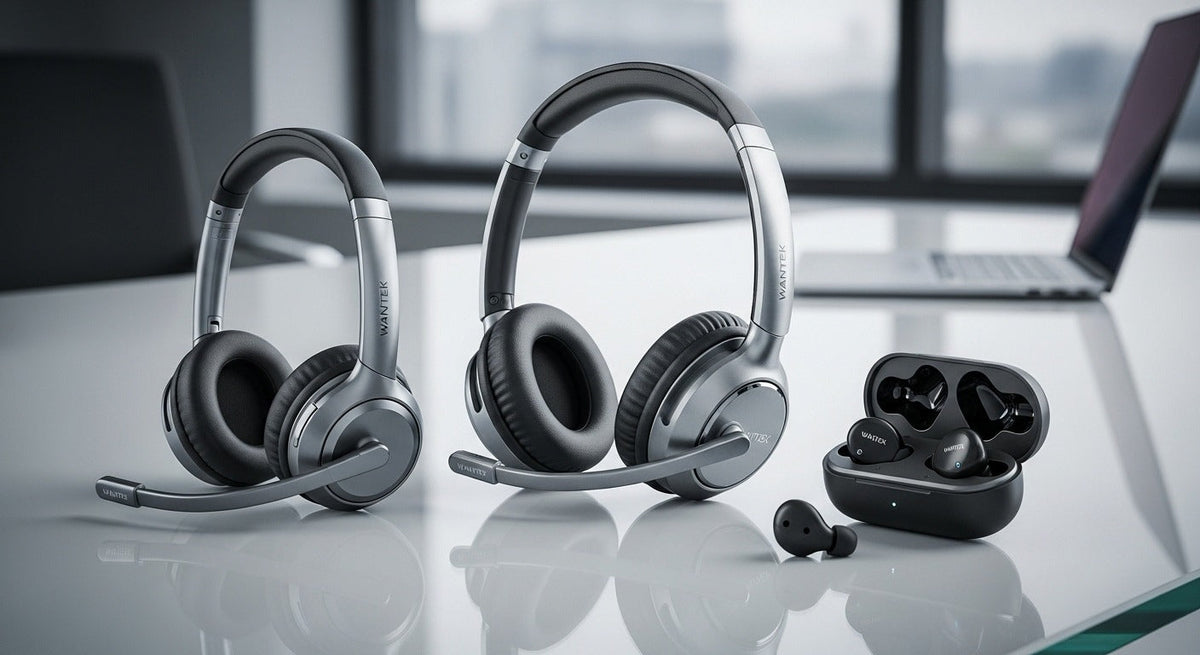
Here, “headset” means a headband-style device with a microphone, while “earbuds” means compact earpieces with built-in microphones. These are practical comparison categories: an earbud can also be marketed as a headset. Neither shape alone establishes how competent, attentive, or professional its wearer is.


Are headsets or earbuds more professional?

Neither is automatically more professional. Choose around the quality of the conversation, the setting, and any workplace requirements. If your concern is visual presentation, compare your actual camera preview rather than assuming a headband or a smaller earpiece sends the right message.

Separate how you look from how you sound

If your concern is appearance, preview both options in your normal camera framing. Earbuds occupy less space around your head; a headband and boom microphone are more visible. That is a design difference, not evidence that clients or interviewers prefer one option.

If your concern is communication, listen to the microphone output. The sound you hear through the earpieces does not tell you what other participants hear from your microphone. HP’s comparison notes that microphone quality varies and that professional earbuds can perform well. See HP’s earbuds and headphones comparison.

Our recommendation is to treat appearance as a preference after confirming clear speech, usable controls, fit, and the requirements of the meeting. For Bluetooth use, verify the intended computer or phone connection and the call controls in the app you actually use. You do not need to replace working earbuds simply to acquire a more businesslike silhouette.

is bluetooth headset better than earbuds for making calls

Choose around the meeting you actually have

The following is a practical selection framework, not a ranking based on comparative testing.

Choose by your work-call situation
Situation Starting choice What to verify
Occasional calls from a quiet room Starting choice Your existing headset or earbuds What to verify Speech is understandable and you can mute confidently.
Frequent client calls or presentations Starting choice Compare a boom-mic headset with your current device What to verify Listen for voice consistency when you turn your head and use the keyboard.
A video interview where appearance concerns you Starting choice Whichever tested option you feel comfortable wearing What to verify Check the camera preview and any instructions from the interviewer.
A shared office with conversation nearby Starting choice The specific device that handles your room best What to verify Test outgoing speech with representative background conversation.
Long meetings without a charging break Starting choice A suitable wired headset, or a wireless device with adequate documented talk time What to verify Check the exact connection, fit, and uninterrupted call duration.
Calls while traveling Starting choice A compact device that passes a test in that location What to verify Check speech, connection, battery, and the privacy of your surroundings.

For a broader comparison of features and work setups, use our business headset guide. This article focuses on professional presentation and communication, rather than selecting a universal best model.


When a boom-mic headset is worth comparing

A boom microphone gives you a visible microphone position to adjust. If you speak for much of the day, that makes it a useful feature to evaluate alongside mute controls and comfort. It does not establish that every boom-mic headset outperforms every earbud.

Test the headset while sitting naturally, looking between your screen and notes, and speaking at your normal volume. Follow the manufacturer’s positioning instructions. If a device works only when you hold an unnatural posture, it is a poor fit for that workflow.

For long sessions, assess the headband, ear cushions, glasses fit, and any pressure you notice over time. For earbuds, check whether they stay comfortably in position without repeated adjustment. Comfort depends on the wearer and the specific design; do not infer it from product category alone.

Our home office headset feature guide explains the wider selection criteria once you have decided that a dedicated work headset is worth exploring.


When earbuds are a reasonable professional choice

Earbuds are worth keeping if their microphone works well in your room, the controls suit your calls, and you prefer their compact form. A visible boom is not a prerequisite for usable voice pickup: Bose also describes work-call options that use microphones without a boom arm. See Bose’s explanation of headsets and work headphones.

Business-focused earbuds have existed alongside headband-style headsets. Logitech’s Zone True Wireless specifications, for example, document noise-canceling microphones and call controls including mute. This demonstrates why the exact model matters; it is not a current buying recommendation. Logitech announced global end of sale for that model effective March 31, 2026, or while supplies last. Logitech’s documented specifications. Logitech’s end-of-sale notice.

If your earbuds already meet the needs of your meetings, compare any proposed replacement against them. A change should solve a specific problem—such as awkward muting, uncomfortable fit, or unclear outgoing speech—not merely change your appearance.


Check microphone noise reduction, not just ANC

Three different mechanisms can appear under the broad label “noise cancellation”:

  • Active noise cancellation (ANC): reduces unwanted sound reaching the listener through electronic processing. Apple describes its AirPods ANC as countering outside sound before you hear it.
  • Passive isolation: physically limits sound reaching your ears through the fit and structure of the earpieces.
  • Microphone noise reduction: addresses unwanted sound in the outgoing voice signal. Its effectiveness needs to be evaluated on the specific device and setup.

Read Apple’s explanation of ANC and Transparency modes.

A quieter listening experience does not establish that people on the call hear less background noise. When comparing devices, make a separate microphone recording or test call instead of relying on how quiet the room sounds to you.

Also check the features your meeting platform supports. Microsoft documents mute synchronization and call controls for Teams-certified personal peripherals. Verify the exact device and connection against the platform’s documentation; a generic Bluetooth connection is not proof of those features. Review Microsoft’s certified-peripheral features.

is bluetooth headset better than earbuds for making calls

Run a short check before an important call

Use the same computer, meeting app, room, and connection you plan to use for the meeting. This is a practical check you can perform, not a test result from Wantek.

  1. Select the input and output. Confirm that the app is using the intended microphone and earpieces.
  2. Listen to a speech sample. Say your name and a sentence containing names or numbers, then check whether each word is understandable.
  3. Repeat with normal room activity. Turn your head, type briefly, and include the background conditions you expect during the call.
  4. Check muting. Use the control you intend to rely on and confirm what happens in the app and at the receiving end.
  5. Check fit and power. Wear the device before the meeting and verify adequate battery or the intended wired connection.
  6. Preview your camera. Set the framing, then leave the audio device alone unless it needs adjustment.

In the Teams desktop app for Windows and Mac, Microsoft provides a test-call option under Settings > Devices > Audio settings. It records and plays back a short message so you can check your setup. Follow Microsoft’s test-call instructions.

If you have already chosen your preferred form, our Zoom meeting audio guide covers the next stage of evaluating a meeting setup.


Frequently asked questions

Can I use different devices for my microphone and speakers in Teams?

Yes. Teams lets you select a speaker and microphone separately in its device settings, so check both selections before joining a call.

Does a charging case’s battery figure equal uninterrupted earbud talk time?

No. Logitech’s Zone True Wireless specifications list earbud talk time separately from the case’s additional recharges. Compare the specific model’s talk-time rating when planning an uninterrupted call.

Are earbuds professional enough for video interviews?

Earbuds can be a suitable choice if your voice is clear, the connection works reliably in your setup, and you can use the controls confidently. Test them beforehand and follow any equipment instructions from the interviewer.

Is wearing a headset unprofessional during client meetings?

A headset is a reasonable choice for client meetings when it supports clear communication. Check your camera preview, microphone position, and mute controls, and follow any equipment requirements provided by your organization or client.

Should I replace my earbuds with a headset for work calls?

Keep your earbuds if they meet your meeting needs. Compare a headset when you need to address a specific problem, such as uncomfortable fit, awkward mute controls, or unclear outgoing speech.

Joe Steve

Joe Steve writes about business headsets, workplace audio, device compatibility, and headset buying decisions at Wantek. His work focuses on turning product specifications and connection details into practical guidance, helping readers choose the right headset for their devices, work environments, and communication needs.

1 comment

Which is better if you are a little hard of hearing?

Karen,

Leave a comment

Please note: comments must be approved before they are published.