Welcome to Wantek online store!

Announcement: Free shipping in USA, UK, FR, DE, IT, ES

headset with mic with usb

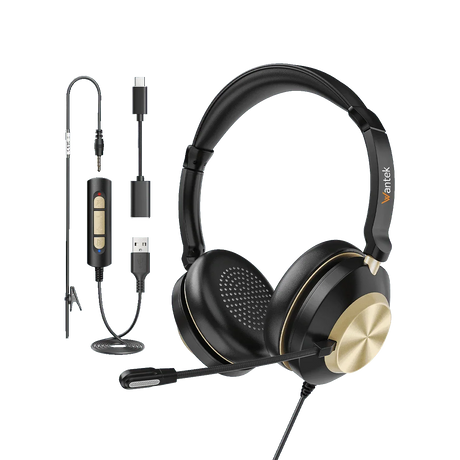
Dual Ear Headsets with Mic for Work Calls

(17 products)

Choose a dual-ear headset when you prefer call audio in both ears while working, meeting, or handling customer conversations.

Start with the device you use for calls, then match the connection before comparing individual models.

View as

Dual-Ear Headset Buying Guide

Choose by Device and Connection First

Start with the device you use for calls and the ports or headset connection it supports. Then narrow the Wantek dual-ear range by connector before comparing individual models.

Customer service professional using a Wantek dual-ear wired headset at a desk phone

For a PC or Laptop

Start with the ports available on your computer.

The current Wantek dual-ear range includes wired USB-oriented models such as H602, H682, H786 and H882. The H602 3-in-1 variant lists USB-C, USB and 3.5mm connections, while H786 and H882 product specifications list USB and 3.5mm.

Confirm the exact connection on the individual product page before ordering.

Compare USB Headsets

For a Desk Phone

Do not choose an office-phone headset from the connector shape alone.

The collection includes dual-ear H602 and H682 variants using RJ-style connections, including different wiring versions. Similar modular plugs are not automatically interchangeable.

Start with the complete phone model and verify the required connection or wiring before choosing a headset.

Check Desk Phone Compatibility

For a 3.5mm or 2.5mm Headset Jack

The collection includes dual-ear 3.5mm and 2.5mm variants.

Choose one only when the device supports that exact headset connection. A plug that physically fits does not by itself confirm device compatibility.

Model Families

Compare Wantek Dual-Ear Headset Families

Use these model families as starting points, then open the exact product page to confirm the current specification and variant.

Model family Current collection starting points
H602 Dual-ear USB, 3.5mm, 2.5mm and RJ variants, plus a USB-C / USB / 3.5mm 3-in-1 version.
H682 Dual-ear 3-in-1 USB, 3.5mm, 2.5mm and RJ variants.
H786 Dual-ear wired model; current specification lists USB / 3.5mm.
H882 Dual-ear stereo wired model; current specification lists USB / 3.5mm.

The right starting point depends first on the calling device and connector—not the model number alone.

Wearing Style

Dual Ear or Single Ear?

Dual ear

Both ears covered

A dual-ear headset places audio over both ears. Choose this wearing style when you prefer to hear call audio in both ears and want less interaction with surrounding activity while you are on a call.

Single ear

One ear stays open

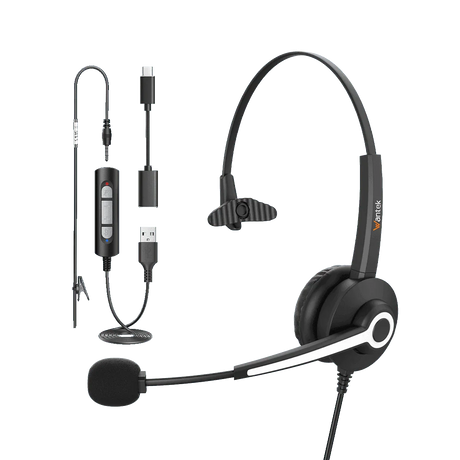
A single-ear headset leaves one ear open. It is the better starting point when hearing coworkers, visitors or workplace activity is important during calls.

Compare Single-Ear Headsets
Professional wearing a Wantek dual-ear wired office headset

Important Distinction

Dual Ear Does Not Automatically Mean Active Noise Cancellation

Wearing style and noise-control features are separate specifications.

Covering both ears can reduce distraction from the room, but it does not mean that a headset uses active noise cancellation. Microphone noise reduction is also a separate feature because it affects what the person on the other end of the call hears.

Check the individual product specification before choosing based on noise-control features.

Four-Question Check

Choosing a Dual-Ear Headset for Office or Call-Center Work

Start with four questions:

Where do your calls happen?

Computer, physical desk phone, or another supported device?

Which connection does that device support?

USB, USB-C, 3.5mm, 2.5mm or an RJ-style connection?

Do you want both ears covered?

Choose dual-ear when audio in both ears fits your work environment. Compare single-ear models when room awareness matters more.

Does the exact model fit your setup?

Check the individual product page and use the compatibility information for desk-phone models before ordering.

Use the Headset Finder

Desk Phone Buyers

Verify the Phone Model Before Ordering

RJ-style headset connections require extra care.

Wantek uses different wiring labels for selected desk-phone headsets. Do not treat RJ1, RJ2 and RJ4 as interchangeable simply because the modular plugs look similar.

Use the complete phone brand and model number to confirm the required headset path.

Check My Phone Model
Wantek dual-ear wired headset beside a business desk phone

Buyer Questions

Frequently Asked Questions

What is a dual-ear headset?

A dual-ear, or binaural, headset places audio over both ears. Wantek currently lists dual-ear wired models for computer and compatible phone-based calling setups.

Which connections are available in the dual-ear collection?

The current collection includes USB-oriented, USB-C, 3.5mm, 2.5mm and RJ-style variants. Connection options differ by model, so confirm the exact product specification before ordering.

Should I choose a single-ear or dual-ear headset?

Choose dual-ear when you prefer call audio in both ears. Choose single-ear when keeping one ear open to coworkers, visitors or other activity around you is more important.

Does a dual-ear headset automatically have active noise cancellation?

No. Dual-ear describes the wearing style. Active noise cancellation and microphone noise reduction are separate product features and should be checked in the individual specifications.

Can I use a dual-ear Wantek headset with a desk phone?

Only when the exact phone model and required connection are compatible. For RJ-style models, verify the phone and required wiring configuration rather than choosing by plug appearance.

Which Wantek dual-ear model should I choose?

Start with your device and connector. H602, H682, H786 and H882 families provide different wired dual-ear options, so use the exact product page to confirm the connection and specifications you need.

Next Step

Find the Right Connection Before You Choose

Compare /3

Loading...