
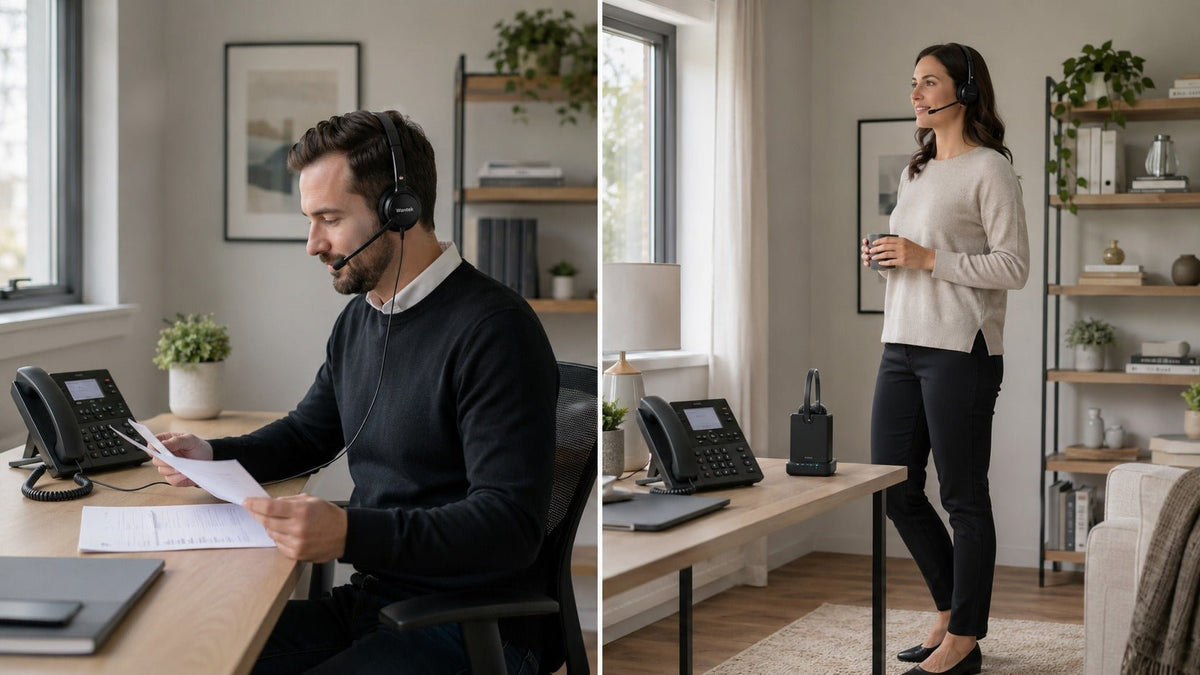
Choose a wired home phone headset if you take calls at one desk and want a simple connection without charging. Choose wireless if you need to move during calls and can manage a battery and compatible base. In either case, check the exact phone model, port, and required accessories before buying.
Quick choice: A wired connection avoids a local radio link; wireless gives you room to move. Sound quality depends on the specific headset and phone system, so neither connection type guarantees clearer calls.
| Decision factor | Wired headset | Wireless headset |
|---|---|---|
| Movement | Limited by the cable length. | Within the system’s usable wireless range. |
| Power | Most passive analog models need no headset charging. | Requires battery charging. |
| Local connection | Physical cable; no headset-to-base radio link. | Bluetooth or DECT radio link; range depends on the setup. |
| Phone fit | Check the phone port, connector, and wiring. | Check the phone, compatible base or adapter, and call controls. |
| Call quality | Depends on the headset, microphone, phone, and wider call path; connection type alone does not decide it. | |
Wired Home Phone Headsets: Benefits and Limits
A wired headset is often the simplest option for a fixed calling position. It does not need wireless pairing, and most passive analog models do not contain a rechargeable battery.
That does not mean every wired headset is automatically superior. Call quality still depends on the telephone, network, microphone, speakers, connector compatibility, and any digital processing used elsewhere in the call path.
Why Choose Wired?
A wired headset works best when the phone and user stay in one place.
-
Consistent local connection. A wired headset sends its signal through a physical cable rather than a local radio link. This avoids Bluetooth or DECT dropouts between the headset and its base. However, the phone system or carrier network may still introduce compression, bandwidth limits, noise, or latency.
-
No headset battery to manage. Most passive wired telephone headsets do not require charging. USB headsets, amplified systems, and models with powered controls may draw electricity from the connected device or an external adapter, so power requirements should still be checked before purchase.
-
Reduced wireless exposure. A wired headset removes one radio connection from the system. That can reduce the local wireless attack surface, but it does not make the complete call private. The telephone, base station, VoIP service, carrier network, and other infrastructure remain part of the communication path.
-
Potentially lower cost. Wired headsets are often less expensive than wireless systems with similar core call features because they do not require a rechargeable battery, radio hardware, or charging base. Price still varies according to microphone design, materials, comfort, controls, durability, and included accessories.
A compatible telephone headset can therefore be a practical option for a fixed desk, provided its connector and wiring match the phone.
Where the Cord Gets in the Way
The same cable that simplifies the connection also limits movement.
-
Movement depends on cable length. There is no universal six- or ten-foot standard. Cable length varies by product, connector, extension configuration, and phone setup. Check the manufacturer’s specifications rather than assuming the headset will reach across a room.
-
Cable management requires attention. Cords can twist, catch on furniture, or become tangled when they are poorly routed or stored.
-
A loose cord can become a snagging hazard. In a home with pets, children, rolling chairs, drinks, or a crowded desk, the cable should be positioned so it cannot easily catch a person or object.
For someone who makes calls from one organized location, these disadvantages may be minor. For someone who regularly moves between rooms, they may be decisive.

Wireless Home Phone Headsets: Benefits and Limits
A wireless headset lets you move beyond the length of a cord while a call continues, provided the connection remains stable in the rooms you use.
The important phrase is within the system’s usable range. Wireless performance depends on the headset, base, radio technology, building materials, antenna design, interference, and physical distance.
Why Choose Wireless?
-
Greater mobility. Wireless headsets allow movement beyond the length of a cable. This is especially useful for parents, home-based professionals, caregivers, and anyone who handles calls while completing other tasks.
-
Less cable clutter. Removing the headset cable can produce a cleaner workspace, although a charging cable or base station may still be required.
-
More connection options on selected models. Some wireless systems can connect to a desk phone, computer, and mobile phone through a compatible multi-device base. This is not a standard feature of every Bluetooth or DECT headset. Compatibility must be confirmed for the exact model and phone.
-
Flexible headset placement. A wireless headset can usually be stored on a charging cradle or in another convenient location rather than remaining physically attached to the telephone.
Charging, Range, and Setup
Wireless freedom introduces additional hardware and maintenance.
-
Charging becomes part of the routine. Wireless headsets depend on batteries, and rechargeable batteries gradually lose usable capacity as their internal materials and chemical processes change over time. Compare rated talk time, charging time, replaceability, and warranty terms for the exact model.
-
Wireless performance can vary. Walls, floors, metal structures, radio congestion, base placement, and distance may affect range or connection stability.
-
Digital transmission can add latency. Wireless audio requires encoding, transmission, reception, and decoding. The delay is usually small enough for ordinary phone conversations, but it is not identical across devices, codecs, and connection methods.
-
Wireless systems may cost more. The price can reflect the battery, radio components, charging hardware, device-switching capabilities, remote call controls, and mobility—not necessarily better sound quality.
Wireless headsets are therefore most valuable when the ability to move outweighs the additional charging, compatibility, and setup requirements.
Bluetooth vs. DECT for Home Phones
If you choose wireless, check whether the phone supports Bluetooth or needs a compatible DECT headset base.
Bluetooth is common on computers and mobile devices; DECT is common in cordless phone and dedicated headset systems. The base and exact model determine which devices you can use.
Bluetooth: Flexible Device Support
Bluetooth operates in the 2.4 GHz ISM band, which is also used by Wi-Fi and other equipment. Shared spectrum can create packet interference, although adaptive frequency hopping helps Bluetooth avoid persistently busy channels.
Bluetooth is attractive when you want one headset to work with several device categories. A headset may connect directly to a smartphone or computer, while landline use normally requires a Bluetooth-enabled phone base, compatible adapter, or multi-device headset system.
Do not rely on the old assumption that Bluetooth always has a fixed 30-foot range. The Bluetooth SIG explains that Bluetooth range depends on radio power, receiver sensitivity, antennas, obstacles, and path loss. Real-world performance can vary substantially between products and environments.
Bluetooth may be the better fit when:
- You need compatibility with a computer or smartphone.
- Your phone base explicitly supports Bluetooth.
- You primarily move within one room or a nearby area.
- Multi-device flexibility matters more than maximum dedicated range.
DECT: A Dedicated Phone Connection
DECT stands for Digital Enhanced Cordless Telecommunications. In the United States, qualifying unlicensed personal communication devices operate in the 1920–1930 MHz band in the United States. This separates them from ordinary 2.4 GHz Wi-Fi and Bluetooth traffic.
DECT systems frequently offer greater indoor and line-of-sight range than typical Bluetooth audio products. However, advertised range is not a guarantee of whole-home coverage. Walls, reinforced concrete, metal, multiple floors, radio conditions, and base placement can reduce performance.
DECT also does not mean “desk phone only.” Some systems connect exclusively to a telephone, while others support desk phones, computers, or mobile devices through a multi-device base. The base station and product design determine connectivity.
DECT standards define security features rather than leaving the radio link completely unprotected. These include DECT authentication and ciphering mechanisms. Actual security still depends on the device, implementation, configuration, and the rest of the call path.
DECT may be the better fit when:
- Reliable movement around a larger home is the priority.
- The headset will mainly serve a desk or home phone.
- You prefer a dedicated base rather than direct device pairing.
- Your phone and the DECT base are explicitly compatible.
Compatibility Comes Before Wired vs. Wireless
Before comparing sound, range, or battery life, identify the device handling the call and how the headset will connect to it.
Check:
- The exact phone brand and model.
- Whether the phone has a dedicated headset port.
- Whether the connector is RJ9, 2.5 mm, 3.5 mm, USB, or another format.
- Whether the headset port uses a compatible internal wiring arrangement.
- Whether wireless use requires a dedicated base, adapter, electronic hook switch, or handset lifter.
- Whether remote answer and end-call controls are supported.
- Whether the headset is intended for a desk phone, cordless handset, computer, or multiple devices.
Two plugs can look identical while using different internal pin arrangements. A headset labeled “RJ9” is not automatically compatible with every RJ9-equipped telephone. For the physical connection path, review the phone ports and cables setup guide.
The best headset for home phone is therefore not simply the model with the longest range or strongest marketing claims. It is the model that works correctly with your phone and fits your calling behavior.
Which Home Phone Headset Should You Choose?
Need a broader product checklist? Use the home phone headset buying guide after checking the connection below.
Use your calling location and device requirements to narrow the connection type.
Choose a Wired Headset When
- You take most calls from a fixed desk.
- You want to avoid charging and wireless pairing.
- You prefer a straightforward physical connection.
- Cable management is not a significant problem.
- You have confirmed the phone’s connector and wiring requirements.
- Cost is more important than mobility.
Choose a Wireless Headset When
- You regularly move during calls.
- You need to reach files, appliances, other rooms, or work areas.
- You prefer fewer cables around the desk.
- You are comfortable charging another device.
- The headset’s real-world range is appropriate for your home.
- The base or adapter is compatible with your telephone.
Choose Bluetooth When
- You need computer or smartphone connectivity.
- Your landline base supports Bluetooth or a compatible adapter.
- Multi-device use is a priority.
- Your required roaming area is moderate.
- You have verified the exact pairing and switching behavior.
Choose DECT When
- Longer dedicated range is more important than direct Bluetooth pairing.
- Your primary use is telephone calling.
- You are comfortable using a dedicated base.
- The system supports your phone and any additional devices you require.
- You have checked the manufacturer’s indoor and outdoor range specifications.

Frequently Asked Questions
What are the main advantages of a wired home phone headset?
A wired headset can provide a consistent physical connection without a headset battery or wireless pairing. Passive models are usually ready whenever the phone is available. They can also be less expensive than wireless systems with comparable basic call features.
Compatibility must still be verified. Connector shape alone does not confirm that a headset will work with a particular phone.
What benefits do wireless home phone headsets offer?
Wireless headsets provide greater movement during calls and remove the cable between the user and the phone or base. They can be useful for multitasking, larger workspaces, and users who do not remain at one desk.
Actual range, battery life, device compatibility, and call-control functions vary by model.
Is sound quality better on wired or wireless headsets?
A wired headset avoids wireless encoding and radio transmission between the headset and phone. This can produce a consistent local connection with negligible headset-link latency.
However, overall call quality also depends on the telephone network, microphone, speakers, codec, signal processing, fit, and surrounding noise. A well-designed wireless headset may sound better than a poorly designed wired model.
Which type has less risk of interference?
A wired headset is not affected by radio interference between the headset and phone because it does not use a wireless headset link.
Bluetooth and DECT systems can experience performance changes due to distance, obstacles, radio conditions, and device design. DECT usually operates separately from ordinary 2.4 GHz Wi-Fi and Bluetooth traffic, while Bluetooth uses interference-management techniques such as adaptive frequency hopping.
Is a wired headset automatically more secure?
No. A wired headset eliminates the local radio link, but the call may still pass through a cordless phone base, VoIP service, carrier network, or other digital infrastructure.
Bluetooth and DECT include security mechanisms, but their effectiveness depends on the protocol version, implementation, configuration, and complete call system.
Can any Bluetooth headset connect to a home phone?
No. The phone must have Bluetooth headset support, or the setup must include a compatible Bluetooth adapter or headset base. A headset that works with a smartphone does not automatically work with a landline phone.
Can a DECT headset connect to a computer or mobile phone?
Some can. DECT describes the wireless technology, not the complete connection options. Certain bases support only desk phones, while others support computers, mobile devices, or multiple sources.
What should I check before buying?
Confirm the phone model, headset port, connector type, internal wiring, required adapters, wireless-base compatibility, remote call-control support, cable length, rated talk time, charging method, and return policy.
Check Your Phone Before Choosing
Have the full phone model ready. Confirm its supported connection and wiring, then compare a headset that fits the way you take calls.

