
Welcome to Wantek online store!

Announcement: Free shipping in USA, UK, FR, DE, IT, ES

The Wantek 602f: A Deep Dive into This Workhorse Headset

The Wantek 602f: A Deep Dive into This Workhorse Headset

Joe Steve |

You know that feeling. You're hunting for a decent work headset. Not some overpriced gadget loaded with features you'll never touch. Just something wired, simple, and reliable. Something that helps you hear calls clearly without making your desk look like a charging station.

The Wantek H602 3-in-1—also commonly searched as the Wantek 602F—enters the chat.

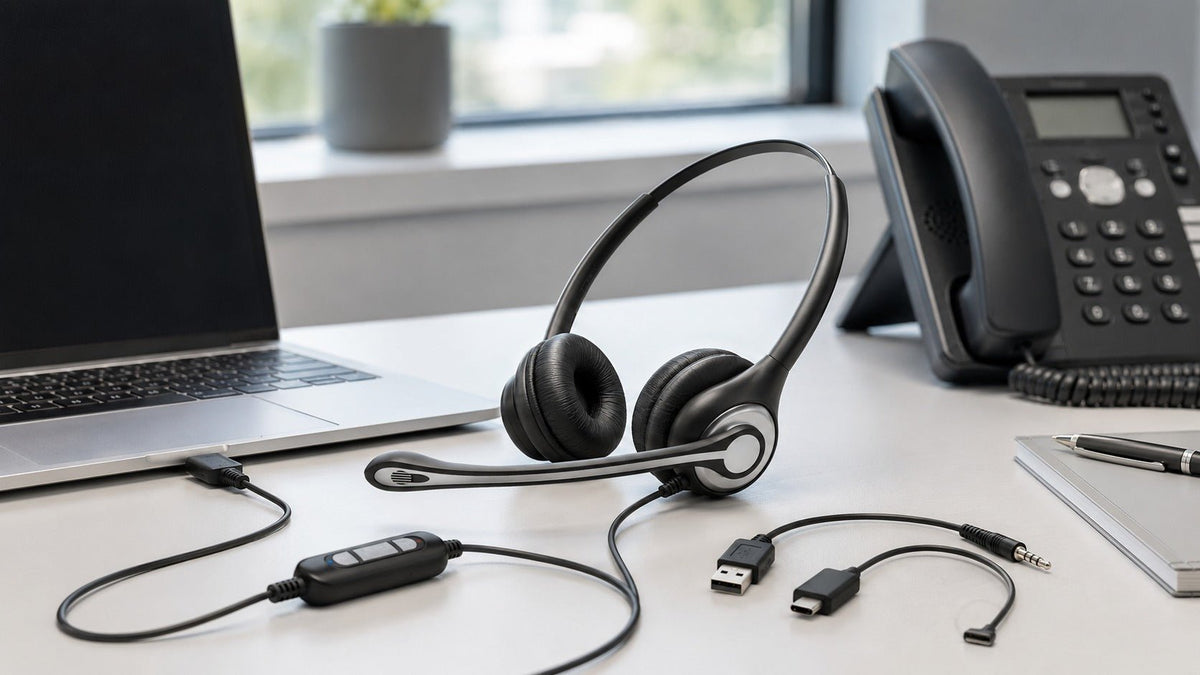
It isn't wireless. It doesn't have RGB lighting. It won't ask you to install another app or remember another battery percentage. It is a lightweight, dual-ear office headset built around USB-C, USB-A, and 3.5 mm connectivity.

Not flashy. Not complicated. Just practical.

Unpacking the Beast: What Exactly Is This Thing?

The Wantek 602F is a dual-ear corded office headset. The current model number is HSM-602FUSB, and its entire purpose is straightforward: help people communicate clearly across compatible computers, laptops, tablets, and mobile devices.

No Bluetooth. No charging. No pairing ritual.

The 3-in-1 connection system supports:

  • USB-C
  • USB-A
  • 3.5 mm audio

That makes it considerably more flexible than a headset locked to one connector. You can use USB-A with a traditional desktop, USB-C with many newer laptops and tablets, or 3.5 mm with devices that still include a compatible headset jack.

When people ask, “What is 602F used for?” the short answer is office communication.

The longer answer includes remote meetings, customer support, online teaching, sales calls, webinars, training sessions, and other voice-focused work. It is not trying to be a studio headphone or premium gaming headset. It is built for people who spend a large part of the day talking and listening.

Think of it as the Toyota Corolla of work headsets. Sensible. Affordable. Not remotely interested in showing off.

The Noise-Reducing Microphone: Keep the Claims Real

Let's get one thing straight. “Noise canceling” has become one of the most abused phrases in the headset industry.

The Wantek 602F uses a boom microphone with PNC, or passive noise-canceling design. The microphone is intended to emphasize the speaker's voice while reducing some surrounding sound.

That does not mean the headset creates a magical cone of silence around you.

It does not have active noise cancellation in the earcups. It also should not be confused with an AI-powered microphone system that digitally erases every keyboard click, barking dog, or conversation behind you.

What it does have is a microphone positioned close to your mouth. That already gives it an advantage over the built-in microphone sitting several feet away inside your laptop.

Position matters. Keep the boom near the corner of your mouth and pointed toward your voice. Do that, and the microphone has a better chance of capturing you instead of the room.

The boom rotates up to 330 degrees, so you have plenty of room to find a sensible position. The ear sections can also rotate up to 180 degrees for easier adjustment and storage.

Simple engineering. Sensible result.

Does Flipping the Microphone Up Mute It?

No. This detail matters.

The product specifications list a one-key mute control on the inline control module. They do not confirm flip-to-mute functionality.

Rotating the microphone upward moves it out of the way. To mute the call, use the physical mute control on the cable.

That may sound less futuristic, but a dedicated button has an advantage: you know exactly what action controls the microphone. No gestures to remember. No software animation to watch. Press the control and continue with your call.

Comfort That Doesn't Fight Back

I've worn office headsets that felt like medieval equipment. Hard ear pads. Heavy frames. Headbands that slowly drill into your skull.

The Wantek 602F takes a lighter approach.

It weighs approximately 85 grams, or 3 ounces. That is much lighter than the 150-gram figure sometimes associated with this model online. The low weight helps reduce the amount of pressure hanging from your head during longer calls.

The headset also includes:

  • An adjustable headband
  • Soft dual-ear cushions
  • Rotating ear sections
  • Replaceable ear cushions
  • Replaceable microphone covers

The dual-ear design covers both ears, helping you concentrate on the conversation instead of every discussion happening around your desk.

That focus comes with a trade-off. If you need to hear coworkers, doorbells, children, alarms, or other environmental sounds while working, a dual-ear headset may reduce your situational awareness more than a mono model.

Comfort is also personal. Head size, ear shape, room temperature, and preferred clamping pressure all matter. The lightweight construction is a good starting point, but no headset can honestly promise fatigue-free comfort for every person during an eight-hour shift.

Need one ear free?

Choose a mono headset built for calls

The Wantek H681 combines a single-ear design with USB-A, USB-C and 3.5mm connectivity—useful when clear calls and room awareness both matter.

Compare the Mono H681

Controls That Don't Require a Manual

Complicated headset controls are a special kind of workplace punishment.

Press once to answer. Twice to mute. Hold for three seconds to activate some mode you never asked for. Accidentally press it four times and the headset starts speaking another language.

The Wantek 602F avoids that nonsense.

Its inline control module gives you two essential functions:

  • Volume adjustment
  • One-key microphone mute

That's it.

You do not need a companion app just to lower the call volume. You do not need to remember a series of button combinations. The controls stay on the cable where you can reach them during a meeting.

Physical controls are especially useful when you're handling customer calls. When you need to mute quickly, searching through an application's audio menu is not an acceptable adventure.

One important distinction: the hardware mute control may not visually synchronize with every meeting application's on-screen mute indicator. Check the microphone status inside your software before discussing anything your caller should not hear.

Compatibility: Flexible, Not Universal

This is where the Wantek 602F becomes useful—and where the original product description needs precision.

The headset supports USB-C, USB-A, and 3.5 mm connections. That gives it broad compatibility, but “broad” does not mean “everything.”

It can work with many:

However, compatibility depends on the device.

Some USB-C ports do not handle analog audio accessories in the same way. Some phones require a digital audio adapter. Some 3.5 mm ports support headphones but not an external microphone. Older desktop computers may use separate headphone and microphone jacks instead of one combined TRRS headset port.

Check the device port before buying. A connector that physically fits does not automatically guarantee that every microphone, mute, or volume function will work.

The Wantek H602 3-in-1 is also not the RJ9 desk-phone version. It should not be presented as a direct replacement for an RJ9 office-phone headset.

If you need a headset for a Cisco, Avaya, Yealink, Poly, Grandstream, or another dedicated desk phone, verify the exact phone model and connector arrangement first. Do not buy based on the phrase “standard phone jack.” Desk-phone wiring is less standard than it looks.

Setup: Usually Simple

For a compatible computer or mobile device, setup should be straightforward.

Connect the appropriate plug, open your calling application, and select the headset as both the microphone and speaker. Depending on the operating system, it may appear as a USB audio device.

For Zoom, Microsoft Teams, Google Meet, or another calling platform, run an audio test before the real meeting. Confirm three things:

  1. You can hear the test audio.
  2. The application receives sound from the boom microphone.
  3. The inline mute control stops microphone transmission.

No Bluetooth menu. No battery. No firmware update before your Monday morning call.

That simplicity is one of the headset's strongest arguments.

Sound Quality: Built for Voices

Let's be realistic about audio.

The Wantek 602F is an office communication headset. Its main job is reproducing speech clearly enough for meetings, customer conversations, lessons, and training calls.

It is not marketed as a reference monitor for music production. It is not built for cinematic surround sound. It is not a replacement for a dedicated podcast microphone.

The dual-ear configuration can make calls easier to follow because audio reaches both ears. That is useful when you're listening to detailed instructions, dealing with a quiet caller, or working in a room with conversational distractions.

For music between calls, it can do the job. Just do not buy it expecting deep audiophile bass, a vast soundstage, or studio-monitor accuracy.

For voice work, practicality matters more than theatrical sound.

Can You Use It for Podcasting?

Technically, you can record speech with it.

Should you call the result “podcast-level quality”? That depends on an actual recording test, not marketing enthusiasm.

The boom microphone is suitable for calls, webinars, online classes, and basic voice recordings. A dedicated podcast microphone will normally give you more control over tone, gain, room noise, plosives, and recording consistency.

If your podcast is a simple remote conversation and convenience matters more than studio production, the 602F may be adequate. If you are producing a polished narrative show, use a proper recording microphone.

Know the tool. Respect the tool.

Durability: What We Can Actually Say

The 602F is a lightweight corded headset designed for regular office use. The ear cushions and microphone covers can be replaced, which is useful because those are normal wear items.

Beyond that, avoid fantasy claims.

The available specifications do not establish a braided-nylon cable, Kevlar reinforcement, drop-test rating, bend-cycle result, or guaranteed multi-year lifespan for HSM-602FUSB. Saying that its cable “lasts forever” would be nonsense. No cable does.

The microphone boom is adjustable, not indestructible. The cable is functional, not a tow rope. Treat both with basic respect:

  • Do not wrap the cable tightly around the headset.
  • Do not pull the headset out by the cable.
  • Do not repeatedly force the microphone beyond its intended rotation.
  • Store it somewhere other than beneath your office chair.

Do that, and you give it a fair chance of lasting.

The Price: Affordable Without the Fairy Tale

At the time of this review, the listed price is around $28.50. Prices and availability can change, so check the current product page before making a decision.

That places the 602F in the budget office-headset category. You are paying for wired connectivity, dual-ear call audio, a boom microphone, inline controls, and three common connection options.

That is a practical package for the price.

Is it the best-value headset anywhere on Earth? Nobody can honestly prove that.

Does it compete with every headset costing three times as much? Also no.

But for someone who wants a lightweight wired headset without paying for Bluetooth, batteries, ANC, device-management software, or premium branding, the value proposition makes sense.

Real-World Scenarios: Where the 602F Fits

Remote work

You're moving through Zoom, Teams, or Google Meet calls all day. Your laptop microphone captures too much of the room. The 602F puts the boom microphone closer to your mouth and gives you physical volume and mute controls.

Customer support

You're listening to account numbers, addresses, order details, and frustrated explanations. The dual-ear design helps keep your attention on the caller.

Call centers

You need a lightweight corded headset that does not require charging. The 85-gram construction, inline controls, and replaceable ear cushions suit fixed computer-based workstations.

Confirm that your call-center software and computer ports support the selected USB or 3.5 mm connection.

Online teaching

You're explaining algebra while sharing a screen and watching the chat. A dedicated boom microphone and easy mute control are more practical than leaning toward the laptop every time you speak.

Sales calls

You want predictable connectivity and clear voice communication without wondering whether your Bluetooth battery will survive the afternoon.

Webinars and training

The dual-ear design helps users concentrate on longer presentations, while the 3-in-1 connection system makes the headset easier to deploy across mixed computer hardware.

Casual gaming

It may work for voice chat and ordinary game audio on compatible devices. It is not designed for competitive positional audio, wireless console use, or immersive surround-sound gaming.

Wantek 602F uses for remote work, call centers, teaching, and podcasting

The Downsides: No Product Is Perfect

I won't sugarcoat it. The Wantek 602F has limitations.

The cable is only 1.2 meters

That is approximately 3.9 feet, not six feet. It should be sufficient when your laptop or computer is close to the desk, but a tower PC sitting farther away may require a suitable extension.

It is wired

The cable gives you reliable, battery-free operation. It also keeps you physically connected to the device. If you like walking around during calls, this is not your headset.

There is no Quick Disconnect

The product specification explicitly lists Quick Disconnect as “No.” You cannot separate a QD coupling and walk away while leaving the lower cable connected.

It is dual-ear

That helps with concentration but reduces awareness of what is happening around you. People who regularly communicate with nearby coworkers may prefer a mono headset.

It does not provide earcup ANC

The PNC specification refers to noise reduction associated with the microphone design. It does not mean the speakers actively cancel the noise you hear around you.

Compatibility still requires checking

USB-C, USB-A, and 3.5 mm cover many devices, but not every port, operating system, adapter, or calling platform behaves identically.

The Verdict: Should You Buy It?

Probably—if your needs match what the product actually is.

Buy the Wantek 602F if you want:

  • A lightweight dual-ear office headset
  • USB-C, USB-A, and 3.5 mm connectivity
  • A 330° adjustable boom microphone
  • PNC microphone noise reduction
  • Physical volume and mute controls
  • Battery-free operation
  • Replaceable ear cushions and microphone covers
  • A budget price around the $30 range

Look elsewhere if you need:

  • Bluetooth
  • Active noise cancellation in the earcups
  • A mono design
  • RJ9 desk-phone connectivity
  • Quick Disconnect
  • A long cable
  • Studio recording quality
  • Premium music or competitive gaming performance

The 602F knows what it is. A lightweight wired tool for computer-based calls. No battery anxiety. No pairing headaches. No wireless freedom either.

When someone asks, “What is 602F used for?” tell them the truth.

It is for remote meetings, customer support, online teaching, sales conversations, webinars, training, and other work where clear, straightforward communication matters more than flashy features.

No more. No less.

Sometimes, that is exactly what you need.

FAQs: Wantek 602F Features and Compatibility

1. What is the primary connectivity type of the Wantek 602F?

The Wantek H602 3-in-1 is a wired headset supporting USB-C, USB-A, and 3.5 mm connections. Compatibility depends on the ports and audio capabilities of the connected device.

2. Is the Wantek 602F a mono or dual-ear headset?

It is a dual-ear corded headset. Audio is delivered to both ears, helping users concentrate on calls and meetings.

3. Does the Wantek 602F have active noise cancellation?

No. The listed PNC feature applies to the microphone's noise-reducing design. The earcups do not provide active noise cancellation.

4. Does the microphone use AI noise reduction?

The official structured specifications identify PNC but do not confirm AI noise reduction. It should be described as a noise-reducing boom microphone, not an AI microphone.

5. How far can the microphone rotate?

The boom microphone rotates up to 330 degrees. The ear sections have a listed rotation angle of up to 180 degrees.

For teams and call centers

Outfitting more than one workstation?

Compare Wantek headsets by connector, wearing style and workflow so every agent gets a model that fits the phone or computer they actually use.

Shop Call Center Headsets

Leave a comment

Please note: comments must be approved before they are published.