
Let’s be honest—when was the last time you gave your headphone wire a second thought? We obsess over drivers, noise cancellation, and battery life, but that unassuming cable? It’s like the bassist in a rock band: crucial but criminally underrated. Until it fails. Then suddenly, you’re left with one working earbud during your morning jog, questioning all your life choices.
Headphone wires are the silent workhorses of our daily audio routines. They survive being stuffed into pockets, yanked from jacks, and occasionally used as makeshift cat toys. Whether you’re a commuter, gamer, or just someone who enjoys yelling at podcasts, understanding your headphone wire—and when to consider a headphone wire replacement—can mean the difference between blissful audio and a staticky nightmare.
The Anatomy of a Headphone Wire: More Than Just Plastic and Metal
At first glance, a headphone cable seems simple. But peel back the layers (sometimes literally, if your dog gets to it), and you’ll find a marvel of engineering. Here’s what’s really going on inside:
- Conductors: Typically copper, these carry the audio signal. Oxygen-free copper (OFC) is the gold standard for audiophiles—though whether you can actually hear the difference is debatable.
- Insulation: Rubber or nylon coatings prevent tangling and protect against wear. Braided cables? Even better. They’re like the armored tanks of the wire world.
- Shielding: Wrapped around the conductors, this blocks interference from phones, Wi-Fi, and other electronic gremlins.
- Connectors: Gold-plated ones resist corrosion, but no, they won’t make your lo-fi beats sound like a symphony.
Source: GearIT
The Curious Case of the Wireless Headphone Wire
Wait, isn’t that an oxymoron? Not quite. Many premium wireless headphones, like the Bose QuietComfort Ultra, include a detachable cable. Why?
- Battery emergencies: Bluetooth dies, but your meeting doesn’t.
- Audiophile mode: Some swear wired connections deliver richer sound.
- Legacy devices: Because your 2012 DVD player isn’t jumping on the Bluetooth train anytime soon.
It’s a clever loophole—wireless freedom with a wired safety net.

Choosing Your Perfect Match: A Wire for Every Lifestyle
Not all cables are created equal. Your ideal headphone wire depends on how you use it.
For the Audiophile: OFC and Shielding
If you’re the type who debates FLAC vs. MP3 at parties, invest in:
- Oxygen-free copper conductors (for "purer" signal transmission).
- Dual-layer shielding to block interference from your microwave’s existential crisis.
- Reinforced terminations—because nothing ruins a Mahler symphony like a loose connection.
For the Gym Rat: Durability Over Delicacy
Sweat, movement, and overzealous arm curls murder flimsy wires. Look for:
- Rubberized coating that laughs at moisture.
- Tangle-free designs (because nobody has time to unravel knots mid-deadlift).
- Short lengths—1.2 meters max. Unless you enjoy strangling yourself with a cable.
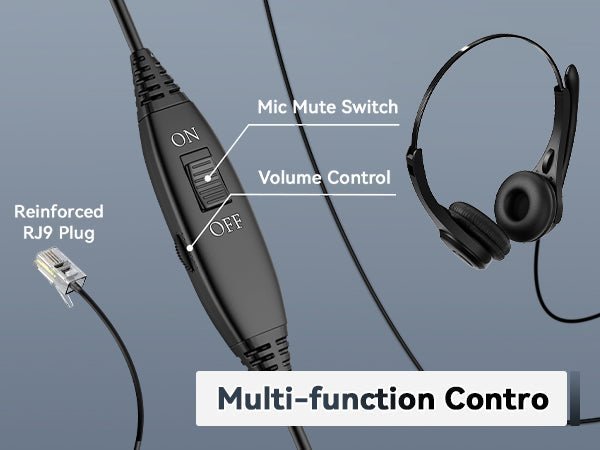
For the Gamer/Streamer: The Headphone Wire with Mic
A good mic cable is non-negotiable. Prioritize:
- Inline controls (mute buttons save marriages during heated raids).
- Noise-canceling mics that ignore your mechanical keyboard’s clackocalypse.
- Compatibility checks: Some mics work only with specific devices (looking at you, Apple).
Pro tip: Test mic quality before buying. Some budget options make you sound like you’re broadcasting from a submarine.
When to Break Up with Your Cable: Signs You Need a Headphone Wire Replacement
Love is blind, but wire damage isn’t. Here’s when to say goodbye:
- The One-Eared Wonder: If sound cuts out unless you twist the cable into a pretzel, it’s time.
- Frayed Ends: Exposed wires aren’t a fashion statement. They’re a fire hazard.
- Static Apocalypse: If your music sounds like a haunted radio, the cable’s shielding is toast.
DIY Fixes: Heroic or Hopeless?
- Electrical tape: A temporary fix for minor frays. It’s the Band-Aid of the wire world.
- Soldering: Only if you’re skilled. Otherwise, you’ll turn your headphones into abstract art.
- Knot magic: Tying a loose wire can sometimes restore contact. Emphasis on sometimes.
For most, buying a replacement is smarter. Prices range from $10 (basic) to $200 (for cables marketed with words like "quantum" and "nano").
Cable Care: How to Make Your Wire Outlive Your Phone
Treat your cable right, and it’ll stick around longer than that gym membership you never use.
Storage Hacks
- Loop, don’t strangle: Use the "over-under" coiling method to prevent internal breaks.
- Case it: A hard case protects against keys, coins, and existential dread in your bag.
- Avoid temperature extremes: Heat melts insulation; cold turns wires brittle.
Usage Tips
- Pull from the plug, not the wire: Yanking the cable is like grabbing a sandwich by the mayo. Messy.
- Pet-proofing: Dogs and cats see wires as chew toys. Bitter apple spray helps. So does hiding them.
- Unplug when idle: Constant bending weakens connections. Give your jack a break.
Cleaning (Yes, Really)
Dirt and sweat corrode connectors over time. Wipe down with a microfiber cloth dipped in rubbing alcohol (lightly!). For grimy plugs, a toothpick works wonders.
Debunking Wire Myths: Don’t Believe the Hype
Let’s demystify some cable folklore:
- "Gold-plated connectors sound better." Nope. They resist rust but don’t improve audio.
- "Thicker wires = better quality." Not always. Shielding and materials matter more than girth.
- "Bluetooth is inferior." Modern codecs like LDAC close the gap. Unless you’re a bat, you might not notice.
Fun fact: The world’s most expensive audio cable costs $725,000. It’s woven with unicorn hair (probably).
The Future: Are Wires Going Extinct?
With Bluetooth dominating, wired headphones might seem retro. But consider:
- Latency: Gamers and editors still prefer wired for zero lag.
- Sound purists: Some argue even lossless Bluetooth compresses audio.
- Reliability: No pairing issues, no battery anxiety.
That said, the wireless headphone wire hybrid trend proves there’s room for both.
Source: SoundGuys
Frequently Asked Questions:
1. What types of headphone wires are available, and how do I choose the right one?
There are several types, including braided, rubber-coated, and fabric-wrapped wires. Choose based on durability, flexibility, and your usage environment (e.g., braided for extra strength).
2. How can I prevent my headphone wires from tangling?
Use cable organizers, wrap wires loosely in a figure-eight pattern, or opt for tangle-free designs like flat or memory-free cables.
3. What’s the best way to clean and maintain headphone wires?
Gently wipe with a damp cloth, avoid harsh chemicals, and store them coiled in a dry place to prevent damage.
4. Can damaged headphone wires be repaired, or should I replace them?
Minor issues like fraying can sometimes be fixed with electrical tape or heat shrink tubing, but severely damaged wires may need replacement for safety.
Parting Wisdom
Your headphone wire is more than a tangle-prone nuisance. It’s the lifeline between you and your audio nirvana. Whether you’re shopping for a headphone wire with mic, a wireless headphone wire backup, or just trying to resurrect your favorite pair with a headphone wire replacement, choose wisely.
And next time you’re untangling that cable knot from the depths of your bag? Take a breath. Even the best wires can’t escape entropy. 🎧
Better Sound Starts with the Right Wire – Shop High-Quality Audio Cables!
Whether you're an audiophile, gamer, or gym-goer, the right wire makes all the difference. Browse Our Collection!

