
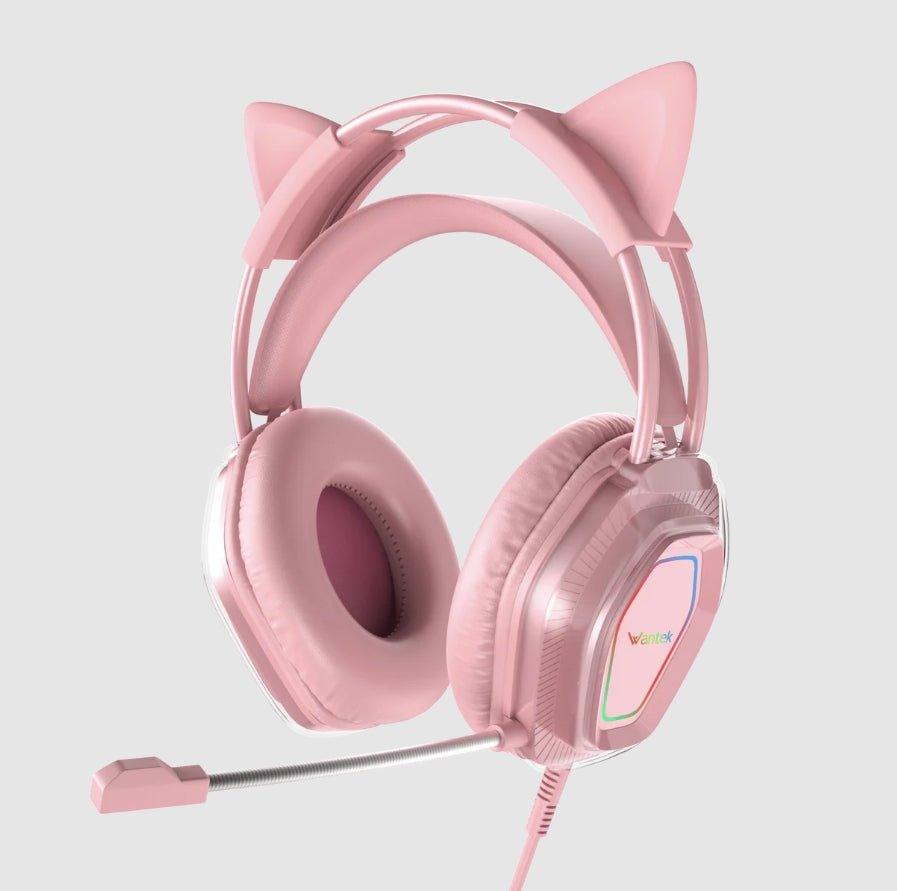
Cat-ear headphones are a style category, not a connection standard. Some models are Bluetooth, some use 3.5 mm audio, and some add USB only to power lighting. Start with the platform and audio path before comparing ears, LEDs, or color.
Quick answer: Choose cat-ear headphones by platform, wired or wireless audio, microphone, comfort, lighting power, and whether the ears are removable. Do not assume “USB” means USB audio or “gaming” means every console is supported.

Connection Comes Before the Cat-Ear Design
A cat-ear headset can use the same audio connections as an ordinary gaming headset. A 3.5 mm model depends on the controller, PC, phone, or adapter providing a compatible analog path. A wireless model may use Bluetooth or a dedicated receiver, with platform support determined by the exact product.
| Decision area | What to check | Why it matters |
|---|---|---|
| Audio path | 3.5 mm, USB audio, Bluetooth, or dedicated wireless receiver | The decorative design does not determine how the headset connects to the source. |
| Microphone | Boom or built-in mic, mute control, and position | Voice-chat usefulness depends on the actual microphone path and controls. |
| Style features | Removable ears, LED power, color, cable routing, and weight | Lighting or ears can change comfort and cable needs without changing audio compatibility. |
Check What the USB Cable Actually Does
Some wired gaming headsets use 3.5 mm for audio and a separate USB connection only for lighting. In that setup, plugging in USB does not replace the analog audio cable. Read the product description and connector diagram before assuming one cable handles everything.
Comfort Still Matters in a Novelty Headset
Cat ears add visual weight above the headband, while LEDs can require an extra cable or battery. Check headband adjustment, earcup size, clamp, total weight, and whether the decorative ears can be removed when you want a simpler setup.
Match Gaming Features to the Platform
For a broader platform-first checklist, see the 2026 gaming headset buying guide. It separates wired and wireless support, microphone requirements, latency, and platform-specific features.
Example: Wantek V10 Cat-Ear Headset
The current Wantek V10 uses a 3.5 mm plug for audio and USB to power its LED lights. It has removable cat ears, cushioned earcups, an adjustable boom microphone, and inline volume and mute controls. Those details make it a wired gaming option rather than a Bluetooth model.
Frequently Asked Questions
Are cat-ear headphones usually Bluetooth?
Not necessarily. Cat ears describe the styling. Check whether the exact model uses 3.5 mm, USB audio, Bluetooth, or a dedicated wireless receiver.
Does USB always carry the audio on LED cat-ear headsets?
No. Some models use 3.5 mm for sound and USB only for lighting power. Verify the product's connector description before setup.
Can cat-ear headphones work on consoles?
Some can, but console support depends on the exact audio connection and platform. Check the controller, console, headset connector, and microphone path together.
See the Wantek V10 Cat-Ear Gaming Headset
Check the current wired connection, removable ears, microphone, controls, and LED-lighting setup.

