
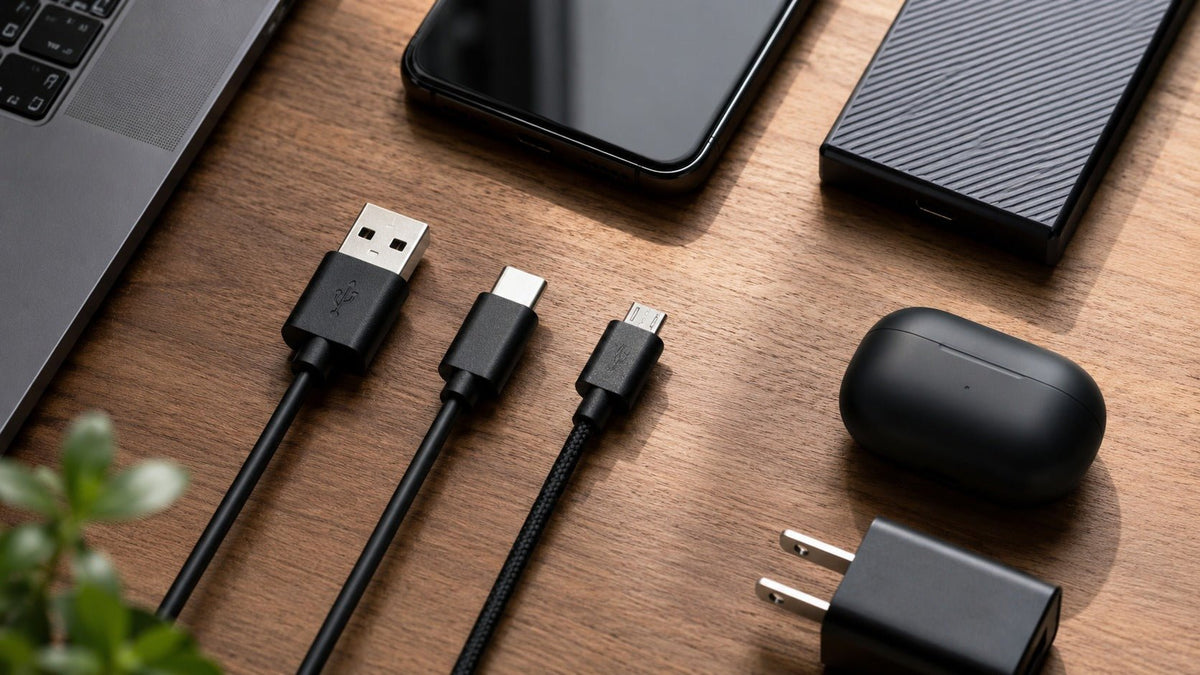
USB-A, USB-C, and Micro-USB are connector formats. They do not, by themselves, tell you the exact data speed, charging wattage, display capability, or USB generation of a device.
Quick answer: USB-C is usually the best connector for new general-purpose devices because it is reversible, compact, and can support modern data and power standards. USB-A remains common for legacy peripherals and receivers. Micro-USB is primarily a legacy connector that still matters when an existing device requires it.
The Most Important Rule: Connector Shape Is Not the Protocol
USB-IF explicitly warns that USB Type-C is not the same thing as USB 3.2, USB4, or USB Power Delivery. A USB-C port can be implemented with USB 2.0 data only, while another USB-C port can support faster USB data, DisplayPort Alt Mode, USB4, and high-power USB PD.
That is why “USB-C is faster” is incomplete. A connector can make certain capabilities possible, but the device and cable still have to implement them.
USB-A vs USB-C vs Micro-USB at a Glance
| Connector | Reversible? | Common role | What it can tell you | What it cannot tell you |
|---|---|---|---|---|
| USB-A | No | Computers, chargers, receivers, legacy peripherals | Physical plug/receptacle family | Exact USB speed or charging power |
| USB-C | Yes | Phones, laptops, tablets, modern accessories | Reversible Type-C interface | Whether USB 3.2, USB4, PD, or video is supported |
| Micro-USB | No | Older phones and small accessories | Legacy compact connector family | Exact protocol, charging speed, or device capability |
USB-C: Best Long-Term Connector, but Check the Labels
USB-C’s strongest physical advantages are its reversible orientation and compact connector. The ecosystem can also support scalable performance and power.
USB Power Delivery can reach up to 240W over appropriately designed USB-C cables and equipment. That does not mean every USB-C charger, port, or cable can deliver 240W. USB-IF cable guidance identifies relevant certified power and data-rate markings.
If you are buying a cable for a laptop, monitor, dock, or high-power charger, match the cable’s rated capabilities to the device instead of buying by connector shape alone.
USB-A: Still Useful for Existing Hardware
USB-A remains common on desktop PCs, game consoles, chargers, keyboards, mice, headset receivers, and older docks. It is not automatically “slow.” USB-A has been used with multiple USB data generations.
The practical limitation is its one-way plug orientation and the industry’s shift toward smaller USB-C connectors on new mobile and laptop hardware. If your computer or headset receiver still uses USB-A, there is no benefit in replacing a working connection merely to make the plug newer.
Micro-USB: Legacy, but Sometimes Still Required
Micro-USB was widely used for charging and data on phones and accessories before USB-C became dominant. Its non-reversible plug makes it less convenient than USB-C for repeated everyday connection.
But “old” does not mean you can substitute another connector. If a device physically uses Micro-USB, use a compatible cable that meets that device’s requirements. An adapter changes the physical interface; it does not automatically add a faster USB mode or a newer charging protocol.
Data Speed: Read the USB Performance Specification
Do not assign a speed to USB-A or USB-C simply from appearance. USB-C can carry USB 2.0, USB 3.2, USB4, or other supported modes depending on implementation. USB-A ports can also support different USB generations.
For a data cable, look for the device’s documented USB mode and the cable’s certified data-rate marking where available. A cable used only for charging may not provide the data performance you expect.
Charging: USB-C Does Not Automatically Mean Fast Charging
USB Power Delivery is a separate protocol and hardware system. The charger, source port, cable, and receiving device negotiate supported power. The effective charge level is limited by the compatible capabilities across the chain.
A high-power USB-C charger can usually negotiate lower supported power for compatible USB-PD devices, but do not assume every USB-C device or cable implements USB PD. Follow the device manufacturer’s charging specification.
Video Output: Another Capability That Must Be Verified
Some USB-C ports support display output through technologies such as DisplayPort Alt Mode or USB4. Others do not. A USB-C connector on a phone, headset, power bank, or inexpensive laptop does not guarantee external-display support.
Likewise, connector shape alone should not be used to make broad claims that a legacy connector can “never” transport a particular kind of signal. The useful buying question is what the specific port, cable, and device support together.
Need one wired headset for USB-C, USB-A, and 3.5mm devices?
The Wantek H602 3-in-1 uses USB-C, USB-A, and 3.5mm connection options. Verify the exact device port before connecting.
Which Connector Should You Choose?
Choose USB-C when:
- You are buying a new phone, laptop, tablet, dock, charger, or accessory and want the modern reversible connector.
- You need capabilities such as USB PD, higher USB data rates, or display output and the exact devices explicitly support them.
- You want to reduce the number of different physical cable types in a newer setup.
Keep using USB-A when:
- Your PC, console, charger, or receiver already provides the USB-A port you need.
- A USB-A wireless dongle or business headset works reliably and there is no functional reason to replace it.
Use Micro-USB when:
- The device was designed for Micro-USB and you need a replacement charging/data cable.
- You are maintaining older equipment rather than choosing a connector for a new product ecosystem.
Headsets: Connector Compatibility Is More Than “It Fits”
A headset with USB-C may use USB audio, while another USB-C accessory may only charge through the connector. A 3.5mm audio headset is different again. Our USB vs 3.5mm headset guide explains the audio signal-path difference. Before buying, check whether the device supports USB audio, analog 3.5mm headset input, or the specific wireless receiver you plan to use.
Comparing wired computer headsets?
Browse Wantek USB headsets and filter by the connector your computer or phone actually supports.
Frequently Asked Question (FAQs)
Is USB-C always faster than USB-A?
No. USB-C describes the connector. Actual data performance depends on the USB protocol supported by the host, device, cable, and port.
Does every USB-C cable support 240W charging?
No. USB PD can support up to 240W with appropriate equipment, but cable and device capabilities vary. Check certified power markings and manufacturer requirements.
Can every USB-C port output video?
No. Display output requires the necessary supported mode, such as DisplayPort Alt Mode or USB4 functionality. The connector alone does not guarantee it.
Should I replace Micro-USB devices just because USB-C is newer?
Not necessarily. If the device still meets your needs, use the correct cable. USB-C matters more when choosing new hardware or consolidating a modern setup.
Bottom Line
Choose connectors by the devices you own and the capabilities you need. USB-C is the strongest default for new equipment, USB-A remains useful for existing peripherals, and Micro-USB is mainly a compatibility requirement for older devices. For actual work-headset selection, continue with the headset-with-mic guide after identifying the required port. Always separate connector shape from USB speed, power, and video features.

