
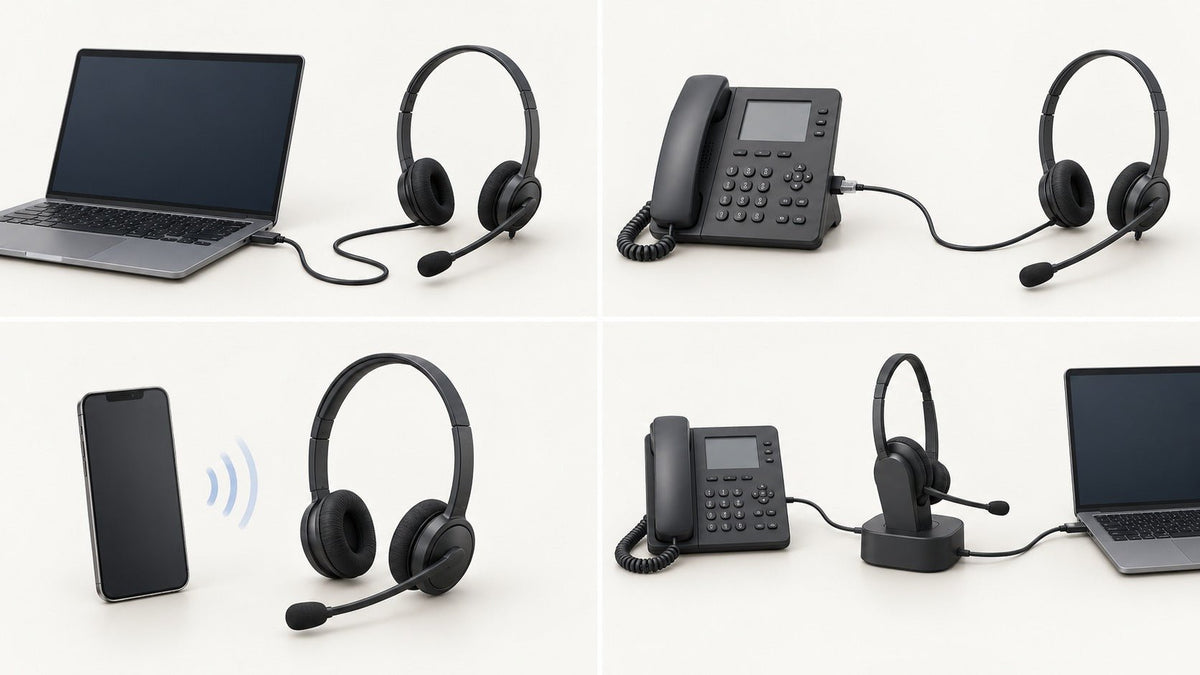
A VoIP headset is the microphone-and-earpiece endpoint you use with a VoIP desk phone, computer softphone, or calling app. The headset itself does not make a call “VoIP.” Start with the device handling the call, then choose a connection that device actually supports.
Quick answer: For computer-based VoIP, USB is usually the simplest wired path and Bluetooth can add mobility. For an IP desk phone, verify the exact model before choosing RJ9, USB, Bluetooth, DECT, a base, or an EHS accessory. Then compare microphone design, wearing style, controls, and comfort.
What Is a VoIP Headset?
“VoIP headset” describes the job the headset is doing, not one specific connector. Voice over IP calls can run through a computer app, a mobile app, an IP desk phone, or a setup that uses more than one device. A headset that works well in one of those paths may not connect to another without a different cable, adapter, receiver, or base.
This is why choosing by a broad label such as “VoIP compatible” is risky. The useful question is: where does the call run, and how does that device accept headset audio?

Start With Where the VoIP Call Runs
| Call path | Common headset paths | Verify before buying |
|---|---|---|
| Computer softphone or UC app | USB-A, USB-C, Bluetooth, or a wireless USB receiver/base. | Computer port, operating system, app behavior, and required hardware call controls. |
| IP desk phone | RJ-style headset port, USB, built-in Bluetooth, or a wireless base/DECT path, depending on the phone. | Exact phone model, supported headset interface, wiring, required accessories, and remote call-control support. |
| Smartphone VoIP app | Bluetooth or a supported wired USB-C path. | Phone connector, mobile OS, microphone support, and app behavior. |
| Desk phone + computer | A multi-device base/headset or separate supported interfaces. | Whether you need simple switching, simultaneous connections, or remote answer/end on either device. |
If your calls run through a physical phone, check the phone first. Wantek’s guide to desk-phone headset ports, cables, and jacks explains why similar-looking modular plugs are not enough to confirm compatibility.
Choose the Connection Before the Features
USB-A or USB-C
USB is a practical starting point for a VoIP softphone on a desktop or laptop because the same cable can carry headset audio and microphone input. The remaining checks are the physical port, operating-system support, and whether the calling app recognizes any inline or headset buttons you expect to use.
USB-C and USB-A describe the connector, not the level of app integration. If your computer has USB-C but your headset is USB-A, an adapter may solve the physical connection, but it does not create software support that was not already present. For USB-C-specific buying questions, see the USB-C headset guide for work calls.
Bluetooth
Bluetooth can be useful when you want to move between a laptop and phone without a cable. Check how the headset handles pairing and switching, especially if you use both devices during the workday. Multipoint pairing also should not be confused with mixing audio from two devices at the same time.
For an IP desk phone, do not assume Bluetooth support from the phone’s brand or from the presence of a Bluetooth menu. Confirm that the exact phone model supports the headset connection and call workflow you need.
DECT and Wireless Bases
DECT office headsets usually rely on a dedicated base rather than pairing directly like a standard Bluetooth headset. That can suit users who need a desk-centered wireless setup, but the base, phone or computer connection, and any remote call-control accessory still need to be matched as one system.
If wireless desk-phone mobility is the main requirement, the guide to wireless headsets for phone systems covers the audio path and call-control path separately.
RJ9 and Other Modular Desk-Phone Connections
RJ-style wired headsets are still relevant for many physical office phones, including IP phones. The plug can look correct while the internal wiring or phone settings are wrong for the headset. Treat the complete phone model as the compatibility key, not the connector shape alone.
Desk-phone rule: if you cannot confirm the exact phone model and supported headset path, do not treat a matching plug as proof of compatibility.
What Matters Most for VoIP Calls?
Microphone Design and Position
For work calls, the microphone is a primary part of the buying decision. A boom microphone places the pickup point closer to the mouth than a microphone built into an earcup or earbud. Whatever style you choose, look for stable positioning and test the microphone in the room where calls actually happen.
Keep microphone noise reduction separate from active noise cancellation. Microphone processing is intended to affect what the other person hears. ANC is intended to reduce some sound reaching the wearer. A headset can have one without the other.
Mono vs. Dual-Ear Wearing Style
A mono headset leaves one ear open, which can help when you need to hear coworkers, visitors, or room activity. A dual-ear headset places call audio over both ears and can provide more physical separation from the room. Wearing style does not, by itself, tell you whether a headset has ANC, better microphone performance, or broader compatibility.
Mute, Answer/End, and Platform Controls
Basic speaker and microphone audio can work even when every hardware button does not. If answer/end, mute synchronization, or platform-specific controls are important, verify them separately from audio compatibility.
Microsoft maintains a list of personal peripherals certified for Microsoft Teams, and Zoom publishes Zoom Workspace Certified Hardware. Those programs are useful reference points when your deployment depends on tested platform behavior rather than basic audio alone.
Comfort and Deployment Consistency
For frequent calls, compare headset weight, headband pressure, ear-cushion contact, cable management, and how easily users can reach mute or volume controls. For team purchases, test the complete setup on the actual calling devices before standardizing one model across many desks.
Wantek VoIP Headset Options by Workflow
The examples below are organized by connection path, not as a universal ranking. The correct choice still depends on the calling device and required controls.
| Workflow | Wantek example | What to verify |
|---|---|---|
| Fixed computer softphone | Wantek H600 USB headset: single-ear, wired USB, boom microphone, inline volume and mute. | Available USB port, operating system, calling app, and any required app-specific call controls. |
| Multiple wired connectors | Wantek H602 3-in-1 wired headset: dual-ear with USB-C, USB-A, and 3.5 mm connection options. | Which connection the calling device supports and whether inline controls behave as required on that path. |
| Bluetooth laptop + phone | Wantek 186BTC: Bluetooth work headset with a boom microphone and multipoint positioning. | Pairing/switching behavior, calling apps, charging workflow, and whether a desk phone needs a different connection. |
These examples do not imply universal VoIP, Teams, Zoom, or desk-phone certification. Verify the exact endpoint and any required platform controls before purchase.
VoIP Headset Compatibility Checklist
Identify the device handling the call.
Write down the exact computer, smartphone, or IP desk-phone model. If calls use more than one device, list each one separately.
Confirm the supported headset connection.
Check USB-A, USB-C, Bluetooth, RJ-style headset ports, or the required wireless base. For desk phones, use the exact model rather than the brand name alone.
Separate audio from call controls.
Confirm speaker and microphone audio first, then verify mute, answer/end, and any remote call-control behavior you require.
Choose mono or dual-ear based on the workspace.
Keep one ear open when room awareness matters, or use dual-ear coverage when you want call audio in both ears.
Test the real calling environment.
Check microphone pickup, listening level, comfort, cable or wireless behavior, and the apps used during a normal workday.
Pilot before a larger rollout.
For team deployments, validate the full phone or computer, headset, adapter/base, settings, and call-control path before standardizing the setup.
VoIP Headset FAQ
Will any USB headset work with VoIP?
Not automatically. A USB headset can be a practical choice for computer-based VoIP, but you still need compatible USB hardware, operating-system audio support, and any calling-app controls you require.
Can I connect a Bluetooth headset directly to an IP desk phone?
Only if the exact phone supports the required Bluetooth headset path. Some phones need a USB receiver, wireless base, EHS accessory, or another connection instead.
Is a VoIP headset different from a regular computer headset?
Sometimes the same headset can serve both roles. “VoIP headset” usually describes use with an internet-based calling system; the actual compatibility depends on the computer, phone, app, connector, and controls.
Do I need a Teams- or Zoom-certified headset?
Not for every basic audio use case. Certification matters more when your deployment depends on tested platform integration, hardware call controls, or a standardized business setup.
Is DECT better than Bluetooth for VoIP calls?
Neither is universally better. DECT commonly uses a dedicated office base, while Bluetooth can fit laptop and phone workflows. Choose by device support, mobility needs, controls, and deployment setup.
Using an IP Desk Phone?
Check the exact phone model, connection, and wiring before choosing an RJ9, USB, Bluetooth, or wireless-base path.

