
I’ve been there. You know the scene. It’s late. The house is quiet. You want to game without waking anyone up. So you grab your fancy wireless earbuds, the ones that cost way too much, and you try to pair them with your Xbox. You press buttons. You hold buttons. You reset the console. Nothing. Absolutely nothing. Your Xbox stares at you like a brick wall.
That moment of rage is universal. It’s 2026, and Microsoft still hasn’t made this simple. The entire Bluetooth gaming headset Xbox ecosystem is a tangled mess of workarounds, proprietary chips, and questionable design choices. But I’ve spent years testing every solution. I’ve wired myself into controllers, bought cheap adapters, and returned headsets like I’m running a small business. Let me save you the headache.
The Ugly Reality of Bluetooth and Xbox Consoles
Here’s the cold hard truth. Xbox does not support standard Bluetooth audio. Period. Not the Series X. Not the Series S. Not even the Xbox One models from last decade. Microsoft built their own system. They call it Xbox Wireless. It’s fast. It’s reliable. It sounds incredible. But it’s not Bluetooth.
This creates a massive problem. You see a flashy headset on Amazon. The description screams “wireless gaming headset.” You buy it. You open the box. You try to connect. Nothing. Why? Because most of those headsets use Bluetooth, and your Xbox doesn’t speak that language. The frustration is real. I’ve felt it. It feels like the universe is gaslighting you.
The Technical Garbage You Need to Understand
Latency. That’s the enemy. Bluetooth has it. Xbox Wireless doesn’t. When you fire a gun in Call of Duty, the sound should be instant. With Bluetooth, you get a delay. Maybe a hundred milliseconds. Maybe more. In a casual game like Stardew Valley, you won’t notice. In a sweaty ranked match of Halo Infinite? You’ll die. You’ll blame your teammates. But really, it’s the Bluetooth lag.
Bandwidth is another issue. Bluetooth is a narrow pipe. It struggles with high-quality game audio plus voice chat simultaneously. Xbox Wireless is a firehose. It handles everything. That’s why Microsoft stuck with it. But they also locked us into their ecosystem. Want to use your headset with your phone? You better hope it also has Bluetooth. Otherwise, you’re buying two headsets.

The Workarounds That Actually Work
After years of experimenting, I’ve found three real solutions. Some are elegant. Some are janky. All of them work.
The Wired Solution: Boring but Reliable
Every Xbox controller since the One S has a 3.5mm headphone jack. Plug in any wired headset. It works instantly. No delay. No pairing. No bullshit. But wires are annoying. They snag on chair arms. They get chewed by pets. You stand up and rip your controller off the table. It’s not glamorous. It’s functional.
I used wired headphones for months. They were fine. But every time I got up for a snack, I had to unplug. Every time I leaned back, I tugged the controller. Eventually, I couldn’t handle it anymore. I wanted freedom. I wanted wireless.
The Bluetooth Dongle Trick: Techy and Janky
You can buy a Bluetooth transmitter that plugs into your Xbox. The Turtle Beach Audio Advantage Plus is a popular one. It connects via USB or optical audio. Then you pair your own Bluetooth headphones. Sounds perfect, right? Not exactly.
Here’s the problem: latency. Even with low-latency codecs like aptX, there’s still a delay. It’s fine for Skyrim or Red Dead Redemption 2. You won’t notice the audio lag when exploring a forest. But for competitive multiplayer games? You’ll feel it. Every gunshot arrives a fraction of a second late. It messes with your instincts.
I tried this method with my Sony WH-1000XM5 headphones. The audio was beautiful. The lag was unbearable. I lasted two days before returning the dongle. If you only play single-player story games, this might work for you. If you play anything competitive, skip it.
The Dual Connectivity Solution: The Gold Standard
This is where you want to be. Many modern headsets have both Xbox Wireless and Bluetooth built in. You get low-latency game audio from Xbox Wireless. You get phone calls, Discord chat, and music from Bluetooth. Simultaneously. It’s seamless. It’s beautiful. It’s the best Xbox wireless headset experience available.
I use this setup daily. Game audio comes through loud and clear. My phone stays connected for podcast listening between matches. When a call comes in, I can answer without pausing. It feels like living in the future. This is what you should buy.
Choose by platform and connection
Skip the pairing guesswork
Compare Wantek gaming headsets by console support, connection type, microphone setup, and wearing style before choosing your next headset.
The Best Xbox Wireless Headset Options for 2026
I’ve tested dozens of headsets. Some were amazing. Some were garbage. These are the ones worth your money.
Microsoft Xbox Wireless Headset: The Safe Bet
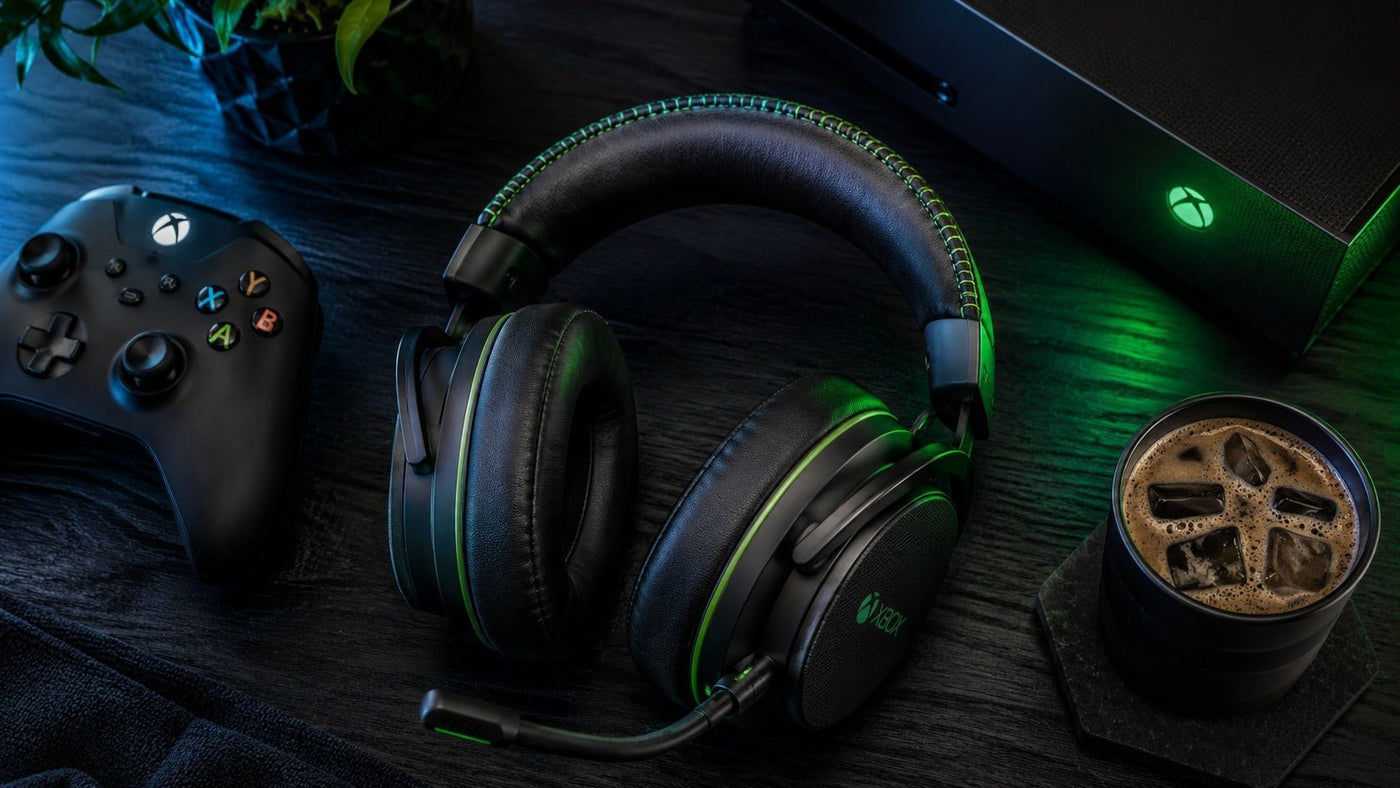
Microsoft’s own headset is literally called the Xbox wireless headset. It’s $100. It connects directly to your console with zero dongles. Just press the sync button. It works perfectly. The audio is clear. The battery lasts about 15 hours. It also has simultaneous Bluetooth for your phone.
The build quality is my main complaint. It’s all plastic. It creaks when you adjust it. The earcups are small. If you have larger ears, you’ll feel pressure after an hour. The mic monitoring feature is weak. You sound muffled to your friends. But for $100? It’s hard to beat. This is the best budget-friendly option.
SteelSeries Arctis Nova 7X: My Personal Favorite
This is my top pick right now. It costs around $180. It uses a USB-C dongle that works with Xbox, PC, Switch, and PlayStation. The audio is crisp. The bass is punchy. The retractable microphone is excellent. Your friends will hear you clearly. The ear cushions are memory foam. They’re like clouds for your head.
Battery life is about 20 hours. It charges via USB-C. It also has Bluetooth for your phone. The dongle is tiny and easy to lose. I’ve almost thrown it away multiple times. The charging cable is USB-C to USB-A, which is annoying. But these are minor complaints. For overall performance, this is the best Xbox wireless headset I’ve used.
Razer Kaira Pro: Flashy and Fun
Razer’s headset comes with RGB lighting. Yes, lights on your head. It looks ridiculous. It also looks awesome. The audio has strong bass response. Great for action games and explosions. The ear cushions have cooling gel. Your ears don’t sweat, even during long sessions. It uses Xbox Wireless directly.
The downsides: battery life is only 15 hours. The RGB drains it faster. You’ll turn off the lights after a week anyway. The price is $150 to $180. It’s competitive with the SteelSeries but falls slightly behind in audio clarity. If you want something flashy and fun, this is for you.
Turtle Beach Stealth 700 Gen 2 MAX: The Marathon Runner
Turtle Beach knows audio. This headset has 40 hours of battery life. That’s insane. You can game all weekend without charging. It’s comfortable. The mic monitoring is excellent. You can hear your own voice naturally. It connects via USB dongle or Bluetooth.
The build is bulky. You look like a pilot from the 1970s. It’s heavy on your head for long sessions. The worst part: it charges via micro-USB. In 2026. That’s unacceptable. I don’t know why Turtle Beach chose this. It’s a dealbreaker for many people. But if you want battery life above all else, this is your headset.
Budget Options That Won’t Break Your Bank
Not everyone can drop $180 on a headset. I understand. Gaming is expensive. Here are affordable options that still work well as a Bluetooth gaming headset Xbox solution.
RIG 700 Pro HX: Light and Simple
This costs around $80. It’s lightweight. You barely feel it on your head. It uses Xbox Wireless directly. No dongle needed. The audio is decent. The mic is okay. There is no Bluetooth. You can’t connect to your phone. But for pure Xbox gaming, it works perfectly.
I used this for a few months. It’s not flashy. It’s not amazing. But it’s reliable. That’s worth something. If you’re on a tight budget, start here.
HyperX Cloud Stinger Core Wireless: The Workhorse
This headset costs about $70. It connects via a USB dongle. The audio is surprisingly good for the price. The ear cups are soft. It’s comfortable for hours. No Bluetooth available. But the mic works well. Your teammates will hear you clearly.
HyperX knows comfort. These earcups feel like pillows. The headband doesn’t squeeze your skull. It’s not the most premium experience, but it gets the job done. For $70, that’s all you can ask.
The Weird World of Bluetooth and Xbox Workarounds
Let me share a personal story. Last year, I tried to use my AirPods Pro with my Xbox Series X. Desperate times. I bought a cheap Bluetooth transmitter from Amazon. $25. It connected. The audio was terrible. Every sound arrived late. Playing Destiny 2 felt like the game was broken.
I upgraded to a Creative BT-W4 transmitter. $40. It uses aptX Low Latency. Better, but not perfect. Story games were playable. Competitive games were not. I finally gave up and bought the SteelSeries Arctis Nova 7X. The lesson is clear: don’t hack your way to wireless. Buy the right tool for the job.
The Phone as a Middleman Method
Some people connect Bluetooth headphones to their phone. Then they use the Xbox app for party chat. Then they plug wired earbuds into the controller for game audio. It’s a mess. You have two devices strapped to you. You look ridiculous. But it works.
I tried this once. For one afternoon. Then I gave up. It’s too much hassle. Gaming is supposed to be fun, not a tech support challenge.
Key Features You Should Care About
When shopping for a Bluetooth gaming headset Xbox compatible device, pay attention to these details.
Latency
Look for low-latency codecs. aptX Low Latency is good. Xbox Wireless is better. Ignore marketing claims about “low latency” without codec names. They’re lying.
Battery Life
Anything under 15 hours is painful. You’ll forget to charge. You’ll end up wired during a boss fight. Aim for 20 hours or more.
Comfort
Try to test headsets in person. Clamping force matters. Earcup size matters. Weight matters. Leather earcups get sweaty. Cloth earcups trap smell. Memory foam is the best.
Mic Quality
Your friends matter too. Look for flip-to-mute or retractable mics. Detachable mics are even better. If the mic sound is tinny, your squad will hate you.
Simultaneous Bluetooth
This feature changed my gaming life. Being able to hear game audio from Xbox and a podcast from my phone? It’s incredible. Prioritize this.
The Future of Xbox Audio
Microsoft filed a patent in 2022. It described a controller with built-in Bluetooth audio. Maybe the next generation will support direct pairing with AirPods. Maybe not. The company seems committed to Xbox Wireless. It’s faster and more reliable. Bluetooth is still evolving. Codecs keep changing. Until then, we’re stuck with workarounds.
Final Thoughts From a Tired Gamer
Look, I spent too much time hacking Bluetooth onto my Xbox. It’s not worth it. Buy a proper wireless headset. The SteelSeries Arctis Nova 7X is my top recommendation. The official Xbox wireless headset is the smart budget choice. Both work without headaches.
Gaming should be fun. It shouldn’t feel like a second job in IT support. Check your return policy before ordering. Every headset fits differently. What works for me might pinch your ears. Try them in a store if possible. And if all else fails? Use the 3.5mm jack. It’s not cool. But it works. Sometimes that’s all you need.
FAQ: Exploring Bluetooth Gaming Headsets for Xbox: What You Need to Know
1. Can I use any Bluetooth gaming headset directly with my Xbox console?
No. Xbox consoles do not natively support Bluetooth audio for game sound or chat. Most Bluetooth headsets require a specific Xbox Wireless Adapter or a wired connection to function. Always check for "Xbox compatible" labeling.
2. How do Bluetooth gaming headsets connect to Xbox if Bluetooth doesn’t work?
Many headsets designed for Xbox use a proprietary wireless dongle (often via USB) or include a wired 3.5mm jack to the controller. Some newer models offer dual connectivity, allowing Bluetooth for phone calls while using a separate wireless connection for Xbox audio.
3. Will I lose audio quality or get latency issues using Bluetooth on Xbox?
Since Xbox doesn't support native Bluetooth for gaming, using a Bluetooth headset without a dedicated adapter may result in high latency, poor audio sync, and no chat functionality. For low-latency, reliable performance, use a headset with Xbox Wireless technology or a wired connection.
4. Can I use Bluetooth for party chat and game audio at the same time on Xbox?
No, not through Bluetooth alone. Xbox requires a licensed wireless connection or a wired controller connection for simultaneous game audio and chat. Bluetooth can be used as a secondary audio source (e.g., for Discord on a phone), but not for Xbox party chat or in-game voice.
Compatibility support
Confirm your Xbox setup before ordering
Send your console, controller, adapter, and connection details to Wantek for product guidance before you choose a headset.
Reduce the risk of choosing the wrong connection path.
Check My Gaming SetupWantek resource hub
Verify the Xbox connection before buying
A generic Bluetooth label does not guarantee console support. Confirm the controller, console and adapter path.
Compare Wantek gaming headsetsBrowse options and verify platform support.

