
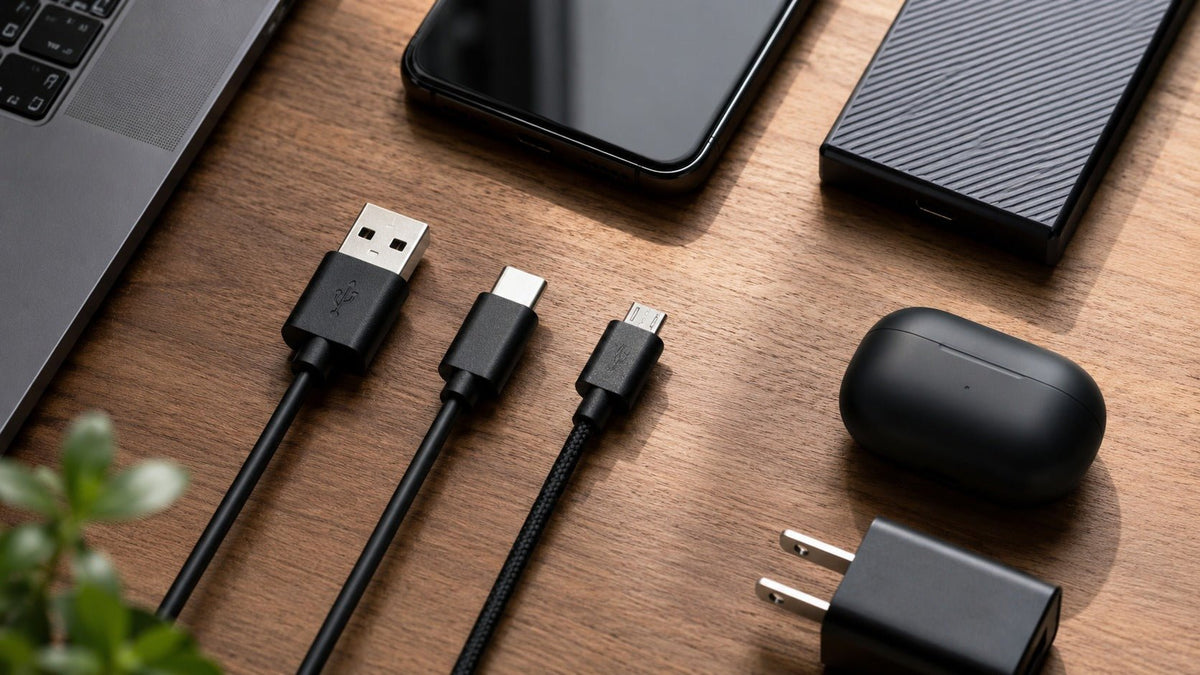
USB-A, USB-C und Micro-USB sind Anschlussformate. Sie sagen für sich genommen nichts über die genaue Datengeschwindigkeit, die Ladeleistung, die Display-Fähigkeit oder die USB-Generation eines Geräts aus.
Kurze Antwort: USB-C ist meist der beste Anschluss für neue Allzweckgeräte, da er beidseitig einsteckbar und kompakt ist und moderne Daten- sowie Stromstandards unterstützt. USB-A ist weiterhin gebräuchlich für ältere Peripheriegeräte und Empfänger. Micro-USB ist primär ein veralteter Anschluss, der nur dann noch von Bedeutung ist, wenn ein bestehendes Gerät ihn erfordert.
Die wichtigste Regel: Die Steckerform ist nicht das Protokoll
Das USB-IF warnt ausdrücklich davor, dass USB Type-C nicht dasselbe ist wie USB 3.2, USB4 oder USB Power Delivery. Ein USB-C-Anschluss kann nur mit USB 2.0-Daten implementiert sein, während ein anderer USB-C-Anschluss schnellere USB-Daten, den DisplayPort Alt Mode, USB4 und eine leistungsstarke USB-PD-Ladung unterstützen kann.
Deshalb ist die Aussage „USB-C ist schneller“ unvollständig. Ein Anschluss kann bestimmte Funktionen ermöglichen, aber das Gerät und das Kabel müssen diese auch unterstützen.
USB-A vs. USB-C vs. Micro-USB im Überblick
| Anschluss | Beidseitig steckbar? | Typische Rolle | Was er verrät | Was er nicht verrät |
|---|---|---|---|---|
| USB-A | Nein | Computer, Ladegeräte, Empfänger, ältere Peripherie | Physikalische Stecker-/Buchsenfamilie | Genaue USB-Geschwindigkeit oder Ladeleistung |
| USB-C | Ja | Telefone, Laptops, Tablets, modernes Zubehör | Beidseitig steckbare Type-C-Schnittstelle | Ob USB 3.2, USB4, PD oder Video unterstützt wird |
| Micro-USB | Nein | Ältere Telefone und kleines Zubehör | Veraltete kompakte Anschlussfamilie | Genaue Protokolle, Ladegeschwindigkeit oder Gerätefähigkeiten |
USB-C: Der beste Anschluss für die Zukunft, aber auf die Kennzeichnung achten
Die stärksten physischen Vorteile von USB-C sind seine beidseitige Einsteckbarkeit und der kompakte Stecker. Das Ökosystem kann zudem skalierbare Leistung und Stromversorgung unterstützen.
USB Power Delivery kann über entsprechend ausgelegte USB-C-Kabel und -Geräte bis zu 240 W erreichen. Das bedeutet nicht, dass jedes USB-C-Ladegerät, jeder Anschluss oder jedes Kabel 240 W liefern kann. Die USB-IF-Kabelrichtlinien identifizieren relevante zertifizierte Kennzeichnungen für Leistung und Datenübertragungsrate.
Wenn Sie ein Kabel für einen Laptop, Monitor, eine Dockingstation oder ein Hochleistungsladegerät kaufen, achten Sie auf die spezifizierten Fähigkeiten des Kabels für Ihr Gerät, anstatt nur nach der Steckerform zu gehen.
USB-A: Weiterhin nützlich für bestehende Hardware
USB-A ist weiterhin weit verbreitet bei Desktop-PCs, Spielekonsolen, Ladegeräten, Tastaturen, Mäusen, Headset-Empfängern und älteren Dockingstationen. Er ist nicht automatisch „langsam“. USB-A wurde für verschiedene USB-Datengenerationen verwendet.
Die praktische Einschränkung ist die einseitige Steckerorientierung und der Branchentrend hin zu kleineren USB-C-Anschlüssen bei neuer Mobil- und Laptop-Hardware. Wenn Ihr Computer oder Headset-Empfänger noch USB-A verwendet, gibt es keinen Vorteil darin, eine funktionierende Verbindung nur auszutauschen, um einen neueren Stecker zu haben.
Micro-USB: Veraltet, aber manchmal noch erforderlich
Micro-USB war vor der Dominanz von USB-C weit verbreitet für das Laden und die Datenübertragung bei Telefonen und Zubehör. Der nicht beidseitig einsteckbare Stecker macht ihn weniger komfortabel als USB-C für den täglichen Gebrauch.
Aber „alt“ bedeutet nicht, dass Sie ihn einfach durch einen anderen Anschluss ersetzen können. Wenn ein Gerät physisch Micro-USB nutzt, verwenden Sie ein kompatibles Kabel, das die Anforderungen des Geräts erfüllt. Ein Adapter ändert nur die physische Schnittstelle; er fügt nicht automatisch einen schnelleren USB-Modus oder ein neueres Ladeprotokoll hinzu.
Datengeschwindigkeit: Lesen Sie die USB-Leistungsspezifikation
Schließen Sie nicht allein aufgrund des Aussehens von USB-A oder USB-C auf eine Geschwindigkeit. USB-C kann je nach Implementierung USB 2.0, USB 3.2, USB4 oder andere unterstützte Modi übertragen. Auch USB-A-Anschlüsse können unterschiedliche USB-Generationen unterstützen.
Achten Sie bei einem Datenkabel auf den dokumentierten USB-Modus des Geräts und die zertifizierte Datenraten-Kennzeichnung des Kabels, sofern verfügbar. Ein Kabel, das nur zum Laden gedacht ist, bietet möglicherweise nicht die erwartete Datenleistung.
Laden: USB-C bedeutet nicht automatisch schnelles Laden
USB Power Delivery ist ein separates Protokoll- und Hardwaresystem. Das Ladegerät, der Quellanschluss, das Kabel und das Empfangsgerät handeln die unterstützte Leistung aus. Die effektive Ladegeschwindigkeit wird durch die kompatiblen Fähigkeiten der gesamten Kette begrenzt.
Ein leistungsstarkes USB-C-Ladegerät kann normalerweise eine geringere unterstützte Leistung für kompatible USB-PD-Geräte aushandeln, aber gehen Sie nicht davon aus, dass jedes USB-C-Gerät oder -Kabel USB PD implementiert. Befolgen Sie die Ladespezifikationen des Geräteherstellers.
Videoausgabe: Eine weitere Eigenschaft, die überprüft werden muss
Einige USB-C-Anschlüsse unterstützen die Display-Ausgabe durch Technologien wie DisplayPort Alt Mode oder USB4. Andere nicht. Ein USB-C-Anschluss an einem Telefon, Headset, einer Powerbank oder einem günstigen Laptop ist keine Garantie für die Unterstützung externer Bildschirme.
Ebenso sollte allein die Steckerform nicht dazu dienen, pauschal zu behaupten, dass ein älterer Anschluss „niemals“ eine bestimmte Signalart übertragen könnte. Die hilfreiche Frage beim Kauf ist, was der spezifische Anschluss, das Kabel und das Gerät gemeinsam unterstützen.
Sie benötigen ein kabelgebundenes Headset für USB-C-, USB-A- und 3,5-mm-Geräte?
Das Wantek H602 3-in-1 bietet Anschlussmöglichkeiten für USB-C, USB-A und 3,5 mm. Überprüfen Sie den genauen Geräteanschluss vor dem Anschließen.
Welchen Anschluss sollten Sie wählen?
Wählen Sie USB-C, wenn:
- Sie ein neues Telefon, Laptop, Tablet, Dock, Ladegerät oder Zubehör kaufen und den modernen, beidseitig steckbaren Anschluss wünschen.
- Sie Funktionen wie USB PD, höhere Datenraten oder Videoausgabe benötigen und die Geräte diese explizit unterstützen.
- Sie die Anzahl verschiedener physischer Kabeltypen in einem neueren Setup reduzieren möchten.
Verwenden Sie weiterhin USB-A, wenn:
- Ihr PC, Konsole, Ladegerät oder Empfänger bereits den USB-A-Anschluss bietet, den Sie benötigen.
- Ein kabelloser USB-A-Dongle oder ein Business-Headset zuverlässig funktioniert und es keinen funktionalen Grund für einen Austausch gibt.
Verwenden Sie Micro-USB, wenn:
- Das Gerät für Micro-USB konzipiert wurde und Sie ein Ersatz-Lade-/Datenkabel benötigen.
- Sie ältere Geräte warten, anstatt einen Anschluss für ein neues Produkt-Ökosystem zu wählen.
Headsets: Anschlusskompatibilität ist mehr als nur „Es passt“
Ein Headset mit USB-C nutzt möglicherweise USB-Audio, während ein anderes USB-C-Zubehör über den Anschluss nur lädt. Ein 3,5-mm-Audio-Headset ist wiederum etwas anderes. Unser Leitfaden zu USB- vs. 3,5-mm-Headsets erklärt den Unterschied im Audiosignalweg. Prüfen Sie vor dem Kauf, ob das Gerät USB-Audio, einen analogen 3,5-mm-Headset-Eingang oder den spezifischen drahtlosen Empfänger unterstützt, den Sie verwenden möchten.
Sie vergleichen kabelgebundene Computer-Headsets?
Durchsuchen Sie Wantek USB-Headsets und filtern Sie nach dem Anschluss, den Ihr Computer oder Telefon tatsächlich unterstützt.
Häufig gestellte Fragen (FAQs)
Ist USB-C immer schneller als USB-A?
Nein. USB-C beschreibt nur den Anschluss. Die tatsächliche Datenleistung hängt vom USB-Protokoll ab, das vom Host, dem Gerät, dem Kabel und dem Anschluss unterstützt wird.
Unterstützt jedes USB-C-Kabel 240 W Ladeleistung?
Nein. USB PD kann bei entsprechender Ausstattung bis zu 240 W unterstützen, aber die Fähigkeiten von Kabeln und Geräten variieren. Prüfen Sie die zertifizierten Leistungskennzeichnungen und die Herstelleranforderungen.
Kann jeder USB-C-Anschluss Video ausgeben?
Nein. Die Videoausgabe erfordert den notwendigen unterstützten Modus, wie DisplayPort Alt Mode oder USB4-Funktionalität. Der Anschluss allein ist keine Garantie dafür.
Sollte ich Micro-USB-Geräte ersetzen, nur weil USB-C neuer ist?
Nicht unbedingt. Wenn das Gerät Ihre Anforderungen weiterhin erfüllt, verwenden Sie das richtige Kabel. USB-C ist wichtiger, wenn Sie neue Hardware auswählen oder ein modernes Setup konsolidieren.
Fazit
Wählen Sie Anschlüsse nach den Geräten, die Sie besitzen, und den Funktionen, die Sie benötigen. USB-C ist der Standard für neue Geräte, USB-A bleibt für bestehende Peripherie nützlich und Micro-USB ist hauptsächlich eine Kompatibilitätsanforderung für ältere Geräte. Für die Auswahl des richtigen Arbeits-Headsets folgen Sie dem Leitfaden für Headsets mit Mikrofon, nachdem Sie den benötigten Anschluss identifiziert haben. Unterscheiden Sie stets zwischen der Steckerform und den USB-Geschwindigkeits-, Strom- sowie Videofunktionen.

