
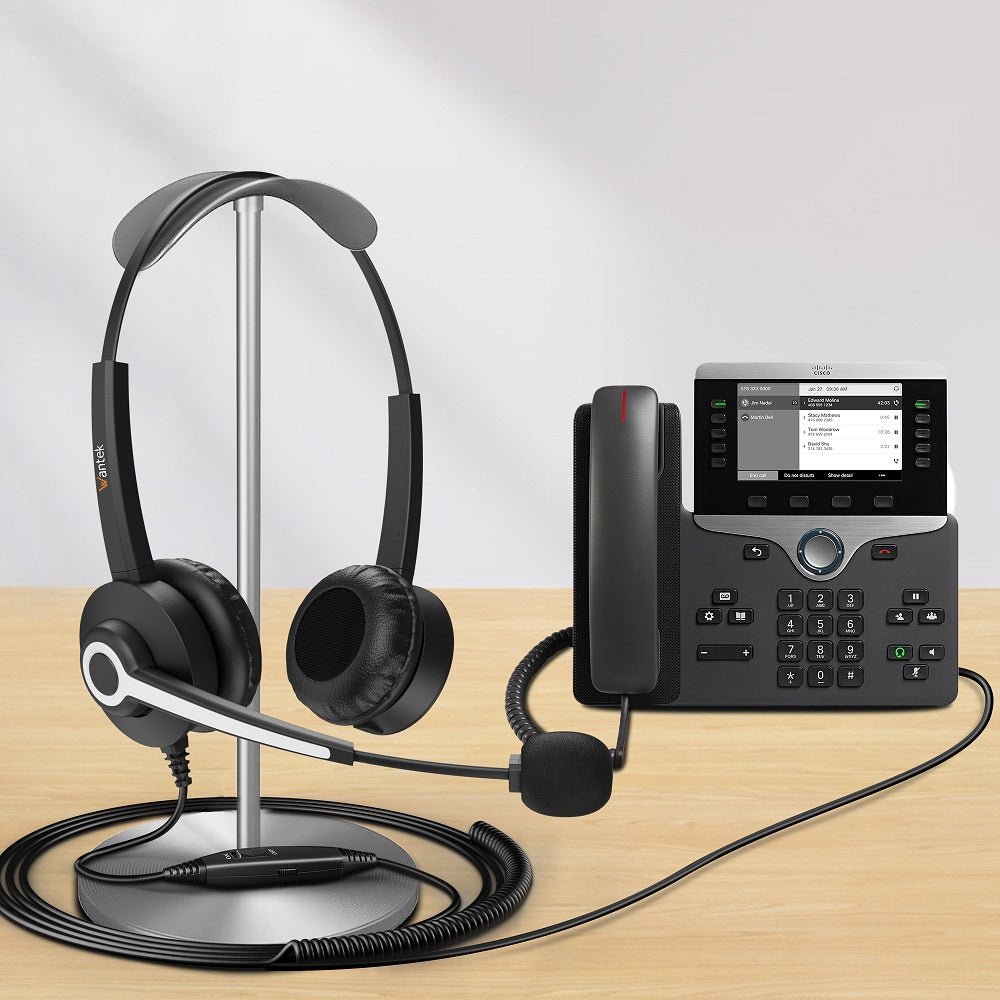
The Cisco IP Phone 8841 uses an RJ-9 analog headset jack. Choose a headset with the correct RJ-9 wiring for that phone, or a wireless headset system with a documented RJ-9/base connection. The 8841 does not support direct Bluetooth headset pairing or direct USB-headset audio.
Quick answer: For a simple wired setup, look for a Cisco 8841-compatible RJ-9 headset and confirm its wiring, not just its plug shape. For wireless use, check a supported base, the required RJ-9/AUX cable, and whether you need remote call answering.
Which Headset Connections Work With the Cisco 8841?
The 8841 has a standard wideband-capable RJ-9 analog headset port, according to the Cisco IP Phone 8841 data sheet. Its connection options differ from the Cisco 8851 and 8861, which support additional headset paths.
- Wired RJ-9 headset: Supported when the headset's wiring and phone compatibility match. Cisco lists its Headset 531 and 532 with an RJ-9 connection for the 8841.
- Wireless headset with a base: Possible through an explicitly supported phone-side connection. Cisco documents Headset 561/562 base arrangements using a Y-cable with RJ-9 and AUX connections for the 8841.
- Bluetooth headset paired directly to the phone: Not supported. The 8841 has no native Bluetooth headset support.
- USB headset plugged directly into the phone: Not a supported 8841 headset path. Do not transfer the USB headset features of another 8800-series model to the 8841.
| Headset path | Cisco 8841 connection and purchase check |
|---|---|
| Wired RJ-9 | Supported through the analog headset jack. Confirm the headset model and wiring; Wantek lists its H682 RJ2 variant for the 8841. |
| DECT wireless base | Use a supported base with the correct RJ-9/AUX Y-cable. Check firmware and any required EHS settings. |
| Direct Bluetooth | Not supported. The 8841 cannot pair directly with a Bluetooth headset. |
| Direct USB headset | Not supported. USB headset support on other Cisco 8800 phones does not apply to the 8841. |
For Cisco-branded models and firmware-specific connection details, use the Cisco headset compatibility guide. Physical fit and two-way audio are not the same as full button or remote-answer support.
Choosing a Wired RJ-9 Headset
RJ-9 identifies the connector style, but not every headset with that plug has the same wiring. Match the phone model to the headset's stated compatibility list. If a seller uses a wiring designation such as RJ2, verify that designation for the exact product rather than assuming every RJ-9 headset is interchangeable.
Wantek lists the h682 dual-ear RJ-9 headset with RJ2 wiring as compatible with the Cisco 8841. That is Wantek's product-level compatibility listing, not a claim of Cisco certification or independent testing. The h682 is a wired headset with a boom microphone and inline mute and volume controls. Review the RJ2 headset compatibility list and the product's connector before ordering.

A mono headset keeps one ear uncovered; a dual-ear headset can help a user concentrate in a shared office. Choose the wearing style for your working environment, but treat the 8841 connection and wiring as a separate requirement.
Can You Use a Wireless Headset With the Cisco 8841?
Yes, with a compatible wireless base and the correct connection to the phone. This does not mean Bluetooth earbuds can pair with the 8841. For example, Cisco describes its 561 and 562 as DECT headsets that connect through a base, with an RJ-9 and AUX Y-cable arrangement supported for the 8841.

If you need to answer or end calls away from the desk, verify the base's electronic hookswitch (EHS) support, the correct cable, and any phone-side settings. The AUX socket is used for supported control connections; it is not a substitute for the headset audio jack. Cisco's multiplatform phone accessories documentation explains the RJ-9/AUX Y-cable arrangement and EHS settings for supported configurations.
Confirm which firmware family your phone runs and the exact base and cable part numbers. A wireless headset that works with a laptop does not automatically work with a Cisco desk phone.
How to Connect and Test a Wired Cisco 8841 Headset
- Confirm the model and cable. Check that the phone is an 8841 and that the headset is listed for its RJ-9 connection and wiring.
- Connect the headset. Insert the plug into the dedicated headset jack on the back of the phone, not the handset or AUX socket. Route the cable through the phone's cable channel to avoid strain.
- Select headset audio. Use the phone's Headset button and make a test call.
- Test both directions. Check what you hear and what the other caller hears. Then test mute and volume controls in the actual call workflow.
- Check advanced requirements separately. If you need wideband audio or remote call answering, follow the applicable Cisco headset and firmware instructions rather than assuming those functions are enabled by the plug alone.
If the Headset Does Not Work
No sound: Check that the plug is in the headset jack, the Headset button is selected, and phone volume is audible. Reseat the cable and repeat the call.
You hear the caller, but the caller cannot hear you: Check the microphone position, any headset mute control, and the exact connector wiring. An RJ-9 plug can fit while the wiring is incompatible.
Audio works, but answer/end controls do not: Separate audio compatibility from call-control compatibility. On a wireless base, review the supported EHS cable and phone configuration; inline wired controls are not the same as remote hookswitch control.
Not sure which wiring variant is installed: Compare the product SKU and connector documentation with the 8841 compatibility listing before buying adapters. Avoid combining unverified cables just because their connectors fit.
Cisco 8841 Headset FAQ
Does the Cisco 8841 support Bluetooth headsets?
No. The Cisco 8841 does not support native Bluetooth headset pairing. A compatible wireless headset can still work through its own supported base and phone-side cables.
Can I use a USB headset directly with the Cisco 8841?
No. Cisco lists RJ-9 as the 8841's headset connection. USB-headset support on certain other Cisco 8800 models does not apply to the 8841.
Which Wantek headset is listed for the Cisco 8841?
Wantek's h682 dual-ear RJ-9 headset with RJ2 wiring lists the Cisco 8841 as compatible. Confirm the current product variant and phone model before purchasing.
Will any RJ-9 headset work with a Cisco 8841?
No. RJ-9 describes the physical connector, not a universal wiring or call-control standard. Check a model-specific compatibility list and test the exact headset configuration.
Check the RJ2 Headset Option
Review the Wantek h682's listed Cisco 8841 compatibility, connector, and current product details before ordering.

