
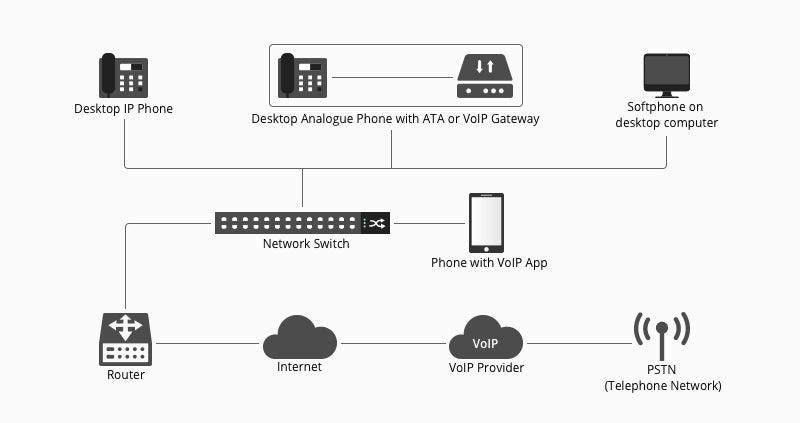
A business VoIP phone system carries voice calls over an IP network instead of relying only on a traditional analog phone line. The practical buying decision is not “VoIP or no VoIP” in isolation; it is how the service, network, phones, apps, headsets, and support process fit your team.
Quick answer: Start with the number of users, call locations, current phone numbers, internet reliability, desk-phone or softphone preference, headset needs, and the features your team actually uses.
What Is a Business VoIP Phone System?
VoIP stands for Voice over Internet Protocol. A business system can use dedicated IP desk phones, computer applications, mobile apps, or a mix. The service converts voice into digital data, carries it across an IP network, and connects calls to other users or public telephone networks through the provider.
What Equipment Do You Need?
| Component | Role | What to verify |
|---|---|---|
| Internet/network | Carries call traffic between devices and the service. | Reliability, bandwidth, Wi-Fi or Ethernet coverage, and managed-network requirements. |
| VoIP service or PBX | Provides calling, extensions, routing, and account management. | Features, number portability, admin controls, emergency-calling process, and support. |
| Desk phone or softphone | Gives users a device or app for calls. | User role, location, provisioning, and connection method. |
| Headset | Provides hands-free listening and microphone input. | Phone or computer compatibility, microphone, controls, and wearing style. |
Desk Phones vs. Softphones
Dedicated IP desk phones
A desk phone can suit fixed workstations, reception desks, shared areas, and teams that prefer a familiar physical handset. It may also expose dedicated headset, USB, or Bluetooth options depending on the exact model.
Computer or mobile softphones
A softphone runs on a computer or mobile device. It can reduce desk hardware and support hybrid work, but the user now depends on the computer, app permissions, microphone and speaker routing, and the quality of the connected headset.
Where Headsets Fit Into VoIP
A headset is an endpoint accessory, not the VoIP system itself. For a desk phone, verify the exact phone model and headset path. For a computer softphone, check USB, 3.5 mm, Bluetooth, or receiver support plus the behavior of mute and call controls in the application.
If the setup uses desk phones, start with Wantek’s desk-phone compatibility checker before choosing cables or headset models.
Plan for Network and Power
Call quality depends on a reliable network path. Wired Ethernet can simplify fixed desks, while Wi-Fi can be useful for mobile devices or supported wireless phones. Some IP phones use Power over Ethernet, while others need a separate power adapter. Document the actual requirement for each phone model.
Features to Define Before Comparing Providers
- Number of users and locations
- Inbound numbers, extensions, and call routing
- Voicemail and forwarding requirements
- Call queues or contact-center needs
- Desktop and mobile applications
- Recording requirements where lawful and appropriate
- Admin, provisioning, security, and support process
- Desk-phone and headset compatibility
Roll Out in Stages
- Document the current call flow and numbers.
- Test the service with a small group of representative users.
- Confirm desk phones, softphones, and headsets on the actual network.
- Train users on transfer, hold, mute, voicemail, and emergency procedures.
- Record the working device and accessory configuration before scaling.
Business VoIP FAQ
Do I need a physical VoIP desk phone?
No. Some teams use computer or mobile softphones, while others prefer dedicated desk phones. The right mix depends on user roles and workflow.
Can I use any headset with a VoIP phone?
No. Desk-phone headset support is model-specific. Computer softphones also need a supported audio connection and application configuration.
Should I choose the cheapest VoIP plan?
Compare the complete requirement: users, features, support, devices, network needs, number management, and deployment effort rather than one monthly price.
Check Desk-Phone Headset Compatibility
If your VoIP rollout includes physical desk phones, identify the exact model before choosing a headset or adapter.
