Bienvenue sur la boutique en ligne Wantek !

Annonce : Livraison gratuite aux USA, UK, FR, DE, IT, ES

Noise Canceling Bluetooth Headphones with Microphone

Casques pour centres d'appels destinés aux équipes de service client

(22 produits)

Choisissez les casques de centre d’appels Wantek en fonction du système utilisé par vos agents. Comparez les modèles filaires USB et USB-C pour les appels sur ordinateur, les variantes compatibles RJ9 et prises téléphoniques pour les téléphones de bureau, ainsi que les casques Bluetooth pour les environnements mobiles compatibles.

Dans les centres d’appels bruyants, évaluez séparément la réduction du bruit du microphone par rapport à l’isolation passive ou à l’annulation active du bruit (ANC) : la première influe sur ce que les interlocuteurs entendent, tandis que les autres influent sur ce que les agents entendent. Après avoir vérifié la connectivité, comparez le confort des modèles mono ou stéréo, les fonctionnalités du microphone sur perche, les commandes en ligne et la mobilité. Pour les achats en gros, consultez les solutions de déploiement de casques USB en gros. Les acheteurs de téléphones de bureau doivent vérifier le modèle exact et le câblage avant de commander.

Voir en

Connection first

Choose a Call Center Headset by Device

Start with where calls happen: a computer, desk phone, or mobile device. Confirm its headset connection before comparing microphone features, fit, and price.

Computer or Softphone

For PC softphones, check whether the computer offers USB-A, USB-C, or a headset-capable audio jack. Confirm that both speaker and microphone work in the calling application.

Inline mute and volume do not guarantee app-level answer/end controls or synchronized mute status.

Desk Phone

Match the exact phone model to its supported headset port and wiring. Wantek RJ1, RJ2, and RJ4 configurations are not interchangeable.

A quick-disconnect (QD) headset may also require a compatible lower cable or adapter.

Check desk-phone compatibility

3.5 mm or 2.5 mm

For 3.5 mm and 2.5 mm connections, verify microphone support and contact wiring—not just plug diameter. Computers with separate mic and headphone sockets may need a compatible splitter.

Wireless

For roaming agents, confirm Bluetooth or a supported wireless base on the calling device. Test range, call controls, and the charging routine before selecting a wireless model.

Not sure where to start? Try the Wantek Headset Finder
Wantek H600 single-ear USB headset with inline controls at an office workstation

Verified starting points

Compare Wantek Headsets for PC, Desk Phone and Wireless Calls

These five examples cover wired computer headsets, an RJ1-wired desk-phone model, and a Bluetooth option. They are starting points—not a performance ranking. Confirm the specific variant and compatible device before buying.

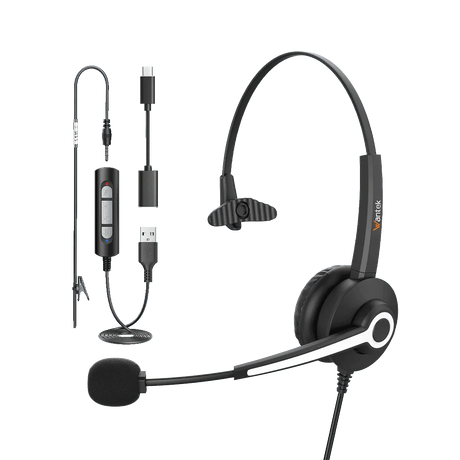
Wantek H600 3-in-1

A single-ear USB-C, USB-A, and 3.5 mm option for computer-based calls. At a listed 85 g, it is lighter than the H681 and H881 models below; fit still needs a trial.

  • Single-ear wired design
  • Type-C, USB, and 3.5 mm connections
  • Listed weight: 3 oz / 85 g
  • Boom microphone
  • USB inline volume and mute controls
Wantek H681 3-in-1

Another mono choice with USB-C, USB-A, and 3.5 mm connections. Compare its 105 g listed weight, controls, and fit with the H600 on the actual workstation.

  • Single-ear wired design
  • Type-C, USB, and 3.5 mm connections
  • Boom microphone
  • Inline volume and mute controls
  • Listed weight: 3.7 oz / 105 g
Wantek H881

A mono USB/3.5 mm model for fixed workstations. Its listed 184 g weight is greater than the H600 and H681, so check fit over a normal shift.

  • Single-ear wired design
  • USB and 3.5 mm connections
  • Listed weight: 6.5 oz / 184 g
  • Boom microphone
  • PNC (passive noise cancellation) listing
  • Volume control and one-key mute
Wantek H600 RJ9 (RJ1)

A wired single-ear option for desk phones confirmed to use Wantek RJ1 wiring. The similarly shaped RJ2 and RJ4 variants are separate compatibility paths.

  • Single-ear wired desk-phone headset
  • RJ9-style connector, RJ1 wiring
  • Listed weight: 3 oz / 85 g
  • Boom microphone
  • Quick disconnect: no
Wantek WK882BT

A dual-ear Bluetooth option for supported computers and mobile calling setups. Confirm device and app compatibility, usable range, and charging needs.

  • Dual-ear Bluetooth headset
  • Bluetooth 5.2
  • Boom microphone
  • Passive noise cancellation
  • One-key mute
  • Up to 45 hours of listed battery life
  • Approximately 2-hour listed charging time

Specifications are taken from the linked Wantek product pages, not independent head-to-head testing. A common model-family name does not mean the USB and RJ versions share a connector or compatibility.

Professional wearing a Wantek WK882BT wireless headset at a computer workspace
Shown: Wantek WK882BT. Select wired or wireless headsets according to the device and work pattern.

Comfort and awareness

Single-Ear or Dual-Ear for Long Shifts?

Room awareness

Choose Single-Ear When Room Awareness Matters

A mono headset leaves one ear uncovered, useful when agents need to hear coworkers or visitors. It also leaves more room sound audible.

Listening focus

Choose Dual-Ear When You Prefer Audio in Both Ears

Dual-ear headsets send call audio to both ears and may help agents focus on callers, but do not automatically provide ANC or a stronger microphone.

For shared desks and long shifts, trial comfort and stability over a realistic work period. Check whether suitable replacement ear cushions and microphone covers can be ordered for the chosen model.

Know the difference

Noise-Reducing Microphones and ANC Are Different

Check two different outcomes on a busy call-center floor: the sound sent to callers and the noise heard by the agent. Product labels such as PNC, ENC, and ANC do not describe the same function.

Microphone noise reduction

Microphone noise reduction (sometimes labeled ENC) targets background sound transmitted to the caller. Test it with realistic nearby conversations and listen from the far end of the call.

Active noise cancellation

ANC reduces some sound reaching the wearer through electronics. PNC refers to passive isolation from the physical design. Neither establishes a measured microphone-noise reduction result.

Desk-phone setup

Using a Desk Phone? Verify Compatibility Before Buying

A desk-phone installation must match the phone, headset wiring, and any required QD cable or wireless base. Test that complete connection before purchasing for the team.

  1. Record the full phone brand and model. Confirm whether calls run on the desk phone, a computer softphone, or both.
  2. Check the supported headset port, RJ1/RJ2/RJ4 wiring, and any QD lower cord, base, or adapter requirements.
  3. Use the documented compatibility path for the exact Wantek variant, not the connector shape alone.
  4. Make a trial call: verify receiving audio, microphone pickup, and the controls that the role actually needs.
Customer service agent wearing a Wantek H600 wired headset at a workstation

Team deployment

Buying Call Center Headsets for a Team?

Segment seats by calling device, connection, and work pattern. Standardize a model only after testing the actual phone or softphone setup.

Run a small pilot that checks two-way audio, mute behavior, wearing comfort, wireless coverage where needed, and replacement parts. Record results by workstation and model before ordering in volume.

  • Calling device, operating system, and app
  • Connection, cable, or adapter required
  • Mono or dual-ear preference and fit
  • Quantity by workstation type
  • Mobility, coverage, and charging needs
  • Microphone, mute, and call-control tests
  • Replacement cushions and support needs
  • Trial results before full rollout

Buying questions

Call Center Headset FAQs

Can I use one headset for both a desk phone and a computer?

Not automatically. Verify both connection paths and whether the selected headset or supported base can switch between them. Some setups require an adapter, a separate headset, or a specifically supported multi-device system.

Are RJ1, RJ2, and RJ4 interchangeable?

No. Wantek uses these labels for different desk-phone wiring configurations. Match the full phone model to the specified headset version before buying.

Will USB or Bluetooth headset buttons answer and end every softphone call?

No. Speaker and microphone audio can work while answer/end functions or mute synchronization remain unsupported. Test your headset, operating system, and calling app together.

Does a USB-C connector guarantee that the microphone works?

No. Confirm that the port and device support the required audio input and output, and that the calling application selects the correct microphone. Connector shape by itself is insufficient.

What should a call center test before a bulk headset order?

Pilot the exact headset variant on the intended phone or softphone. Check outgoing and incoming audio, call controls, fit over a normal work period, cable reach or wireless range, and replacement-part availability.

Continue your research

Call Center Headset Guides and Tools

For deeper comparisons beyond this product collection, review the relevant buying and setup guides.

Comparer /3

Chargement...