
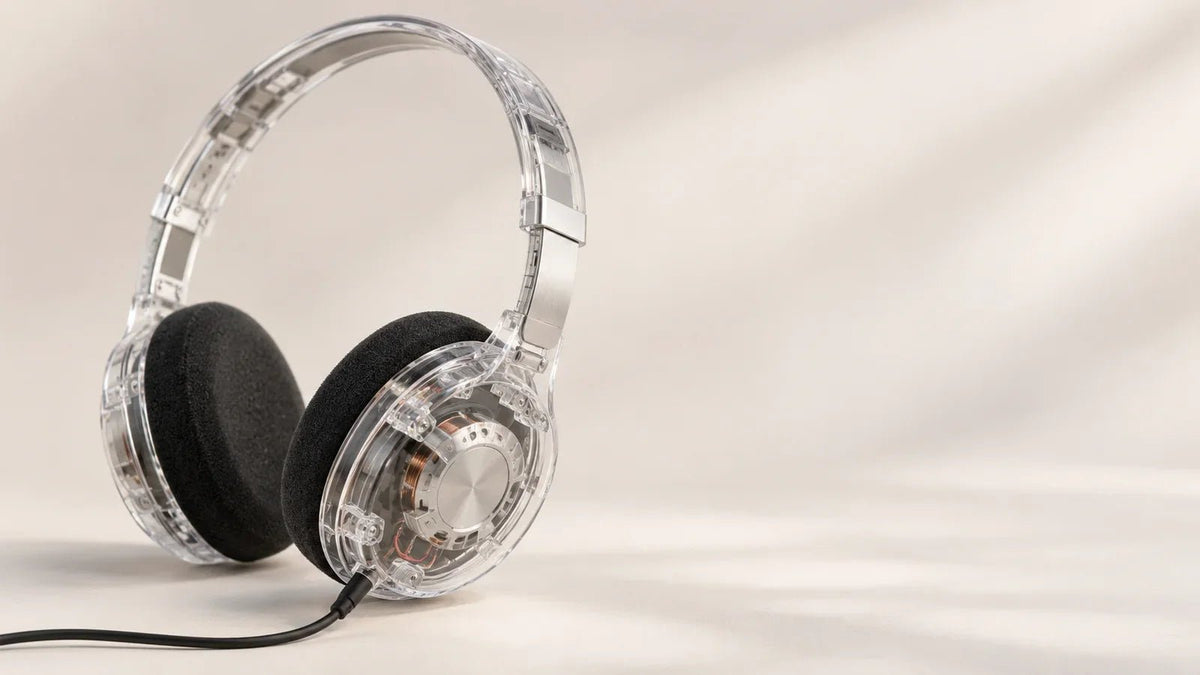
Transparent headphones have see-through or translucent housings that reveal some of the design underneath. If you are shopping for clear headphones, start with the actual finish and wearing style. A transparent shell is a visual choice; it does not tell you how the headphones sound or whether they let outside noise through.
Quick answer: For a clear on-ear look, compare wired models such as Koss KPH30i Clear or CL-20i. For transparent wireless earbuds, Beats Studio Buds + are offered in a Transparent finish. If you meant headphones that let you hear your surroundings, you are looking for transparency mode, a different feature.
What Are Transparent Headphones?
Transparent, clear, and see-through headphones describe an exterior design. Depending on the product, the headband, ear cups, earbuds, or charging case may be partly translucent. Some models reveal internal parts; others simply use clear-colored plastic.
The finish does not establish whether a pair is wired, Bluetooth, noise-canceling, open-back, or suitable for calls. Check those features on the exact model instead of relying on photos or a “transparent” label.
Clear Headphones vs. Transparency Mode
These terms sound alike but answer different shopping questions:
- Transparent design: You can see through some of the headphone's exterior. It changes the appearance, not automatically the audio behavior.
- Transparency or ambient mode: Built-in microphones pick up external sound and reproduce it through the headphones so you can hear more of your surroundings while listening.
- Open-ear or open-back design: This describes an acoustic or wearing arrangement, not a transparent housing or an electronic listening mode.
Some products offer both a clear finish and transparency mode, but neither feature proves the other. For the listening feature, see Wantek's comparison of headphones with transparency mode and ANC.
Three Transparent Headphone Designs to Compare
These are documented examples of different formats, not an independently tested ranking. Verify current finishes and stock with the manufacturer or seller.
| Model | Fit and connection | Documented features |
|---|---|---|
| Koss KPH30i Clear | On-ear; wired | Adjustable fit; in-line mic and remote |
| Koss CL-20i | On-ear; wired | Padded cushions; in-line mic and remote |
| Beats Studio Buds + (Transparent) | In-ear; Bluetooth | Active noise cancellation and transparency mode |
Koss KPH30i Clear: Lightweight Wired On-Ear Headphones
The Koss KPH30i Clear pairs a transparent on-ear design with a wired connection, an adjustable fit, and an in-line microphone and remote. It is worth comparing if you want visible styling without depending on a Bluetooth battery. Check the cable connection against your phone, laptop, or adapter before buying.
Koss CL-20i: Clear On-Ear Style With Call Controls
The Koss CL-20i has a transparent design, padded on-ear cushions, a wired cable, and an in-line microphone and remote. Its on-ear fit and cable length are more relevant to everyday comfort and desk use than the clear housing alone. Confirm connector compatibility with your intended device.
Beats Studio Buds +: Transparent Wireless Earbuds
Beats Studio Buds + in Transparent are true wireless in-ear earbuds, not over-ear headphones. Beats documents active noise cancellation and transparency mode on this model, so it illustrates how a transparent finish and an electronic awareness feature can coexist. If you want a clear look in a compact earbud format, compare ear-tip fit, controls, and battery life with the listening modes you actually use.
How to Choose Transparent Headphones

1. Choose the Wearing Style First
On-ear models rest against the ears; over-ear models surround them; in-ear earbuds sit in the ear canal. Choose by your comfort needs and where you listen. The fact that a housing is clear does not predict pressure, heat, or stability.
2. Confirm the Connection
Check whether the model uses a 3.5 mm plug, USB-C, or Bluetooth. A wired pair may need an adapter for a phone without a headphone jack. With wireless earbuds, check supported controls and battery conditions rather than assuming every model offers the same features.
3. Check the Actual Clear Finish
Product photographs can show different levels of translucency. Look for images of the exact color or variant you plan to buy, including the ear cups or earbuds and the charging case. A clear case does not necessarily mean the earbuds themselves are transparent.
4. Compare Functions Separately From Styling
If you need a microphone for calls, active noise cancellation for commuting, or a way to hear announcements, verify each feature in the manufacturer's specifications. Neither transparency mode nor noise cancellation can be inferred from a see-through shell.
5. Consider Everyday Maintenance and Replacement Parts
Check the manufacturer's care instructions, warranty, ear-pad or tip replacement options, and cable serviceability. Visible components can be attractive, but a transparent finish is not evidence of easier repair or better durability.
Which Type Makes Sense for You?
- Clear, wired, on-ear styling: Start with the Koss examples and compare fit, connectors, and call controls.
- Transparent wireless earbuds: Compare the Transparent Beats Studio Buds + variant with other clear earbuds by seal, listening modes, and case design.
- Hearing people or announcements: Prioritize transparency mode rather than exterior color; a black or opaque pair may offer that feature.
Frequently Asked Questions
Do transparent headphones sound better?
Not because they are transparent. Sound quality depends on the drivers, acoustic design, fit, tuning, and source. A clear housing alone provides no reliable performance comparison.
Are transparent headphones always wireless?
No. Koss sells wired clear on-ear headphones, while Beats offers true wireless earbuds in a Transparent finish. Check the connector and exact product format.
Can clear headphones also have transparency mode?
Yes, when the specific model supports both. Beats lists transparency mode for Studio Buds +, including its Transparent finish. The two features remain separate.
Are transparent headphones the same as open-ear headphones?
No. Transparent refers to the visible housing, while open-ear refers to how the product is worn and how much of the ear canal remains unobstructed.
Looking for Transparency Mode Instead?
If your priority is hearing more of your surroundings, Wantek T3 is an over-ear Bluetooth model that lists ANC and transparency mode. Compare its listening features rather than expecting a transparent exterior.

